

Introduction
Material UI or MUI is a library of UI components that implements Google's Material Design.
Breadcrumbs consist of a list of links that help a user visualize a page's location within the hierarchical structure of a website, and allow navigation up to any of its "ancestors".
Preconditions
- Javascript
- Basic knowledge of NextJS
- Node.js
- V.S. Code,Visual Studio
We cover the below things,
- Create Next application
- Installation of Material UI Components
- How to Apply Material UI components from the official website in NextJS
Step 1
Run the below command to create NextJS application,
npx create-next-app materlapp
cd materlapp
npm i
npm run dev
Step 2
Run the below command for installing Material UI,
npm install @mui/material @emotion/react @emotion/styled
npm install @mui/material @mui/styled-engine-sc styled-components
npm install @mui/icons-material
npm i @mui/lab,
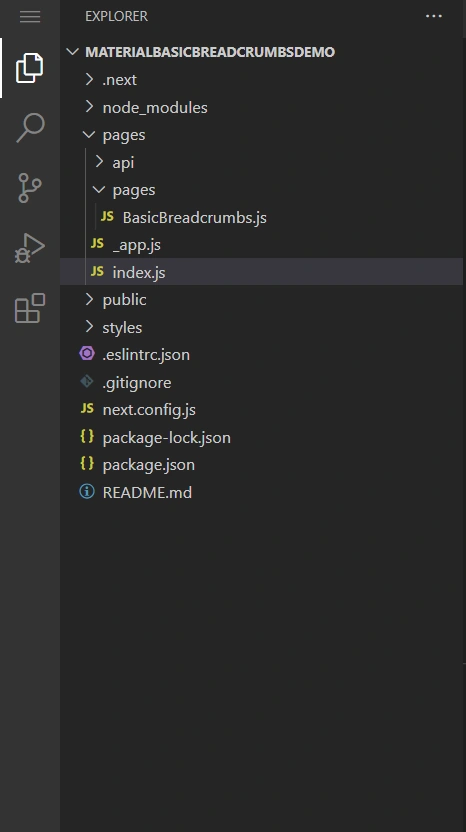
Create the files according to the below image,
Step 3
Add the below code in the BasicBreadcrumbs.js,
import * as React from 'react';
import Typography from '@mui/material/Typography';
import Breadcrumbs from '@mui/material/Breadcrumbs';
import Link from '@mui/material/Link';

function handleClick(event) {
    event.preventDefault();
    console.info('You clicked a breadcrumb.');
}
export default function BasicBreadcrumbs() {
    return (
		<div role="presentation" onClick={handleClick}>
		  <Breadcrumbs aria-label="breadcrumb">
			<Link underline="hover" color="inherit" href="/">
			  MUI
			</Link>
			<Link
			  underline="hover"
			  color="inherit"
			  href="/material-ui/getting-started/installation/"
			>
			  Core
			</Link>
			<Typography color="text.primary">Breadcrumbs</Typography>
		  </Breadcrumbs>
		</div>
    );
}
Step 4
Add the below code in the index.js,
import Head from 'next/head'
import Image from 'next/image'
import styles from '../styles/Home.module.css'
import BasicBreadcrumbs from './pages/BasicBreadcrumbs'

export default function Home() {
  return (
	<>
	  <div className={styles.container}>
		<h1 className={styles.title}>
		  Welcome to <a href="https://nextjs.org">Next.js!</a>
		</h1>
		<main className={styles.main}>
		  <BasicBreadcrumbs />
		</main>
		<footer className={styles.footer}>
		  <a
			href="https://vercel.com?utm_source=create-next-app&utm_medium=default-template&utm_campaign=create-next-app"
			target="_blank"
			rel="noopener noreferrer"
		  >
			Powered by{' '}
			<span className={styles.logo}>
			  <Image src="/vercel.svg" alt="Vercel Logo" width={72} height={16} />
			</span>
		  </a>
		</footer>
	  </div>
	  <br></br>
	  <br></br>
	  <br></br>
	  <br></br>
	  <br></br>
	</>
  )
}
Join the conversation! Your thoughts help the community grow.