

Introduction
Hi friends!! In this article, we will learn about DiffUtil Class and how we can use with RecyclerView in Android. When working with a RecyclerView, the most common way to update its contents is by using an adapter. The adapter provides the views for the data items and handles the binding of data to these views. However, when the dataset changes (items are added, removed, or modified), the adapter needs to reflect these changes in the UI. We can use notifyDataSetChanged() and it is really good when we have small data but when we have a large amount of data then notifyDataSetChanged() does not work well that's why we can use Diffutil class.
Prerequisite
- Having a basic knowledge of Android
- Having the latest version of android studio
- Having a basic knowledge of RecyclerView
What is DiffUtil Class?
According to Android official docs:-
"DiffUtil is a utility class that calculates the difference between two lists and outputs a list of update operations that converts the first list into the second one". So using this class we can handle updates and changes in the dataset of the RecyclerView adapter efficiently. Let's understand this concept in a practical way -
Example

We are going to make an app that has a list of employees and we can sort employees by their name and their role.
Let's Start With Android Studio
Step 1. Create A New Project
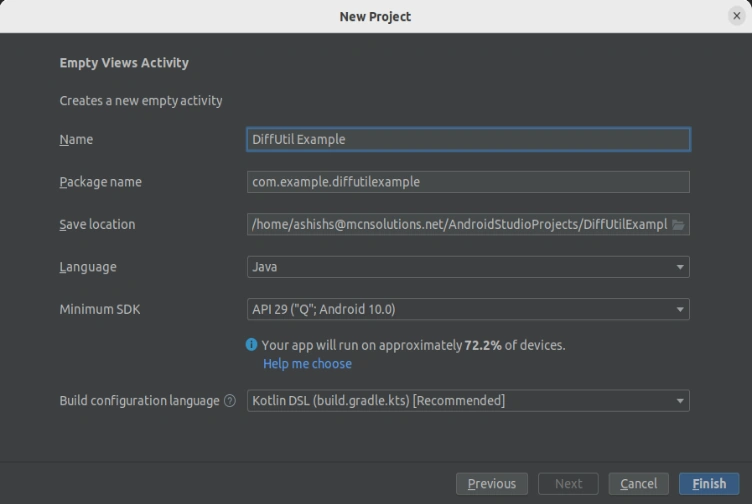
Step 2. Create a new model class
Employee.java
public class Employee {

    public int id;
    public String name;
    public String role;

    public Employee(final int id, final String name, final String role) {
        this.id = id;
        this.name = name;
        this.role = role;
    }

    public int getId() {
        return id;
    }

    public String getName() {
        return name;
    }

    public String getRole() {
        return role;
    }
}
Step 3. Create a new class for dummy data
DummyEmployeeDataUtils.java
import java.util.ArrayList;
import java.util.Collections;
import java.util.Comparator;
import java.util.List;
public class DummyEmployeeDataUtils {
    public static List<Employee> getEmployeeListSortedByName() {
        final List<Employee> employeeList = getEmployeeList();

        Collections.sort(employeeList, new Comparator<Employee>() {
            @Override
            public int compare(Employee a1, Employee a2) {
                return a1.getName().compareTo(a2.getName());
            }
        });

        return employeeList;
    }

    public static List<Employee> getEmployeeListSortedByRole() {
        final List<Employee> employeeList = getEmployeeList();

        Collections.sort(employeeList, new Comparator<Employee>() {
            @Override
            public int compare(Employee a1, Employee a2) {
                return a2.getRole().compareTo(a1.getRole());
            }
        });
        return employeeList;
    }

    private static List<Employee> getEmployeeList() {
        final List<Employee> employees = new ArrayList<>();
        employees.add(new Employee(1, "Employee 1", "Developer"));
        employees.add(new Employee(2, "Employee 2", "Tester"));
        employees.add(new Employee(3, "Employee 3", "Support"));
        employees.add(new Employee(4, "Employee 4", "Sales Manager"));
        employees.add(new Employee(5, "Employee 5", "Manager"));
        employees.add(new Employee(6, "Employee 6", "Team lead"));
        employees.add(new Employee(7, "Employee 7", "Scrum Master"));
        employees.add(new Employee(8, "Employee 8", "Sr. Tester"));
        employees.add(new Employee(9, "Employee 9", "Sr. Developer"));
        employees.add(new Employee(10, "Employee 10", "Developer"));
        return employees;
    }

}
Here we manage a list of employee data and define some essential methods, such as:
-
getEmployeeList() Method: This method creates and returns a list of Employee objects. Each Employee object has an ID, a name, and a role.
-
getEmployeeListSortedByName() Method: This method generates a list of employee data using the getEmployeeList() method. It sorts the list of employees based on their names in ascending order using the Collections.sort() method.
-
getEmployeeListSortedByRole() Method: This method generates a list of employee data using the getEmployeeList() method. It sorts the list of employees based on their roles in descending order using the Collections.sort() method.
The above method is used in other classes for accessing the employee list data.
Step 4. Create a new class
EmployeeDiffCallback.java
import androidx.recyclerview.widget.DiffUtil;
import java.util.List;

public class EmployeeDiffCallback extends DiffUtil.Callback {

    private final List<Employee> mOldEmployeeList;
    private final List<Employee> mNewEmployeeList;
    public EmployeeDiffCallback(List<Employee> oldEmployeeList, List<Employee> newEmployeeList) {
        this.mOldEmployeeList = oldEmployeeList;
        this.mNewEmployeeList = newEmployeeList;
    }
    @Override
    public int getOldListSize() {
        return mOldEmployeeList.size();
    }
    @Override
    public int getNewListSize() {
        return mNewEmployeeList.size();
    }

    @Override
    public boolean areItemsTheSame(int oldItemPosition, int newItemPosition) {
        return mOldEmployeeList.get(oldItemPosition).getId() == mNewEmployeeList.get(
                newItemPosition).getId();
    }

    @Override
    public boolean areContentsTheSame(int oldItemPosition, int newItemPosition) {
        final Employee oldEmployee = mOldEmployeeList.get(oldItemPosition);
        final Employee newEmployee = mNewEmployeeList.get(newItemPosition);

        return oldEmployee.getName().equals(newEmployee.getName());
    }
}
This class extends DiffUtil.Callback and used to determine differences between two lists of employee data to efficiently update a RecyclerView adapter. Here we pass two lists using the constructor and It calculates differences between the old and new lists based on name and role. This helps in minimizing UI updates and providing smoother animations when items are added, removed, or changed in the RecyclerView.
Join the conversation! Your thoughts help the community grow.