

Introduction
This article demonstrates how to use a full-text catalog and full-text search in SQL Server. Full-Text Search in SQL Server lets users and applications run full-text queries against character-based data in SQL Server tables.
Definition From MSDN
Before you can run full-text queries on a table, the database administrator must create a Full-Text Index on the table. The Full-Text Index includes one or more character-based columns in the table.
These columns can have any data types: char, varchar, nchar, nvarchar, text, ntext, image, XML, or varbinary(max) and FILESTREAM. Each Full-Text Index indexes one or more columns from the table, and each column can use a specific language.
Full-text queries perform linguistic searches against text data in Full-Text Indexes by operating on words and phrases based on rules of a particular language such as English or Japanese. Full-text queries can include simple words and phrases or multiple forms of a word or phrase. A full-text query returns documents containing at least one match (also known as a hit). A match occurs when a target document contains all the terms specified in the full-text query and meets other search conditions, such as the distance between the matching terms.
Getting Started
First, start SQL Server, select database, expand storage, right-click on Full Text Catelog, and select New Full Text Catelog.

Image 1.
Enter the catalog name and click OK.

Image 2.
You will see the catalog created after expanding full-text catalogs.

Image 3.
After creating the full-text catalog, it is time to create a Full-Text Index.
Note - If the Full-Text Index feature is disabled, you must execute this query.
use NORTHWND
CREATE FULLTEXT CATALOG ftCatalog AS DEFAULT;
GO
EXEC NORTHWND
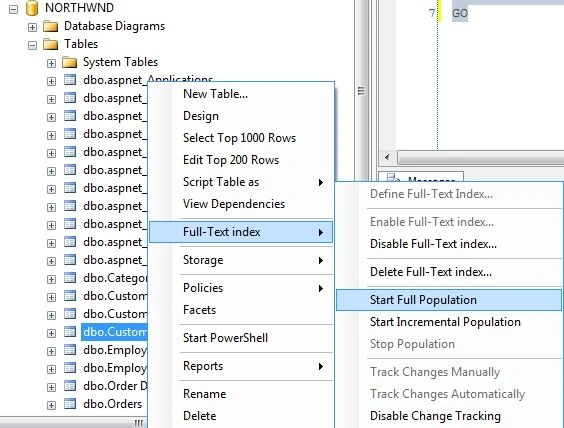
Now right-click on the table, select Full-Text Index, and click Define Full-Text Index.




anish dubeyPosted Aug 27, 2014, 6:32 AM
SQL Server encountered error 0x80070422 while communicating with full-text filter daemon host (FDHost) process. Make sure that the FDHost process is running. To re-start the FDHost process, run the sp_fulltext_service 'restart_all_fdhosts' command or restart the SQL Server instance.