A few months ago, I was working on an Angular application for my company project. At that time, I faced a problem with configuring Angular module in the application. After some time, I found a very simple solution. So today, I am going to explain how to use multiple modules. I am sure you will face this type of problem if you are a beginner in Angular 4 and want to develop an e-commerce or any other type of application. So, first of all, read this article because a module is the backbone of Angular applications.
If you are a beginner to Angular, just go through the given articles.
So now, you need to follow some simple steps to use multiple modules in an Angular application. Create a simple application using Angular CLI. If you are going to use Angular for the first time,
click here. I am going to create an application which contains three modules: App, Employee, Admin, Home.
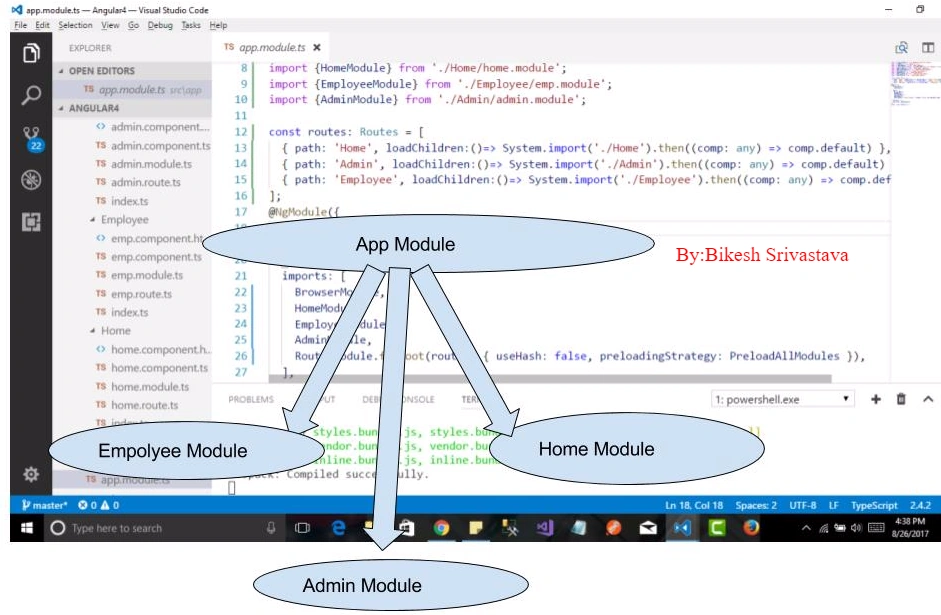
In this image, you can see I have created an app with three modules. I think we can understand it very easily after running the command.
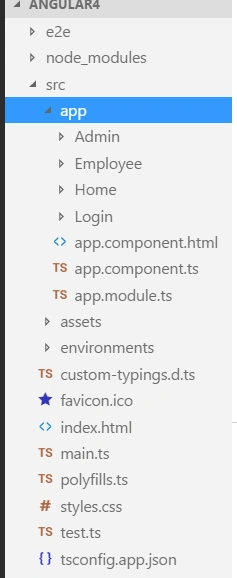
In the above image, we can see that inside
src=>app, Admin, Employee, Home, Login four folder are available. Each folder contains a file like this.
- home.module.ts
- home.route.ts
- home.component.ts
- home.component.html
So, go to your app folder and use the given code as per the given file. Create src=>app=>Home=>home.module.ts.
src=>app=>Home=>home.module.ts
- import { BrowserModule } from '@angular/platform-browser';
- import { NgModule } from '@angular/core';
- import { RouterModule, Routes } from '@angular/router';
- import { HomeComponent } from './home.component';
- const routes: Routes = [
- { path: 'Home', component: HomeComponent },
- ];
- @NgModule({
- declarations: [
- HomeComponent
- ],
- imports: [
- BrowserModule,
- RouterModule.forRoot(routes)
- ],
- providers: [],
-
- })
- export class HomeModule { }
src=>app=>Home=>home.route.ts For now I am not using this file. If you want just copy the highlighted code and paste inside home.route.ts and import in module.
src=>app=>Home=>home.component.ts
- import { Component } from '@angular/core';
-
- @Component({
- selector: 'home',
- templateUrl: './home.component.html',
- })
- export class HomeComponent {
- title = 'Home component ';
- }
src=>app=>Home=>home.component.html
- <h1>
- Welcome to {{title}}!
- </h1>
So, we are done with one module, i.e., Home. Now, it's time to register this module in AppModule. As well as, you can create any number of modules by following the above steps but keep in mind that you have to register that inside the app module.
Inside the app folder, you can see there are three main files.
- app.component.ts
- app.component.html
- app.module.ts
Here, no route is configuring because this module is set for bootstrapping, which means it will run at the starting point. Let me explain how to set route for other modules and configure it.
src=>app=>app.component.ts
- import { Component } from '@angular/core';
-
- @Component({
- selector: 'app-root',
- templateUrl: './app.component.html',
- })
- export class AppComponent {
- title = 'Angular app using Angular CLI by Bikesh Srivastava ';
- }
src=>app=>app.component.html
- <div class="container" style="height:100%">
- <nav class="navbar navbar-inverse navbar-toggleable-md bg-primary">
- <a class="navbar-brand" href="#">Welcome {{title}}</a>
- <div id="navbarNav">
- <ul class="navbar-nav">
- <li class="nav-item active">
- <a class="nav-link" routerLink="/Home">Home</a>
- </li>
- <li class="nav-item">
- <a class="nav-link" routerLink="/Admin">Admin</a>
- </li>
- <li class="nav-item">
- <a class="nav-link" routerLink="/Employee">Employee</a>
- </li>
- </ul>
- </div>
- </nav>
- <div style="margin-top:20px; height:100%">
- <router-outlet ></router-outlet>
- </div>
- </div>
src=>app=>app.module.ts
- import { BrowserModule } from '@angular/platform-browser';
- import { NgModule } from '@angular/core';
- import { AppComponent } from './app.component';
- import { RouterModule, Routes ,PreloadAllModules} from '@angular/router';
- import {AdminComponent} from './Admin/admin.component';
- import {EmployeeComponent} from './Employee/emp.component';
- import {HomeComponent} from './Home/home.component';
- import {HomeModule} from './Home/home.module';
- import {EmployeeModule} from './Employee/emp.module';
- import {AdminModule} from './Admin/admin.module';
- import {LogInComponent} from './Login/login.component'
-
- const routes: Routes = [
-
- { path: 'Home', loadChildren:()=> System.import('./Home').then((comp: any) => comp.default) },
- { path: 'Admin', loadChildren:()=> System.import('./Admin').then((comp: any) => comp.default) },
- { path: 'Employee', loadChildren:()=> System.import('./Employee').then((comp: any) => comp.default) },
- ];
- @NgModule({
- declarations: [
- AppComponent,
- ],
- imports: [
- BrowserModule,
- HomeModule,
- EmployeeModule,
- AdminModule,
- RouterModule.forRoot(routes, { useHash: false, preloadingStrategy: PreloadAllModules }),
- ],
- providers: [],
- bootstrap: [AppComponent]
- })
- export class AppModule { }
src=>main.ts
- import { enableProdMode } from '@angular/core';
- import { platformBrowserDynamic } from '@angular/platform-browser-dynamic';
-
- import { AppModule } from './app/app.module';
- import { environment } from './environments/environment';
-
- if (environment.production) {
- enableProdMode();
- }
-
- platformBrowserDynamic().bootstrapModule(AppModule);
src=>index.html
- <!doctype html>
- <html lang="en">
- <head>
- <meta charset="utf-8">
- <title>Angular4</title>
- <base href="/">
-
- <meta name="viewport" content="width=device-width, initial-scale=1">
- <link rel="icon" type="image/x-icon" href="favicon.ico">
- </head>
- <body>
- <app-root></app-root>
- </body>
- </html>
src=>custom-typings.d.ts
Don't forget to add this part of file and code inside src folder, otherwise you can't find System.import function.
-
-
-
-
-
-
-
-
-
-
-
-
-
-
-
-
-
-
-
-
-
-
-
-
-
-
-
-
-
-
-
-
-
-
-
-
-
-
-
-
-
-
-
-
-
-
- declare module '*';
-
-
-
-
-
-
-
-
-
-
-
-
- declare var ENV: string;
- declare var HMR: boolean;
- declare var System: SystemJS;
-
- interface SystemJS {
- import: (path?: string) => Promise<any>;
- }
-
- interface GlobalEnvironment {
- ENV: string;
- HMR: boolean;
- SystemJS: SystemJS;
- System: SystemJS;
- }
-
- interface Es6PromiseLoader {
- (id: string): (exportName?: string) => Promise<any>;
- }
-
- type FactoryEs6PromiseLoader = () => Es6PromiseLoader;
- type FactoryPromise = () => Promise<any>;
-
- type AsyncRoutes = {
- [component: string]: Es6PromiseLoader |
- Function |
- FactoryEs6PromiseLoader |
- FactoryPromise
- };
-
-
- type IdleCallbacks = Es6PromiseLoader |
- Function |
- FactoryEs6PromiseLoader |
- FactoryPromise ;
-
- interface WebpackModule {
- hot: {
- data?: any,
- idle: any,
- accept(dependencies?: string | string[], callback?: (updatedDependencies?: any) => void): void;
- decline(deps?: any | string | string[]): void;
- dispose(callback?: (data?: any) => void): void;
- addDisposeHandler(callback?: (data?: any) => void): void;
- removeDisposeHandler(callback?: (data?: any) => void): void;
- check(autoApply?: any, callback?: (err?: Error, outdatedModules?: any[]) => void): void;
- apply(options?: any, callback?: (err?: Error, outdatedModules?: any[]) => void): void;
- status(callback?: (status?: string) => void): void | string;
- removeStatusHandler(callback?: (status?: string) => void): void;
- };
- }
-
-
- interface WebpackRequire {
- (id: string): any;
- (paths: string[], callback: (...modules: any[]) => void): void;
- ensure(ids: string[], callback: (req: WebpackRequire) => void, chunkName?: string): void;
- context(directory: string, useSubDirectories?: boolean, regExp?: RegExp): WebpackContext;
- }
-
- interface WebpackContext extends WebpackRequire {
- keys(): string[];
- }
-
- interface ErrorStackTraceLimit {
- stackTraceLimit: number;
- }
-
-
-
- interface NodeRequire extends WebpackRequire {}
- interface ErrorConstructor extends ErrorStackTraceLimit {}
- interface NodeRequireFunction extends Es6PromiseLoader {}
- interface NodeModule extends WebpackModule {}
- interface Global extends GlobalEnvironment {}
All set to run the application. If you get any error, just remove node_module folder and use
"npm install" command on terminal. Let's run the application using
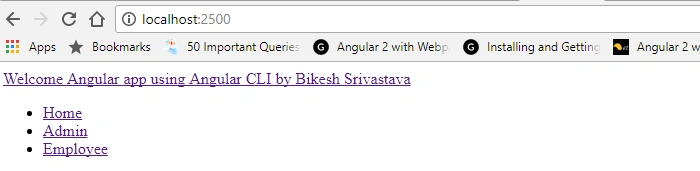
"npm start". The output will looks like this.
Click on any one of the links and see the output.
Sometimes, you can get an error related to port number. Don't worry about that. Just copy the given code and paste inside angular-cli.json
- "defaults": {
- "serve": {
- "port": 2500
- },
- "styleExt": "css",
- "component": {}
- }
Conclusion
In this article, I have explained how to make Angular app communicate with multiple modules; parent to child, and child to parent. In this application, we have found a simple way to load another module. Thereafter, the module will load all components and components will render the HTML according to the selector.


Hamid KhanPosted Aug 1, 2019, 5:26 AM
Good article. Keep it up brother...…….
Chintan PandyaPosted Apr 19, 2018, 1:53 AM
Hi Bikesh, I have tried same things in angular5, But it gives me an error below error i got ERROR in src/app/admin/admin.module.ts(4,10): error TS2395: Individual declarations in merged declaration 'AdminComponent' must be all exported or all local.src/app/admin/admin.module.ts(4,10): error TS2440: Import declaration conflicts with local declaration of 'AdminComponent'. src/app/admin/admin.module.ts(6,31): error TS2449: Class 'AdminComponent' used before its declaration. src/app/admin/admin.module.ts(19,14): error TS2395: Individual declarations in merged declaration 'AdminComponent' must be all exported or all local.
AbobakrPosted Jan 6, 2018, 5:43 PM
This mean I can put module inside module
Manav PandyaPosted Aug 30, 2017, 12:50 AM
Nice share sir ...............