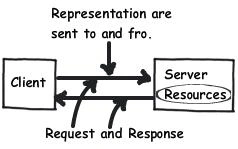
When you send any request or you get any response, you are
actually sending representations.
For example let's say you want to create a new customer record,
you would send some kind of representation as shown below using HTTP PUT.
<Customer>
<Name>Questpond.com</Name>
<Address>Mulund Mumbai</Address>
</Customer>
Once the resource is created you would get a representation
as shown below. The below representation says the customer questpond has been
successfully created and if you wish you can use "http://www.questpond.com/Customer/Questpond/Orders"
defined in the "Next" tag to create
orders for the "questpond" customer.
<Customer>
<Name>Questpond.com</Name>
<Next>http://www.questpond.com/Customer/Questpond/Orders</Next>
</Customer>
The above representation was in XML format if
you wish you can also send and received other presentations like JSON. For
instance below is a simple JSON snippet for creating a new customer record with
name and address.
{Customer :{ Name:'Questpond.com', Address:'Mulund Mumbai'}}
Every request should be an independent request so that we
can scale up using load balancing techniques. Independent request means with the data also
send the state of the request so that the server can carry forward the same
from that level to the next level.
For instance below are two simple representations, the first
representation is sent for logging in.
<Login>
<Name>Questpond.com</Name>
<Password>sdkj#43445</Password>
</Login>
If you are logged in successfully you receive the below
representation.
<Login>
<Success>true</Success>
</Login>
If you want to search for customer, you would send him the
below representation stating that you are in a state of successful logging in
and would like to search all customers.
<Customer>
<Filter>All</Filter>
<Success>true</Success>
</Customer>
In other words every request is independent and the server
does not need to remember your previous request and states.
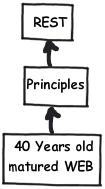
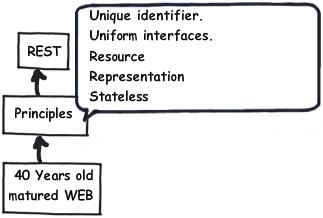
So summarizing REST leverages the old web HTTP by applying
principles 5 important principles:-
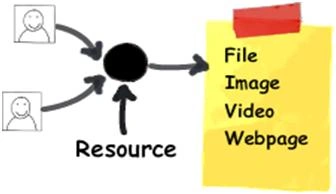
- Everything is a resource.
- Every resource is identified by a unique identifier.
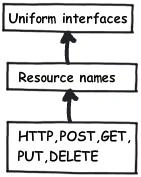
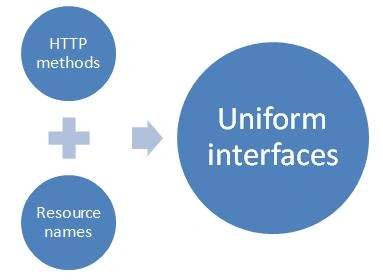
- Use simple and uniform interfaces.
- Communication are done by representation.
- Be Stateless.
Enabling WCF REST services is a three step process:-
- Enable HTTP bindings.
- Expose methods via common interfaces.
- Define your representation.
In order to enable HTTP bindings the first thing is to create an end point behavior with "webHttp" binding. The "webHttp" binding enables HTTP protocol on your WCF services.
<endpointBehaviors>
<behavior
name="NewBehavior0">
<webHttp
/>
</behavior>
</endpointBehaviors>
Create a new endpoint and bind the behavior with your end
point.
<services>
<service name="WcfRest.Service1">
<endpoint behaviorConfiguration="NewBehavior0"
binding="webHttpBinding"
bindingConfiguration=""
contract="WcfRest.IService1" />
</service>
</services>
In order to make your interfaces uniform you we can use the "UriTemplate" property
as shown in the below figure. You can see from the below code snippet how "getStudents" can now be called by using a http GET request
on "/Students/123" , where 123 is the id of the student.
[OperationContract]
[WebGet(UriTemplate = "/Students/{id}")]
string getStudents(string id);
In the same way in the below code snippet we are calling "AddStudent" method
using HTTP POST and we have made the interface uniform using the "UriTemplate" property
as shown in the below code snippet.
[OperationContract]
WebInvoke(Method = "POST", UriTemplate =
"/Students/{studentname}")]
bool Addstudent(string studentName);
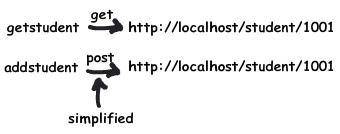
So now if you want to get a particular student use http://localhost:27683/Students.svc/Students/1 with HTTP GET method and if you want to add a
new student call http://localhost:27683/Students.svc/Students/Shiv with HTTP POST. Is n't that much simple as
compared to "getStudents" and
"AddStudent" methods.
[ServiceContract]
public interface IStudents
{
[OperationContract]
[WebGet(UriTemplate = "/Students/{id}")]
string
getStudents(string id);
[OperationContract]
[WebInvoke(Method
= "POST", UriTemplate = "/Students/{studentname}")]
bool Addstudent(string
studentName);
}
Below is the implemented code for the above interface. We
have created a collection of student names in a string collection. In order to add new students we can call
"AddStudent" and to retrieve students we can call "getStudents".
public class Students : IStudents
{
List<string> ostudents = new List<string>();
public Students()
{
ostudents.Add("Shivprasad");
ostudents.Add("Raju");
}
public string
getStudents(string id)
{
return
ostudents[0];
}
public bool
Addstudent(string StudentName)
{
ostudents.Add(StudentName);
return true;
}
}
Testing the above WCF REST services using simple
HTML form
To get a particular student we need to invoke "getStudents" by
using HTTP GET on the URL http://localhost:27683/Students.svc/Students/1
.
The "1" indicates that we want to retrieve the student with ID "1".
To add a particular student
we need to invoke "Addstudent" by using HTTP POST on the URL
http://localhost:27683/Students.svc/Students/Shiv . "Shiv" is the student name we wish to add to
the collection.
In order to make a post
and get on the above URL's we will use simple HTML to do the same. You can also use other methods like "xmlhttprequest"
, WCF proxy etc. In order to keep it simple in this article we will use simple
HTML for now.
<form
action="http://localhost:27683/Students.svc/Students/1"
method="get">
<input type="submit" />
</form>
So if you run the above
HTML with the action pointing to the URL http://localhost:27683/Students.svc/Students/1 and
using the "get" method you should get the below output.
This XML file does not
appear to have any style information associated with it. The document tree is
shown below.
<string xmlns="http://schemas.microsoft.com/2003/10/Serialization/">Shivprasad</string>
In the same way if you
run the below HTML with the action pointing to the URL (http://localhost:27683/Students.svc/Students/shiv
) and using the "post" method you
should get the below output.
<form action="http://localhost:27683/Students.svc/Students/shiv"
method="post">
<input
type="submit" />
</form>
This XML file does not
appear to have any style information associated with it. The document tree is
shown below.
<boolean xmlns="http://schemas.microsoft.com/2003/10/Serialization/">true</boolean>
In the same way you can
try for other HTTP methods like PUT , DELETE etc.
When we discussed REST
fundamentals we said one of the most important things is representation and
format of representation. The current WCF
[WebGet] and [WebInvoke] attribute help you to configure formats in both
request and response in XML and JSON format.
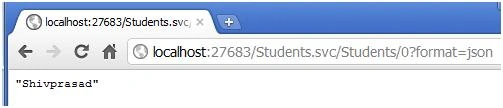
In the below code
snippet we have created the Responseformat as JSON.
[OperationContract]
[WebGet(ResponseFormat=WebMessageFormat.Json,
UriTemplate = "/Students/{id}?format=json")]
string getStudentsJSON(string id);
If you do a get on the
URL you should get the value as shown in the below figure.
Video on REST
If not clear with the above concepts explained see our video on What is REST?
Do watch my 500 videos on C#, .NET, WCF, Design Patterns, SilverLight, SharePoint etc.


Vithal WadjePosted Jan 1, 2013, 3:46 AM
super article
Sujit BhujbalPosted Jul 9, 2012, 6:48 AM
Nice article
Vahaj uddinPosted Nov 20, 2011, 11:12 AM
Hey Shiv Nice and Thanx alot :)