

Introduction
These queries are not related to any specific topic. Each query can be used in some specific conditions. I promise that this article will build some good concepts.
Now we start to learn.
First of all, we create an Employee Table.
CREATE TABLE Employee
(
   Emp_IId Int identity(1,1),
   First_Name Nvarchar(MAX) Not NUll,
   Last_Name Nvarchar(MAX) Not Null,
   Salary Int Not Null,
   City Nvarchar(Max) Not Null
)
Now insert some values into the Employee table.
Insert Into Employee
Select 'Pankaj','Choudhary',25000,'Alwar' Union All
Select 'Rahul','Prajapat',23000,'Alwar' Union All
Select 'Sandeep','Jangid',27000,'Alwar' Union All
Select 'Sanjeev','Baldia',24000,'Alwar' Union All
Select 'Neeraj','Saini',22000,'Alwar' Union All
Select 'Narendra','Sharma',23000,'Alwar' Union All
Select 'Divyanshu','Gupta',25000,'Alwar'
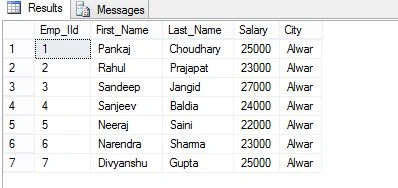
Now Employee looks such as:
Select * From Employee
Query to get (nth) Highest Value
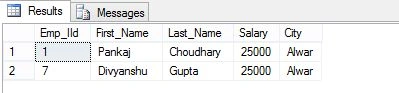
Assume we want to find the information of all employees with the second highest salary from the Employee table. So the query will be:
Select * From Employee Where
Salary= (Select Top 1 Salary From (Select distinct Top 2 Salary From Employee Order by Salary Desc)Tab Order By salary Asc )
Output
Query to get (nth) Lowest Value
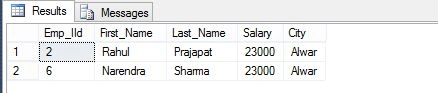
Assume we want to find the information of all employees with the second lowest salary from the Employee table. The So query will be:
Select * From Employee Where
Salary= (Select Top 1 Salary From (Select distinct Top 2 Salary From Employee Order by Salary Asc)Tab Order By salary Desc )
Output
Query to swap the values of two columns
Sometimes we must swap the values of two columns. So I will show you how to interchange the values of two columns.
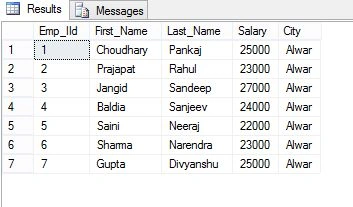
In our Employee table, we swap the values for First_Name and Last_Name.
Update Employee Set Last_Name=First_Name ,First_Name =Last_Name

Select * From Employee
Output
Query to insert a value into an Identity column
Let us try to insert a value into the Employee table.
Insert Into Employee(Emp_IId,First_Name,Last_Name,Salary,City) values(8,'Sonu', 'Singh',32000,'Delhi')
Insert Into Employee(Emp_IId,First_Name,Last_Name,Salary,City) values(9,'Ravi', 'Singh',35000,'Delhi')
Output
Msg 8101, Level 16, State 1, Line 1.
An explicit value for the identity column in table 'Employee' can only be specified when a column list is used, and IDENTITY_INSERT is ON.
When executing the preceding insert query, the system throws an error that we can't insert values into the Identity Column.
Now I show you how to insert a value into an Identity column.
SET IDENTITY_INSERT Employee ON

Insert Into Employee(Emp_IId,First_Name,Last_Name,Salary,City) values(8,'Sonu', 'Singh',32000,'Delhi')
Insert Into Employee(Emp_IId,First_Name,Last_Name,Salary,City) values(9,'Ravi', 'Singh',35000,'Delhi')

SET IDENTITY_INSERT Employee OFF
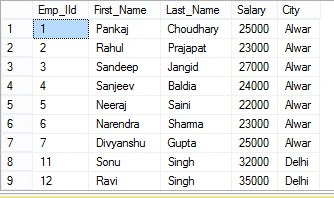
Select * From Employee
Output
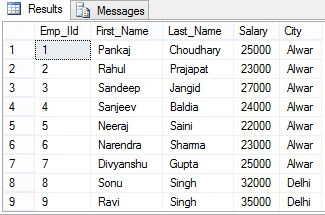
In the preceding query, IDENTITY_INSERT ON allows insertion into the identity Column, and DENTITY_INSERT OFF does not allow insertion into the identity column.
Query to Create Comma Separated List
Assume we want to create a list that holds the First_Name and Last_Name of each employee, and the Employee's names are separated with a Comma (,). So for this query, we use Coalesce to make comma-separated values.
Yan AungPosted Feb 21, 2019, 2:44 AM
Thank Sir! Very useful for me.
Hari ShankerPosted Apr 20, 2016, 12:09 AM
nice
Yashwanth MuthineniPosted Aug 27, 2015, 5:58 AM
Nice Share
Gaurav KumarPosted Jun 16, 2015, 6:59 AM
Very Useful. Thanks Buddy... :)
Neeraj KumarPosted Jun 8, 2015, 3:02 AM
Good Pankaj Kumar Choudhary
RakeshPosted Jun 8, 2015, 12:01 AM
Good one