

System functions perform operations and return information about database objects in SQL Server. In this article, you will see some of the SQL Server System functions which provide information about database objects. The System Functions can never be created by the user. They are pre-defined functions. So let's take a look at a practical example of how to use System Functions in SQL Server. The example is developed in SQL Server 2012 using the SQL Server Management Studio. Some of SQL Server system functions are described in the following.
DataLength Function
The Datalength() function returns the length of the result of the string expression. It is similar to the LEN function.
Syntax
DATALENGTH(string_expression)
Example
Declare @string varchar(20)
Declare @stringname varchar(40)
set @string ='rohatash'
set @stringname ='Satendrta singh'
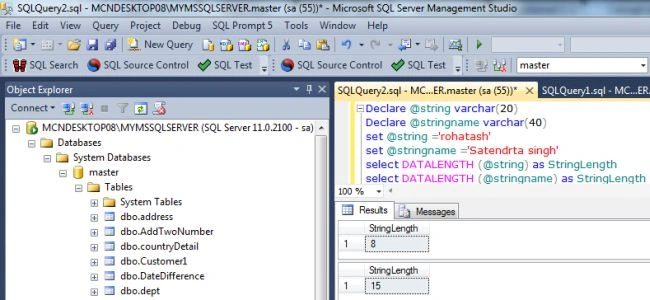
select DATALENGTH (@string) as StringLength
select DATALENGTH (@stringname) as StringLength
Output
DB_NAME Function
DB_NAME Function returns the name of the database with the identifier db_id. If no identifier is specified, the name of the current database will be displayed.
Syntax
DB_NAME([db_id])
In the preceding syntax, db_id is the database identifier.
Example
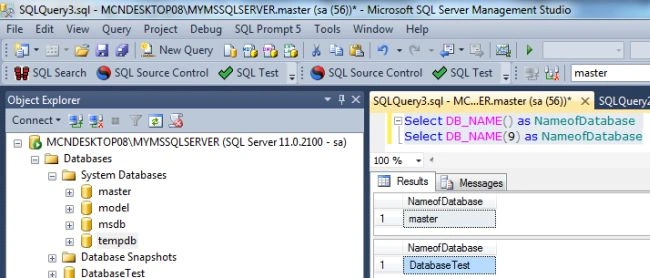
Select DB_NAME() as NameofDatabase
Select DB_NAME(9) as NameofDatabase -- DB_Name with identifier
Host_Name Function
The Host_Name Function returns the name of the host or computer name.
Syntax
HOST_NAME()
Example
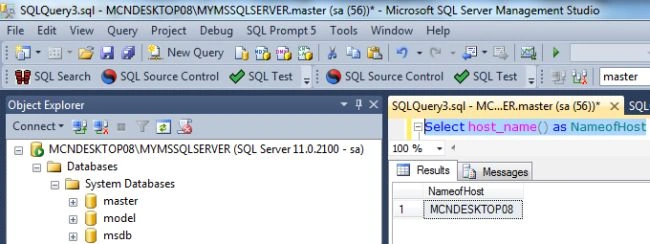
Select host_name() as NameofHost
Output
APP_NAME Function
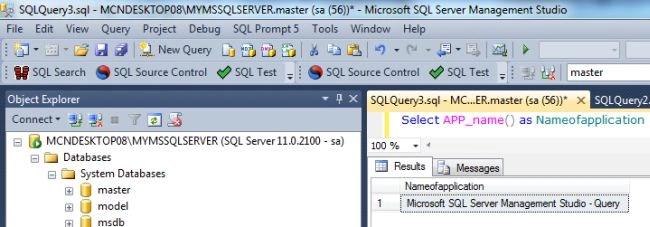
The APP_NAME() function returns a string with the name of the application that initiated the database connection. APP_NAME() can be helpful if you're troubleshooting a connection.
Syntax
APP_NAME()
Join the conversation! Your thoughts help the community grow.