

Introduction
If you work or plan to work with RDBMS such as SQL Server, I'm sure you have heard of indexes. An index in SQL Server contains keys built from one or more columns in the table or view. The index keys are stored in a structure (B-tree) that enables SQL Server to find the row or rows associated with the key values quickly and efficiently. In this article, we will learn what an index is, different types of indexes, why do we need an index, and how to create an index SQL Server with code examples.
What is an index in SQL Server?
An index is a data structure that enables data to be found quickly by SQL Server. Indexes are special lookup tables that the database search engine can use to speed up data retrieval. Simply put, an index is a pointer to data in a table. An index in a database is very similar to an index in the back of a book. We can create an index on one or more columns (maximum 16 columns).
We can compare the index of a table with an index of a book. An index contains a sorted list of info about the contents of a book. When we need to search for a topic then we go through the index and search in the index info. Such that the index saves time and provides quick results.
Mainly an index increases the speed of data retrieval but it also increases the overhead of data modification, like inserting, deleting, and updating the data. Now we consider some important points about indexes. You can create indexes on both, tables and views.
Why do we need an Index on a table?
Suppose we have a table (or view) of records of employees that contains a million records and we want to search for a specific id of an employee. A normal search system will search for the employee ID in each row. This process is called “Table Scan”. A table without a clustered index is called a “heap table”. This process can require a large amount of time if the records are at the end of the table.
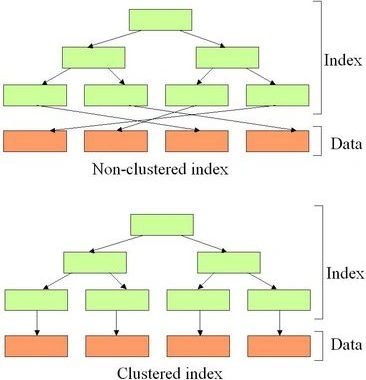
To overcome this problem we can also use indexes. An index arranges the data of the table in a sorted manner in the form of a B-tree (Hash Tables and R-trees are also used).
Types of Indexes
There are the following two main index types.
- Clustered Index
- Non-Clustered Index
Step 1. Copy the code for creating a table as in the following.
CREATE TABLE [dbo].[Employee_Detail](
    [Emp_IId] [int] NOT NULL,
    [Emp_Name] [nvarchar](50) NOT NULL,
    [Emp_Age] [int] NOT NULL,
    [Emp_Salary] [int] NOT NULL
) ON [PRIMARY]

GO
Step 2. Now insert some values into the table as in the following.
Insert into Employee_Detail Values(100,'Pankaj',20,25000)
Insert into Employee_Detail Values(101,'Rahul',19,28000)
Insert into Employee_Detail Values(102,'Sanjeev',21,32000)
Insert into Employee_Detail Values(103,'Divyanshu',22,26000)
Insert into Employee_Detail Values(104,'Omi',26,27000)
Insert into Employee_Detail Values(105,'Sandeep',28,24000)
Insert into Employee_Detail Values(106,'Neeraj',24,35000)
Insert into Employee_Detail Values(107,'Narendra',29,45000)
Now the table will look as in the following.
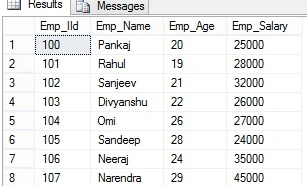
We will now consider both types of indexes.
Clustered Index in SQL Server
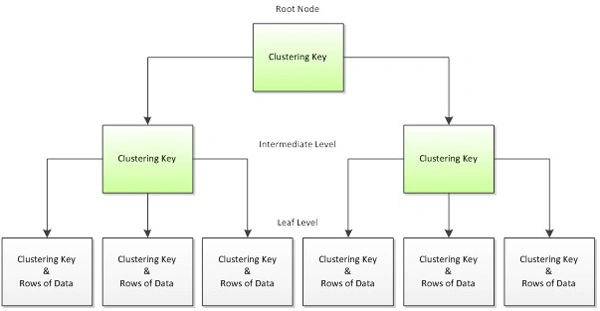
A Clustered Index is a special type of index that reorders the way records in the table are physically stored. Therefore the table can have only one Clustered Index and this is usually made on the primary key. The leaf nodes of a Clustered Index contain the data pages. It is like a dictionary, where all words are sorted in alphabetical order in the entire book. Since it alters the physical storage of the table, only one Clustered Index can be created per table.
We can create a Clustered Index using one of the following two ways.
Using Primary Key
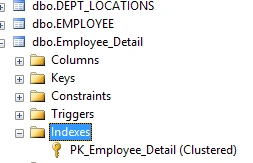
When we create a Primary Key on a table then the system creates a Clustered Index automatically.
Alter table Employee_Detail
Add Constraint Primarykey_Constraint Primary Key(Emp_IId)
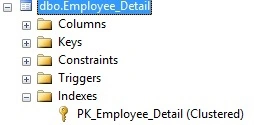
Using "Create clustered index" Query
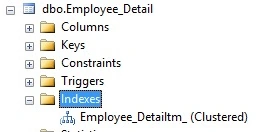
We can also create an index using a "Create Clustered Index" query. The following is a sample.
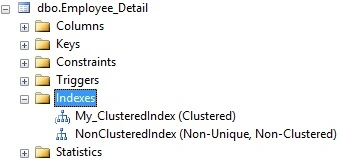
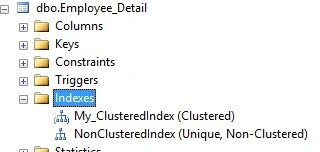
Create Clustered Index My_ClusteredIndex
on Employee_Detail(Emp_IId)
As we said above, the system creates a B-Tree when we create a Clustered Index. The system also creates a B-Tree. We will now examine how a Clustered Index works.
If we create a B-tree for our table then it will look like this.
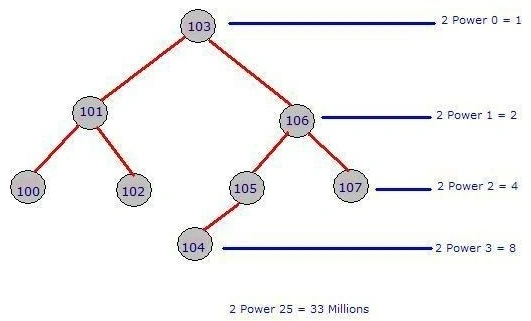
Image Reference Google Searches
A B-Tree contains one head node. In our case node, 103 is our head node. The left side value of each node is always less than the node and the right side value is always greater than the node.
Let us examine some examples.
select * from employee_Detail where Emp_Iid=103
In a normal case, the system will perform four comparisons, the first for 100, the second for 101, and the third for 103, and in the fourth comparison, it will find the desired result.
Using an index it only does a single comparison because 103 is the head node of the B-Tree.
select * from employee_Detail where Emp_Iid=106
In a normal case, the system will do 7 comparisons from 100 to 105 then in the 7th comparison, it will find the desired result.
Using an index only does 2 comparisons. First, we look for the root node value of the root node which is 103 so we move to the next node towards the right side then we find the desired result.
After considering the preceding examples we can say that by using an index we can increase the speed of data retrieval.
Let us consider one more example.
select * from employee_Detail where Emp_Iid=100
In a normal case, the system will do a single comparison because it will find 100 at the beginning of the table.
Using an index the system first checks the root node and it will find the value of the root node is equal to 103. It will then go to the left side of the root node. The value of the next node is 101. That is greater than 100 so the system again moves towards the left side. Now the system finds the desired result.

Ganapathi RamanPosted Dec 16, 2019, 11:51 PM
Great article sir... Concepts are very clear... Thanks a lot!
Soumalya DasPosted Mar 14, 2018, 5:08 AM
Very helpful for concept clearing
Sr KarthigaPosted Feb 14, 2016, 7:47 AM
Good one sir
SharadPosted Jul 17, 2015, 5:50 AM
great article..
Udaya kumarPosted Apr 1, 2015, 4:35 PM
Nice explanation
Gowtham RajamanickamPosted Mar 30, 2015, 10:12 AM
nice
Gowtham RajamanickamPosted Mar 30, 2015, 10:12 AM
nice
Khargesh RajputPosted Mar 30, 2015, 7:20 AM
nice
Ravi MaheshwariPosted Mar 30, 2015, 5:42 AM
thanxs
Vikram ChaudharyPosted Mar 30, 2015, 4:47 AM
Nice one..article helped me to understand the concept in simpler way..keep it up :)
Yogendra YadavPosted Mar 30, 2015, 1:09 AM
Thanks for sharing this article with us...Good Work
RakeshPosted Mar 29, 2015, 8:47 PM
Good...Keep it up Pankaj,thanks for sharing
Santhakumar MunuswamyPosted Mar 29, 2015, 2:36 PM
Good Work