

Stored Procedure
A stored procedure is a batch of Transact-SQL statements (like select, insert and update) compiled into a single execution that can be re-used. If you find yourself using the same query over and over again, it would make sense to put them into a stored procedure. Every time you write a query it is parsed in the database. If you have written a stored procedure for it, it will be compiled once and can be executed multiple times.
There are two steps involved in executing a stored procedure from your program. First, you set the command object property CommandText as the stored procedure name; second, you set the CommandType property as CommandType.StoredProcedure.
Step 1
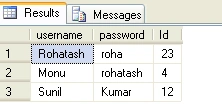
Now we Create a table in a database named logintab and it has the three columns Login, Password and Id.
The Database table looks like the Figure 1 shown below.
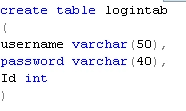
Figure 1
Step 2
Now we create a stored procedure in the database named storlog. The stored procedure looks like Figure 2.
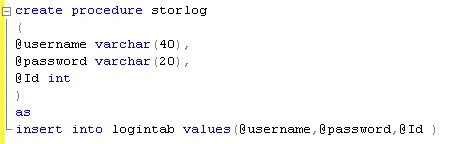
Figure 2
Step 3: Calling stored procedure
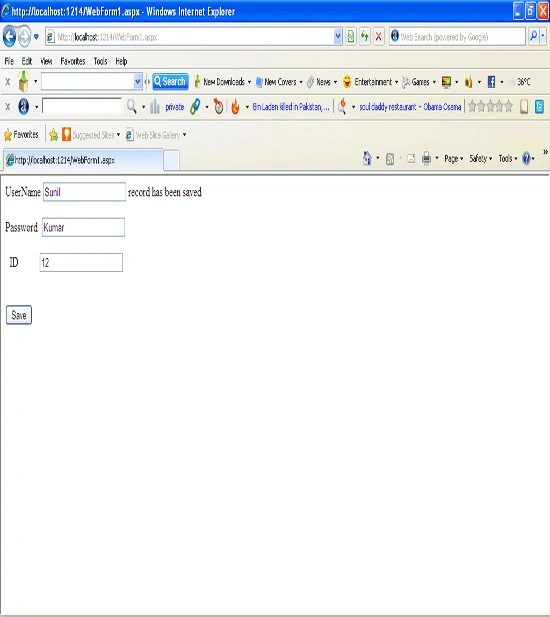
Taking three TextBoxes, one Button and a Label control on the form, the form looks like this.
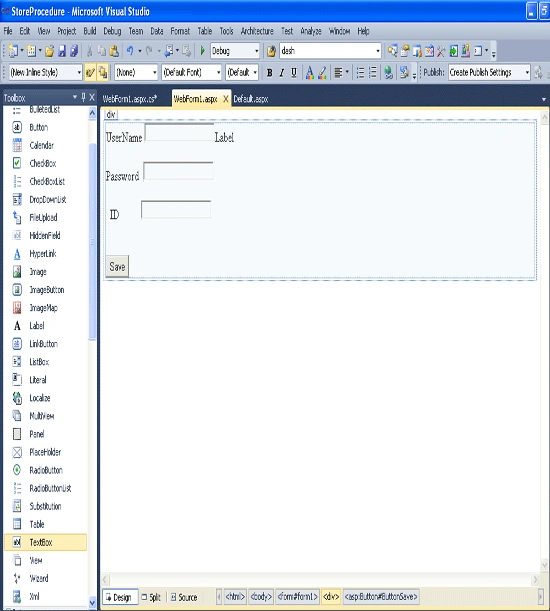
Figure 3
Now double-click on the Save button control and add the following code.
using System;
using System.Collections.Generic;
using System.Linq;
using System.Web;
using System.Web.UI;
using System.Web.UI.WebControls;
using System.Data.SqlClient;
using System.Data;
namespace StoreProcedure
{
Surabhi BansalPosted May 4, 2011, 4:45 PM
To add the data in database this code really works..Please help me if u can send me the code for delete and update also continuation with this add code.