

Introduction
Linux is a popular version of the UNIX Operating System. It is open source as its source code is freely available. It is free to use. Linux was designed considering UNIX compatibility. Its functionality list is quite similar to that of UNIX.
Components of Linux System
Linux Operating System has primarily three components:
- Kernel:
Kernel is the core part of Linux. It is responsible for all major activities of this operating system. It is consists of various modules and it interacts directly with the underlying hardware. Kernel provides the required abstraction to hide low level hardware details to system or application programs. - System Library:
System libraries are special functions or programs using which application programs or system utilities accesses Kernel's features. These libraries implement most of the functionalities of the operating system and do not require kernel module's code access rights. - System Utility:
System Utility programs are responsible for doing specialized, individual level tasks.
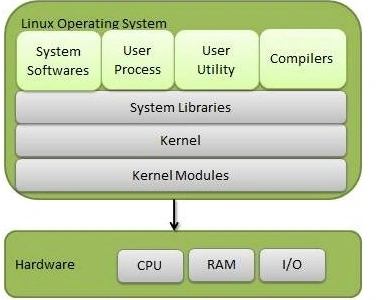
Run level in Linux Operating System:
Run level is a state or mode of operating system in Linux. There are "seven" Run levels which is represented by a single digit integer. It is one of the most important Terms in Linux. Linux kernel supports and differentiates all levels.
Seven Run levels are as follows:
- Run level 0: It means System in haul state, there is no activity.
- Run level 1: It means system is in "single user" mode. Which are rarely used?
- Run level 2: It means system is in multiple users’ mode but no network file system (NFS) are there. Which also rarely used.
- Run level 3: It means system is in multiple users, Command line mode. It is a default run level in most of the Linux system.
- Run level 4: It means system is in User-definable mode. That is not in used.
- Run level 5: It means system is in multiple users’ mode with GUI (graphical user interface). This one is the standard run level.
- Run level 6: It is used when the user wants to restart the system basically for the Reboot sake.
Here, I am going to discuss some basic Linux commands through which you can get the information about your system in Linux environment.
- Cat /proc/memento: It will provide you Memory Information.
- Cat /proc/CPU Info: It will provide you CPU Information.
- Date: It will show you current date or time.
- Whom: It shows who is logged in right now.
- Do -h: It shows disk usage.
- Du: It shows directory space usage.
- Unnamed -a: It shows kernel information.
- W: It shows who is online.
- Cal: It shows the current month calendar.
- Cat /proc/file systems: It shows the type of current file system which are currently using.
- Free: It displays available memory in kilo bytes.
- Cat /proc/version: This command shows what version you are using. And it displays some other information as well.

SubashPosted Oct 7, 2016, 1:59 AM
Nice explanation
Prasanna MuraliPosted May 20, 2016, 11:58 AM
nice...
Kinex MediaPosted Apr 25, 2016, 6:32 AM
Great information Keep it up Swati
Kirtan ParmarPosted Mar 14, 2016, 2:31 PM
anything !!
Kashif SohailPosted Mar 12, 2016, 5:12 AM
Good
Afzaal Ahmad ZeeshanPosted Mar 12, 2016, 4:40 AM
I think you understand that Linux is not at all an operating system. :-) Anyways, welcome to community, Swati!
Vignesh ManiPosted Mar 11, 2016, 5:45 PM
Nice
Saillesh PawarPosted Mar 11, 2016, 10:30 AM
Good start