

What is Selenium Webdriver?
WebDriver is an automated web application testing tool. This provides APIs that easily integrate with any programming language such as C#, Java, or Python.
For details please go through the URL.
The use of Selenium Webdriver is to test any web application.
What is C#?
C# is a programming language of Microsoft that enables developers to build a variety of secure and robust applications that run on the .NET Framework.
Why do we need to integrate Selenium Webdriver with C#?
We can easily integrate the API or drivers in our C# application and test the Web Application.
How to integrate Selenium Webdriver with C#?
Before going on actual integration one should have an infrastructure setup.
Steps to Set Infrastructure
Create a simple project to integrate Selenium webdriver with C# in Visual Studio.
Step 1. Open Visual Studio.
Step 2. Create a New Project.
Select Test Project from the right panel and then select Unit Test Projects.
If you are unable to find the Test project, then select the online template option and search for the template.

Step 3. Adding Selenium references or drivers in the C# project.
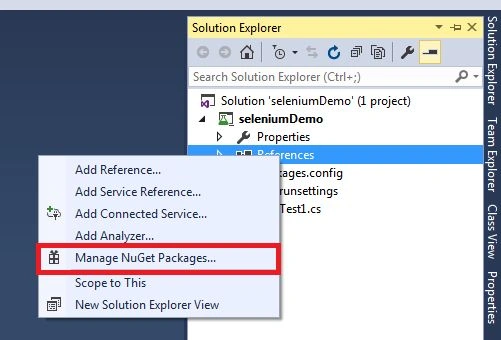
- Firstly, open solution explorer.
- Then expand the project.
- Right-click on references and select the ‘Manage Nuget Packages’ option.
Then you can see the following screen:
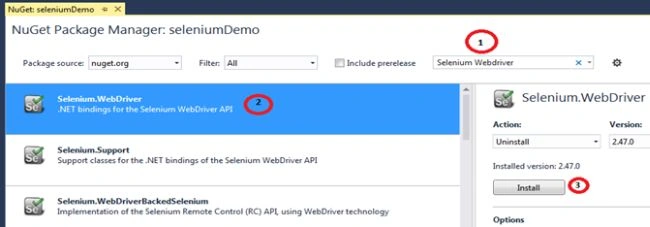
Then follow the steps as in the following image.
- Search Selenium webdriver.
- Select Selenium. web driver
- Click install.
After successfully installing you can see the following screen.
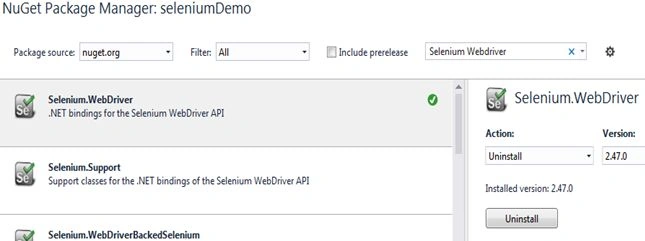
And in references.

Now open the file UnitTest1.cs to start actual coding to integrate the Selenium web driver in our C# application.
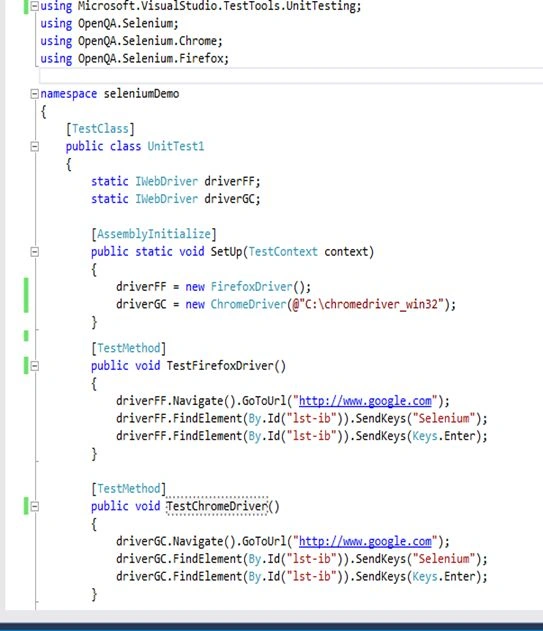
Now we go step by step: Add the below references.
using OpenQA.Selenium;
using OpenQA.Selenium.Chrome;
using OpenQA.Selenium.Firefox;
The above references can provide all classes and properties required to integrate the Selenium web drivers.
One more important thing is that download Chrome Driver on your local machine
Please download it from the URL.
In this way, you need to download Webdriver as per your expected browser.
Now we will run the test cases

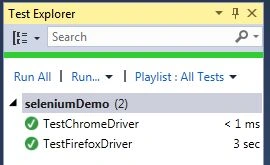
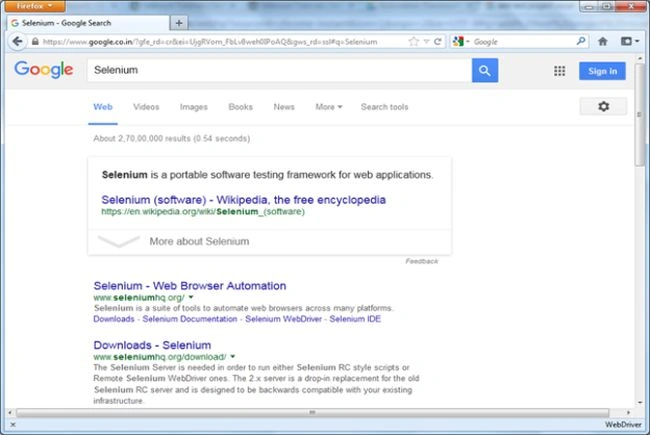
Now you can see the Chrome and Firefox browsers opened by searching Selenium.
Now we will get some details about the Selenium Classes, Commands, Events, and Elements
WebDrivers
We can have webdrivers as per the web browser. For the chrome browser, we do have ChromeDriver, for the Firefox browser we do have FirefoxDriver, and so on.
All these driver classes are derived from the RemoteDriver class.
The syntax to create an object of FirefoxDriver is.
By class
This class can provide the browser data by name, id, ClassName, LinkText, TagName, PartialLinkText, and XPath.
Pavan RamamurthyPosted Mar 31, 2021, 3:19 PM
Thanks for detailed info
Matas VaitkeviciusPosted May 12, 2019, 1:00 AM
Getting following issue https://stackoverflow.com/questions/56096458/the-specified-executable-is-not-a-valid-application-for-this-os-platform-seleni?noredirect=1#comment98828573_56096458
sunil kumarPosted Mar 12, 2019, 8:09 AM
When selenium project deployed to production that is not working
Yuvaraj YuvaPosted Mar 8, 2019, 12:39 AM
How to deploy our selenium automation code into another system? I have created in windows console application i need to deploy to another system, but it showing error like could not load file or assembly webdriver.dll is not found? could anyone help me on this?
Nikhil KulshresthaPosted Sep 7, 2018, 12:57 AM
Nuget packages solution is showing disabled
Avinava BasuPosted Jan 6, 2018, 11:58 AM
This needs to be rewritten.
Dennis GitutoPosted Dec 23, 2017, 4:17 PM
Can one create the framework in VS code in Linux? Thanks in advance
Avilash PatroPosted Nov 8, 2017, 5:06 AM
Hi , I am getting NullReferenceException error on executing the below sample program. Please help on this. using System;using Microsoft.VisualStudio.TestTools.UnitTesting; using OpenQA.Selenium; using OpenQA.Selenium.Firefox; using OpenQA.Selenium.Chrome; namespace SampleSelenium { [TestClass] public class UnitTest1 { static IWebDriver driverGC; public static void SetUp(TestContext context) { driverGC = new ChromeDriver(); } [TestMethod] public void TestMethod1() { driverGC.Navigate().GoToUrl("www.google.com"); } } }
ARJUN GULATIPosted Oct 11, 2017, 12:55 AM
Great .. how we can provide dynamic data or dynamic url with database
Maya JustinianoPosted Oct 10, 2017, 2:44 PM
Thanks its was very helpfully for me
Santhosh KumarPosted Sep 7, 2017, 2:32 AM
The blog gave me idea about the selenium web driver my sincere thanks for this post
Ramesh AnbuPosted Aug 23, 2017, 7:35 AM
Nice article... keep it up...
Ashok KaralePosted Feb 20, 2017, 7:33 AM
Good to start Selenium. Please share more on this.
Anand ReddyPosted Feb 2, 2017, 6:45 AM
I came across following error while running through the step by step tutorial. https://www.screencast.com/t/cTlDwzAVBi
SanPosted Jun 21, 2016, 6:01 AM
Nice article :)
sagar mopagarPosted Jun 14, 2016, 9:28 PM
Just Awesome!!!
Priyaranjan K SPosted Oct 21, 2015, 1:19 PM
Good One
Harshad PansuriyaPosted Oct 6, 2015, 8:55 AM
Nice one
Humayun Kabir MamunPosted Oct 6, 2015, 7:24 AM
Nice...
Santhakumar MunuswamyPosted Oct 5, 2015, 11:53 PM
Nice Share
Shridhar SharmaPosted Oct 5, 2015, 3:51 PM
nice share
Ankit BansalPosted Oct 5, 2015, 5:56 AM
Nice..thanks for sharing with us..
Gowtham RajamanickamPosted Oct 5, 2015, 4:59 AM
useful....
Rajeesh MenothPosted Oct 5, 2015, 4:50 AM
Thanks For Sharing..
Aditya MishraPosted Oct 5, 2015, 1:03 AM
Nice...
Nilesh JadavPosted Oct 4, 2015, 8:49 PM
Nice Post, Thanks for sharing