I know you all are familiar with SQL. If not I strongly recommend you read some basic information here. As the name implies, Web SQL has so many similarities with SQL. So if you are good in SQL, you will love Web SQL too. Web SQL is an API which helps the developers to do some database operations in the client side, like creating a database, opening the transaction, creating tables, inserting values to tables, deleting values, and reading the data. If you need any other way to save some data in the client side, you can use storage mechanisms introduced in HTML5.
Now we will look some of the operations a developer can do with Web SQL. I hope you will like this.
Using the code
As you all know, to work with SQL queries, you must create a database. So the first step we are going to do is create the database.
Create/Open Web SQL Database
To create a Web SQL database, we can use a function called openDatabase which has four parameters as follows.
- Database name
- Version Number
- Description
- Size
- Creation callback.
The creation callback gets fired while the database is being created. Now shall we open a Web SQL database with the above mentioned parameters? We can do that by running a query as follows.
- var myDBInstance = openDatabase('dbSibeeshPassion', '1.0', 'This is a client side database', 2 * 1024 * 1024);
Here I have given the size of my database as 2*1024*1024. In most browsers the size is flexible, but few maintain a limit of 5 MB. As from the above query we have created a Web SQL database. Now we will check whether the DB is created successfully or not.
-
- if (!myDBInstance)
- {
- alert('Oops, your database was not created');
- } else
- {
- var version = myDBInstance.version;
- }
Here, you will get an alert if the database is not created. Or you will be able to fetch the version details from the database instance.
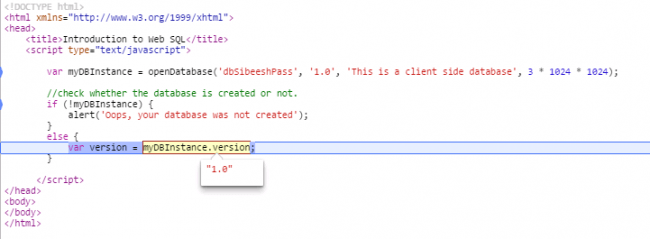 Getting_version_details_from_database_instance
Once the database is created, we can start using the transaction as we use in SQL.
Creating transaction
To create a transaction we can use the following syntax. We can use transaction method from our database instance.
- myDBInstance.transaction(function (tran)
- {
- });
Here,
myDBInstance is our database instance. And
tran is our transaction object which we are going to use for our upcoming operations. Why we use transaction is, as you all know transaction can be roll backed. For example, if any of the operation throws any error, the transaction will be roll backed so there won’t be any kind of mismatching data happening. And of course, we can easily manage error logs with the help of transaction. Shall we write queries needed for our operations?
Firstly, we will create a table in our database. To execute any queries in Web SQL, you must use the method executesql.
- tran.executeSql('CREATE TABLE IF NOT EXISTS Users (id unique, Name, MailID)');
As you can see we are creating the table
Users if it does not exist in the database. As in SQL we are assigning
id as a unique key.
Next thing is we need to insert some rows to our table.
- tran.executeSql('insert into Users (id, Name, MailID) values (1, "Sibi","[email protected]")');
- tran.executeSql('insert into Users (id, Name, MailID) values (2, "Aji","[email protected]")');
- tran.executeSql('insert into Users (id, Name, MailID) values (3, "Ansu","[email protected]")');
If you want to assign name, mailid, id values to insert query, you are welcomed to create those variables and assign to the query as shown below.
- var name = "Sibi";
- var id = "1";
- var MailID = "[email protected]";
- tran.executeSql('insert into Users (id, Name, MailID) values (?,?,?)', [id, name, MailID]);
So we have inserted some values too. Now we need to read the data we have inserted to our table, right? To do that we can use and we need to create a new transaction and another executeSql command.
- tran.executeSql('SELECT * FROM Users', [], function (tran, data) {
- });
Here we will get the output in
data. As you can see I have given a call back function along with the command. This can be used to loop through our data and shows the same in our page. So we can modify our reading transaction block as follows.
- myDBInstance.transaction(function(tran)
- {
- var html = '<table><thead><th>Mail ID </th><th>ID</th><th>Name </th></thead><tbody>';
- tran.executeSql('SELECT * FROM Users', [], function(tran, data)
- {
- for (i = 0; i < data.rows.length; i++)
- {
- html += '<tr><td>' + '<a ' + 'href="mailto:' & lt;
- /code> <code style=" inherit; inherit; 0px !important; 0px !important; font-size: 1em !important; 1.1em !important; font-family: Consolas, 'Bitstream Vera Sans Mono', 'Courier New', Courier, monospace !important; vertical-align: baseline !important; border-radius: 0px !important; bottom: auto !important; float: none !important; auto !important; left: auto !important; outline: 0px !important; overflow: visible !important; static !important; right: auto !important; top: auto !important; auto !important; box-sizing: content-box !important; direction: ltr !important; box-shadow: none !important; display: inline !important; background: none !important;">+ data.rows[i].MailID + '">' + data.rows[0].MailID + '</a > ' +
- '</td><td>' + data.rows[i].id + '</td><td>' + data.rows[i].Name + '</td></tr>';
- };
- html += '</tbody></table>';
- $('#myTab').html(html);
- });
- });
Before that,
- Please don’t forget to include jQuery reference.
- Do not forget to create a div with id myTab.
You can add a CSS for the table we are creating dynamically as follows.
- <style>
- table,
- tr,
- td,
- th
- {
- border: 1px solid #ccc;
- border-radius: 5px;
- padding: 10px;
- margin: 10px;
- }
- </style>
Complete code
Complete code for the implementation is given below.
- <!DOCTYPE html>
- <html xmlns="http://www.w3.org/1999/xhtml">
-
- <head>
- <title>Introduction to Web SQL</title>
- <script src="Scripts/jquery-1.11.1.min.js"></script>
- <script type="text/javascript">
- var myDBInstance = openDatabase('dbSibeeshPassion', '1.0', 'This is a client side database', 3 * 1024 * 1024);
-
- if (!myDBInstance)
- {
- alert('Oops, your database was not created');
- } else
- {
- var version = myDBInstance.version;
-
-
-
- myDBInstance.transaction(function(tran)
- {
- tran.executeSql('CREATE TABLE IF NOT EXISTS Users (id unique, Name, MailID)');
-
- tran.executeSql('insert into Users (id, Name, MailID) values (1, "Sibi","[email protected]")');
- tran.executeSql('insert into Users (id, Name, MailID) values (2, "Aji","[email protected]")');
- tran.executeSql('insert into Users (id, Name, MailID) values (3, "Ansu","[email protected]")');
- });
- myDBInstance.transaction(function(tran)
- {
- var html = '<table><thead><th>Mail ID </th><th>ID</th><th>Name </th></thead><tbody>';
- tran.executeSql('SELECT * FROM Users', [], function(tran, data)
- {
- for (i = 0; i < data.rows.length; i++)
- {
- html += '<tr><td>' + '<a ' + 'href="mailto:' + data.rows[i].MailID + '">' + data.rows[0].MailID + '</a>' +
- '</td><td>' + data.rows[i].id + '</td><td>' + data.rows[i].Name + '</td></tr>';
- };
- html += '</tbody></table>';
- $('#myTab').html(html);
- });
- });
- }
- </script>
- <style>
- table,
- tr,
- td,
- th {
- border: 1px solid #ccc;
- border-radius: 5px;
- padding: 10px;
- margin: 10px;
- }
- </style>
- </head>
-
- <body>
- <div id="myTab"></div>
- </body>
-
- </html>
Output
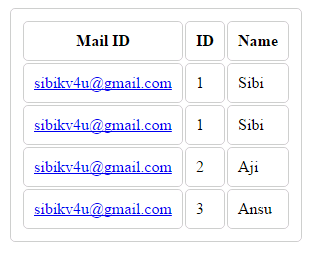 Web_SQL_Output
That is all. We did it. Have a happy coding.
Conclusion
Did I miss anything that you may think is needed? Did you try Web SQL yet? Have you ever wanted to do this requirement? Did you find this post useful? I hope you liked this article. Please share with me your valuable suggestions and feedback.
Your turn. What do you think?
A blog isn’t a blog without comments, but do try to stay on topic. If you have a question unrelated to this post, you’re better off posting it on C# Corner, Code Project, Stack Overflow, or Asp.Net Forum instead of commenting here. Tweet or email me a link to your question there and I’ll definitely try to help if I can.
Please read this article in my blog here.




Sibeesh VenuPosted Aug 11, 2016, 10:20 AM
Soumalya Das Please see my previous reply, I have already shared the link http://sibeeshpassion.com/introduction-to-indexeddb/
Soumalya DasPosted Aug 11, 2016, 4:00 AM
Can u give me some link of indexDb??
Soumalya DasPosted Aug 11, 2016, 3:59 AM
Thank u sir
Sibeesh VenuPosted Aug 11, 2016, 3:43 AM
Soumalya Das W3C has been announced that use of Web SQL is obsolete and deprecated, hence it is not recommended using Web SQL in your applications. Most of the modern web browsers like Mozilla does not support the use of Web SQL, this is also a great limitation of Web SQL. Now we have an alternative of Web SQL, IndexedDB which more efficient and faster than Web SQL. Below are some of the main advantages of IndexedDB. It stores the data as Key-Pair values It is Asynchronous It is non relational Can access the data from the same domain. See here http://sibeeshpassion.com/introduction-to-indexeddb/
Soumalya DasPosted Aug 10, 2016, 7:48 AM
I use it but it can not support in firefox..how to use it in firefox
Sibeesh VenuPosted Feb 2, 2016, 1:02 AM
Raja T Thank you so much.
Sibeesh VenuPosted Feb 2, 2016, 1:02 AM
Mohammed Ibrahim Thank you so much.
Sibeesh VenuPosted Feb 2, 2016, 1:02 AM
Santhakumar Munuswamy Thank you so much.
Sibeesh VenuPosted Feb 2, 2016, 1:01 AM
Upendra Pratap Shahi Thank you so much.
Sibeesh VenuPosted Feb 2, 2016, 1:01 AM
Pankaj Kumar Choudhary Thanks for the information
Sibeesh VenuPosted Feb 2, 2016, 1:01 AM
Manas Mohapatra Thank you so much.
Raja TPosted Feb 1, 2016, 10:27 PM
Nice, Thanks for sharing
Mohammed IbrahimPosted Feb 1, 2016, 2:07 PM
nice
Santhakumar MunuswamyPosted Feb 1, 2016, 2:01 PM
Thanks for nice article
Upendra Pratap ShahiPosted Feb 1, 2016, 12:25 PM
nice share sir.....
Pankaj Kumar ChoudharyPosted Feb 1, 2016, 11:36 AM
Nice Article Sir.... Web Sql is very Nice API. But it not supported by all modern browsers like Firefox and Opera Mini . I am using the latest version of firefox after that web sql is not supporting by firefox i required to install the plugin for this but unfortunately after installing the plugin web sql is not working so it is very big loss that web sql is not supported by many browser till now. Mozilla have said they will never implement it.........
Manas MohapatraPosted Feb 1, 2016, 9:12 AM
Good to know about Web SQL..
Mahesh ChandPosted Feb 1, 2016, 8:42 AM
Thanks. Every day I find something new. To be frank, I didn't know about Web SQL until I read this.
Sibeesh VenuPosted Feb 1, 2016, 7:55 AM
Ranjit Powar Thank you :)
Sibeesh VenuPosted Feb 1, 2016, 7:55 AM
Shweta Lodha Thank you :)
Ranjit PowarPosted Feb 1, 2016, 6:20 AM
Nice one
Shweta LodhaPosted Feb 1, 2016, 5:46 AM
Nice explanation
Sibeesh VenuPosted Feb 1, 2016, 4:42 AM
Shubham Kumar Thank you.
Sibeesh VenuPosted Feb 1, 2016, 4:42 AM
Aqib Shehzad Thank you
Shubham KumarPosted Feb 1, 2016, 4:41 AM
thnxs sir
Muhammad Aqib ShehzadPosted Feb 1, 2016, 4:36 AM
very nice article
Sibeesh VenuPosted Feb 1, 2016, 4:26 AM
Yashwant Vishwakarma Thank you
Yashwant VishwakarmaPosted Feb 1, 2016, 4:26 AM
Nice share, thanks for sharing!!