
Introduction: The InvokeMethod activity is another way to implement a code which is outside of the standard built-in activities. You can use this activity to invoke a method of a class. The class does not need to be part of the workflow or use any of the workflow base classes. The InvokeMethod calls a public method of a specified object or type.
InvokeMethod Properties:
- MethodName: Assign the method name to this property.
- TargetObject: When we want to invoke non-static methods, we need first to create an object that contains the method to execute.
- TargetType: When we want to invoke static methods, we specify the type that contains the static method to execute.
- GenericTypeArguments: When we want to invoke a generic method, we specify generic types in this collection.
- Parameters: The parameter collection of the method to be invoked.
- Result: The return value of the method execution.
InvokeMethod Class:
- System.Object.
- System.Activities.Activity.
- System.Activities.AsyncCodeActivity.
- System.Activities.Statements.InvokeMethod.
Namespace:
System.Activities.Statements.
Assembly: System.Activities (in System.Activities.dll).
Step 1: Open Visual Studio 2010.
- Go to File->New->Project.
- Select WorkflowConsoleApplication.
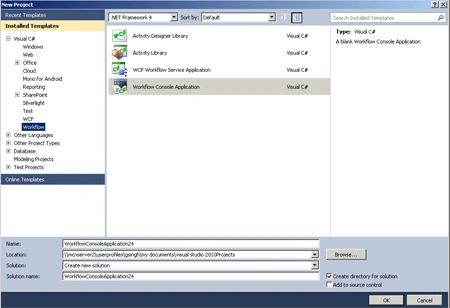
Define Arguments:
Step 2: Go to the Workflow.xaml file and double-click on the Arguments option.
- Click Create Arguments.
- Give Name, Direction, Arguments Type, Default Value.
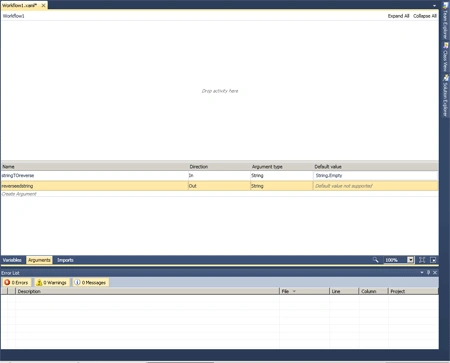
Step 3: Drag Activity from Toolbox.
- Sequence, While, Assign activity.
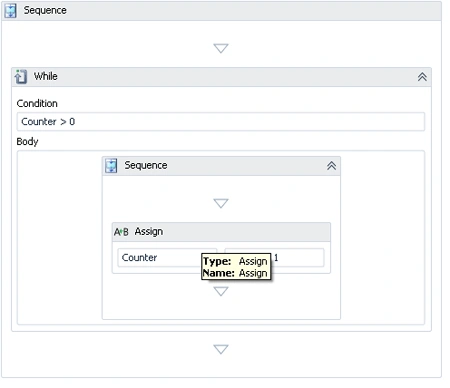
Step 4: Select Sequence and While activity and create variables.
- Define Name, Variable Type, Scope, Default.
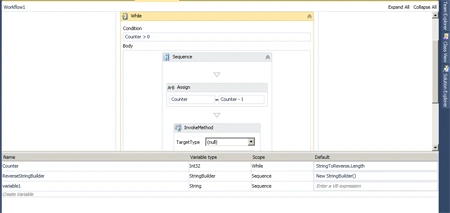
Step 5: Drag Sequence, Assign, InvokeMethod activity inside the body of While activity.
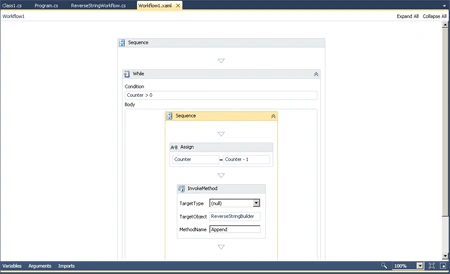
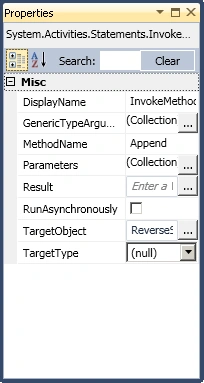
Step 6: Go to properties of InvokeMethod and define MethodName, TargetObject.
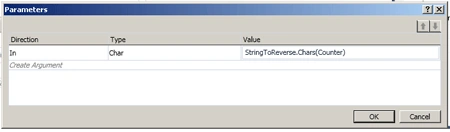
Step 7: Define Parameters for InvokeMethod.
Step 8: Go to the Programe.cs file and write the below code.
using
System;
using
System.Linq;
using
System.Activities;
using
System.Activities.Statements;
using
System.Activities.Expressions;
using
System.Collections.Generic;
using
System.ServiceModel.Activities;
using
System.Runtime.Serialization;
using
System.Collections;
namespace
WorkflowConsoleApplication23
{
class Program
{
static void
Main(string[] args)
{
Console.Write("Enter
string: ");
string reversedString =
string.Empty;
IDictionary<string,
object> results =
WorkflowInvoker.Invoke(new
ReverseStringWorkflow(),
new
Dictionary<string,
object>{ {"StringToReverse",
stringToReverse } });
Console.Write("Reversed
string: ");
Console.WriteLine(results["ReversedString"]);
Console.ReadKey();
}
}
}
Creating Workflow using code:
Step 9: Write the code for creation of Workflow.
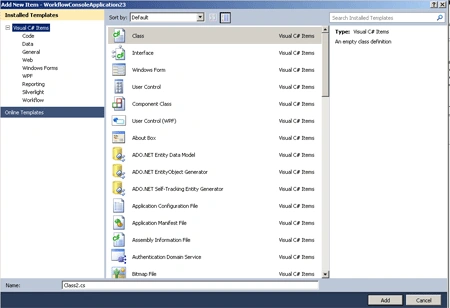
- Go to Solution Explorer->Add->New Item.
- Select Class.
- Class1.cs file open.
Code:
Sashi KanthPosted May 25, 2015, 6:09 AM
Use less, not pretty useful. Should be more clear in explanation.