

This article provides a quick overview of how to use jQuery with Ajax in ASP. Net. We often see in a project that we do not want to reload the page. For example when you select an item from a DropDownList or other control on the same page then that can cause a loss of data. This article will be very helpful for those who are looking for a solution for that type of problem. You can do it many ways such as using Generic Handlers, page methods and using a web service.
Ajax
The Ajax is used to update the part of the web page without reloading the page. For example, if you create a search functionality in your website like Google Searching. When you enter text into the Search TextBox then without reloading the page you see the related text. You can do it easily using Ajax Methods.
Other examples of applications using AJAX are Gmail, Youtube and Facebook tabs.
jQuery with Ajax
All jQuery AJAX methods use the ajax() method. The ajax() method performs an AJAX (Asynchronous HTTP) request.
Syntax
$.ajax({ Parameter1, parameter2..........})
or
$.ajax({
type: ,
contentType: ,
url:, data:,
async:,......
});
The following is the description of some important parameters used by the "$.ajax" method:
Type: The default value of type is GET. A string defining the HTTP method to use for the request (GET or POST).
- GET: Requests data from a specified resource
- POST: Submits data to be processed to a specified resource
ContentType: When sending data to the server, use this content type. The default is "application/x-www-form-urlencoded;
URL: A string containing the URL to which the request is sent. The default is the current page.
Data: Data defines the data to be sent to the server.
async: The default is true. A Boolean value indicating whether the request should be handled asynchronously or not.
Success: A callback function that is executed if the request succeeds.
Now, let's see how to do that.
Example 1
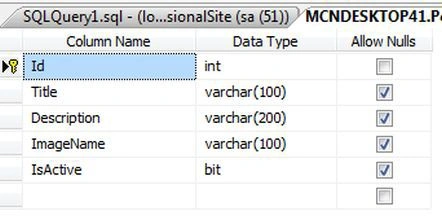
My database table
CREATE TABLE [dbo].[Slider_Table](
[Id] [int] IDENTITY(1,1) NOT NULL,
[Title] [varchar](100) NULL,
[Description] [varchar](200) NULL,
[ImageName] [varchar](100) NULL,
[IsActive] [bit] NULL,
CONSTRAINT [PK_Slider_Table] PRIMARY KEY CLUSTERED
(
[Id] ASC
)WITH (PAD_INDEX = OFF, STATISTICS_NORECOMPUTE = OFF, IGNORE_DUP_KEY = OFF, ALLOW_ROW_LOCKS = ON, ALLOW_PAGE_LOCKS = ON) ON [PRIMARY]
) ON [PRIMARY]
My table structure looks like:
Stored Procedure for insert and Update
You now need to create a Stored Procedure in a SQL Server Database for inserting records into the table. Later in the article we use it to update records in the database table.
Create procedure [dbo].[SliderInsertImage1]
(
@Id int,
@Title varchar(100),
@Description varchar(200),
@ImageName varchar(100),
@IsActive bit
)
AS
begin
insert into Slider_Table values(@Title, @Description, @ImageName, @IsActive)
end
The back-end database work is now done. Now again move to the front-end to make a connection with the database. We store only the name of the image in the database table, the column called ImageName.
Now, add the following code to the .cs file.
using System;
using System.Collections.Generic;
using System.Linq;
using System.Web;
using System.Web.UI;
using System.Web.UI.WebControls;
using System.Web.Services;
using System.IO;
using System.Data;
using System.Data.SqlClient;
public partial class Insert : System.Web.UI.Page
{
protected void Page_Load(object sender, EventArgs e)
{
}
[WebMethod]
public static void InsertMethod(string title, string description, string image_name, bool is_active)
{
int ID=0;
SqlConnection con = new SqlConnection("data source=.;uid=sa; pwd=Micr0s0ft;database=PersionalSite;");
con.Open();
SqlCommand cmd = new SqlCommand("SliderInsertImage1", con);
cmd.CommandType = CommandType.StoredProcedure;
cmd.Parameters.AddWithValue("@Id", ID);
cmd.Parameters.AddWithValue("@Title", title);
cmd.Parameters.AddWithValue("@Description", description);
cmd.Parameters.AddWithValue("@ImageName", image_name);
cmd.Parameters.AddWithValue("@IsActive", is_active);
cmd.ExecuteNonQuery();
con.Close();
}
}
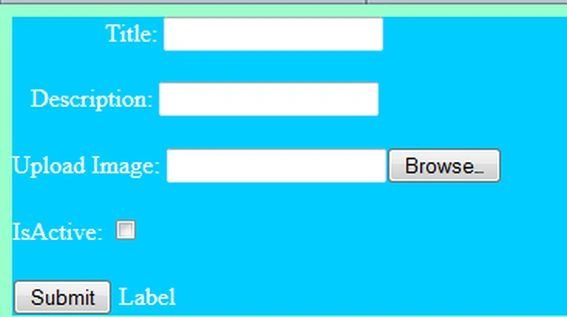
So you can drag and drop controls onto the form. The form has the following code:
<%@ Page Language="C#" AutoEventWireup="true" CodeFile="Insert.aspx.cs" Inherits="Insert" %>
<!DOCTYPE html PUBLIC "-//W3C//DTD XHTML 1.0 Transitional//EN" "http://www.w3.org/TR/xhtml1/DTD/xhtml1-transitional.dtd">
<html xmlns="http://www.w3.org/1999/xhtml">
<head runat="server">
<title></title>
<script src="Scripts/jquery-1.4.1.min.js" type="text/javascript"></script>
<style type="text/css">
.style1
{
color: #FFFFFF;
}
</style>
<script type="text/javascript">
$(document).ready(function () {
$('#Button1').click(function () {
debugger;
var Title = $('#TextBox1').val();
var Description = $('#TextBox2').val();
var UploadImage = $('#FileUpload1').val();
var Isactive = $('#CheckBox1').attr('checked');
$.ajax({
type: 'POST',
contentType: "application/json; charset=utf-8",
url: '<%=ResolveUrl("~/Insert.aspx/InsertMethod") %>',
data: JSON.stringify({title: Title, description: Description, image_name: UploadImage, is_active: Isactive }),
success: function (response) {
alert("Record Has been Saved in Database. Status code: " + response);
}
});
});
});
</script>
</head>
<body style="color: #FF66FF; background-color: #99FFCC">
<form id="form1" runat="server">
<div style="color: #FF33CC; background-color: #00CCFF">
<span class="style1">Title: </span>

Vithal WadjePosted Sep 30, 2014, 2:14 PM
clear understanding