

Static vs Singleton
- Static class is implicitly abstract, meaning a static class object can neither be created nor instantiated whereas singleton pattern allows us to create a single (only one) instance of a class.
- Static class is a stateless class whereas singleton class is state full
- Static class instance is created whenever it is first accessed and becomes accessible throughout the application or per appdomain whereas Singleton pattern provides flexibility that allows us to control instantiation based on the conditions; for example, instance of singleton class can be created per context like single instance of ShoppingCart can be created per customer
- Data stored in the static variable or class is shared and accessed globally throughout the application whereas singleton instance created per context is shared and accessible per context meaning data stored with in the instance created in context will not be shared or accessible from instance created in another context for example items stored in ShoppingCart will be shared and accessible among different login session of a customer but will not be accessible to another customer.
- Static class cannot be inherited or derived from any other class whereas singleton can implement interfaces and inherit from another class.
- Static class cannot be passed as a parameter to any method whereas instance of singleton class can be passed as a parameter to a method or constructor of another class.
- Only static members/fields/properties can be defined within the static class whereas singleton class allows both static and non-static members/fields/properties.
We will now look at and understand the below mentioned use case implementation that demonstrates all of the above facts.
Use Case
Let’s think about the e-commerce online web portal to which thousands of customer already have subscribed. There could be a scenario when several hundred people login at the same time out of which a few people login in to the web portal from multiple applications; i.e., web portal, mobile app or background processes then logged in customers search and add items into their shopping cart. Now think of those customers who have logged in from multiple applications and add items into the shopping cart from multiple applications.
Now the request is to provide a solution that every customer should be able to view all the items of their own private shopping cart but a specific user should be able to view all the items added in the shopping cart from different applications.
Solution
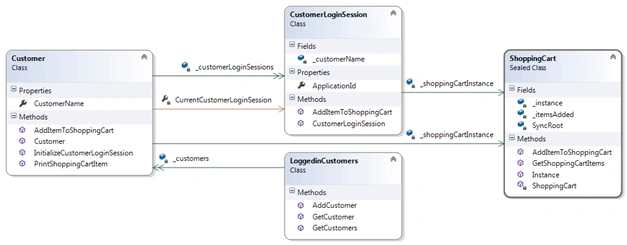
First of all we will implement a solution to have different instances of shopping cart per customer so we need three entities in the solution as mentioned below:
- ShoppingCart class that represents shopping cart. This class has a private field to store items added into the shopping cart.
- Customer class that represents a customer.
- LoggedinCustomers class that stores list a list of logged in customers
Is it possible to create instance of shopping cart per customer with static class implementation? The answer is No because static class is implicitly abstract meaning Static class object can neither be created nor instantiated. .Net CLR implicitly creates one instance of static class internally whenever it is first accessed and the same instance is shared among all other objects in an application.
Now the question arises – Is it possible to create an instance of shopping cart per customer with singleton pattern implementation? The answer is YES, we can use or implement Singleton pattern to restrict one instance created per customer, meaning instance of shopping cart that will be created for customer one will be different from instance created for customer two. Then later the same instance of shopping cart can be passed to different login sessions of customer.
Let’s follow the below mentioned steps to have this implementation in place,
- Implement a Singleton pattern in the ShoppingCart class that ensures or restricts that only one instance of shopping cart is created.
- To meet our requirement of one instance per customer, add a Boolean flag to determine whether we need to create an instance of ShoppingCart or not.
- Declare a collection object variable of type List to store items added into the Shopping Cart.
- /// <summary>
- /// An abstract representation of Shopping Cart.
- /// This class is the implementation of singleton design pattern
- /// which restricts the instantiation of a class to one object
- /// </summary>
- public sealed class ShoppingCart
- {
- private static volatile ShoppingCart _instance; //A static variable which holds a reference to the single created instance
- private static readonly object SyncRoot = new Object();
- private readonly List<string> _itemsAdded = new List<string>();
- /// <summary>
- /// private and parameterless constructor that prevents other classes from instantiating it
- /// </summary>
- private ShoppingCart() { }
- /// <summary>
- /// This method is to get the instance of ShoppingCart class
- /// </summary>
- /// <param name="bCreateInstance">This flag determines whether new instance is to be created or not</param>
- /// <returns>An instance of ShoppingCart class</returns>
- public static ShoppingCart Instance(bool bCreateInstance)
- {
- if ((_instance == null) || (bCreateInstance == true))
- {
- lock (SyncRoot)
- {
- if ((_instance == null) || (bCreateInstance == true))
- _instance = new ShoppingCart();
- }
- }
- return _instance;
- }
- /// <summary>
- /// This method is to add item into the Shopping cart
- /// </summary>
- /// <param name="itemCode"></param>
- public void AddItemToShoppingCart(string itemCode)
- {
- _itemsAdded.Add(itemCode);
- }
- /// <summary>
- /// This method is to get the list of items added into the shopping cart
- /// </summary>
- /// <returns>A list of item added into the shopping cart</returns>
- public List<string> GetShoppingCartItems()
- {
- return _itemsAdded;
- }
- }
- Now define a Customer class with a field to store an instance of ShoppingCart.
- Within the constructor of customer class create an instance of ShoppingCart class.
- Within the Customer class define a method “AddItemToShoppingCart” to add item into the ShoppingCart and method “PrintShoppingCartItem” to print all the items currently added into the shopping cart
- /// <summary>
- /// This class is a blueprint of a customer
- /// </summary>
- public class Customer
- {
- //A local variable to store an instance of ShoppingCart.
- private readonly ShoppingCart _shoppingCartInstance = null;
- #region Properties
- /// <summary>
- /// Property to hold customer name
- /// </summary>
- public string CustomerName { get; set; }
- #endregion
- #region Constructor
- /// <summary>
- /// Constructor to initialize Customer Identifier and Customer Name
- /// </summary>
- /// <param name="customerName">Customer Name</param>
- ///
- public Customer(string customerName)
- {
- CustomerName = customerName;
- _shoppingCartInstance = ShoppingCart.Instance(true);
- }
- #endregion
- /// <summary>
- /// This method is to the add item into the Shopping Cart
- /// </summary>
- /// <param name="itemCode">Item to be added into the shopping cart</param>
- public void AddItemToShoppingCart(string itemCode)
- {
- _shoppingCartInstance.AddItemToShoppingCart(itemCode);
- }
- /// <summary>
- /// This method is to print the items currently added into the shopping cart
- /// </summary>
- public void PrintShoppingCartItem()
- {
- List<string> itemsAdded = _shoppingCartInstance.GetShoppingCartItems();
- StringBuilder itemsAddedToShoppingCart = new StringBuilder();
- foreach (var item in itemsAdded)
- {
- if (itemsAddedToShoppingCart.Length > 0)
- itemsAddedToShoppingCart.Append(", ");
- itemsAddedToShoppingCart.Append(item);
- }
- Console.WriteLine("Items Added in {0}'s Cart : {1}", CustomerName, itemsAddedToShoppingCart.ToString());
- }
- }
- Now define a class named LoggedinCustomers.
- Define a field “_customers” within the LoggedinCustomers class which contains a collection of logged in Customer objects. Defined a method named “AddCustomer” to add a customer into the collection object field. Defined a method named “” to get the list of customer objects stored in the collection object
- public class LoggedinCustomers
- {
- private readonly List<Customer> _customers = new List<Customer>();
- /// <summary>
- /// This method is to get the customer from loggedin customer collection based on the customer name
- /// </summary>
- /// <param name="customerName">Customer Name</param>
- /// <returns>An instance of customer</returns>
- public Customer GetCustomer(string customerName)
- {
- Customer customer = _customers.FirstOrDefault(x => x.CustomerName == customerName);
- return customer;
- }
- /// <summary>
- /// This method is to add customer into the loggedin customer collection
- /// </summary>
- /// <param name="customer">an instance of customer class</param>
- public void AddCustomer(Customer customer)
- {
- _customers?.Add(customer);
- }
- /// <summary>
- ///
- /// </summary>
- /// <returns></returns>
- public List<Customer> GetCustomers()
- {
- return _customers;
- }
- }
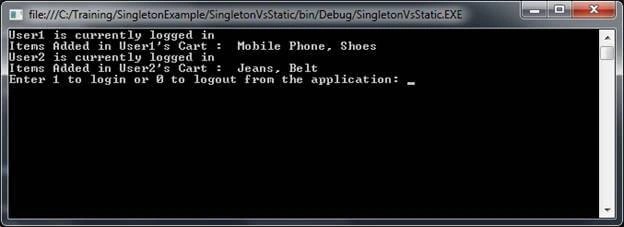
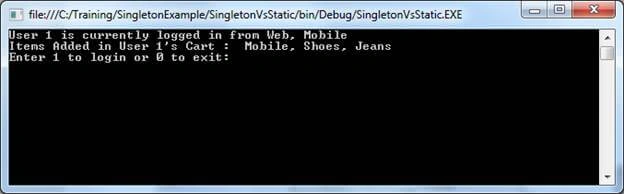
Now write a program that instantiates an instance of Customer class for different users whereas retrieves an existing instance of customer class from a list of logged in customers maintained. This way we will be able to create different instances of shopping cart per customer and add item into the shopping cart.
Code Snippet
Brad KwonPosted Mar 1, 2019, 7:01 AM
Thanks for the very well-written article. I am trying to understand the Singleton pattern so please don’t get this offensive that’s what I don’t intent to. :) I just came across some thoughts while reading and testing your article. Firstly, if the singleton ShoppingCart class is instantiated per the Customer class, isn't it a violation of this pattern? <br/> As you said: Is it possible to create an instance of shopping cart per customer with singleton pattern implementation? The answer is YES And here is sort of classic article about Singleton pattern from the “C# in Dept” author: Essentially, a singleton is a class which only allows a single instance of itself to be created, (http://csharpindepth.com/articles/Singleton) Your sample code worked like a charm and all customers had their own shopping carts. So then every Customer instance has different reference of _shoppingCartInstance. So other questions popped up. Is it safe not to be collected by GC later on? And would it be better not to apply the Singleton pattern for the ShoppingCart class? I hope you don’t get my questions offensive that’s what I don’t intent to. Rather, I am just trying to understand clearly. Thank you. Best, Brad
Vinay Kumar GuptaPosted Jun 16, 2018, 12:45 PM
Thanks very useful and applicable article thanks again.