

- Learn Angular 4.0 in 10 Days - Day 1
- Learn Angular 4.0 in 10 Days - Component - Day 2
- Learn Angular 4.0 in 10 Days - Data Binding - Day 3
- Learn Angular 4.0 in 10 Days - Directives - Day 4
- Learn Angular 4.0 in 10 Days - Pipes & ViewChild - Day 5
- Learn Angular 4.0 in 10 Days - ngForms & ngContent - Day 6
- Learn Angular 4.0 in 10 Days - Service (Dependency Injection) - Day 7
- Learn Angular 4.0 in 10 Days - Ajax Request Handling - Day 8
- Learn Angular 4.0 in 10 Days - Route Process - Day 9
In this Angular 4.0 series, we have already discussed different types of basic and advanced concepts or features of AngularJs 4.0 like data binding, directives, pipes, service, route, HTTP modules, pipes, etc. Now in this article, we will discuss one of the main advantages of Angular 4.0; i.e., Unit Testing, because the Angular Framework has been designed with testability as a primary objective.
Nowadays, JavaScript has become the de facto programming language to build and empower front end/ web applications. We can use JavaScript to develop simple or complex applications. However, applications in production are often vulnerable to bugs caused by design inconsistencies, logical implementation errors, and similar issues. For this reason, it is usually difficult to predict how applications will behave in real-time environments, which leads to unexpected behavior, non-availability of applications, or outages for short or long durations. This generates lack of confidence and dissatisfaction among application users. Also, high cost is often associated with fixing the production bugs. Therefore, there is a need to develop applications that are of a high quality and that offer high availability.
Test-Driven-Development is an engineering process in which the developer writes an initial automated test case that defines a feature, then writes the minimum amount of code to pass the test and eventually refactors the code to acceptable standards.
Now, when we talk about testing in Angular, we basically point out two different types of Testing.Unit Testing
A unit test is used to test individual components of the system. That’s why unit testing is basically called Isolated Testing. It is the best practice of testing small isolated pieces of code. If our unit testing depends on some external resources like database, network, apis then it is not a unit test.
An integration test is a test which tests the system as a whole, and how it will run in production. Unit tests should only verify the behavior of a specific unit of code. If the unit's behavior is modified, then the unit test would be updated as well. Unit tests should not make assumptions about the behavior of other parts of your codebase or your dependencies. When other parts of your codebase are modified, your unit tests should not fail. (Any failure indicates a test that relies on other components and is therefore not a unit test.) Unit tests are cheap to maintain and should only be updated when the individual units are modified. For TDD in Angular, a unit is most commonly defined as a class, pipe, component, or service. It is important to keep units relatively small. This helps you write small tests which are "self-documenting", where they are easy to read and understand.
Functional Testing
The Testing Toolchain
Our testing toolchain consists of the following tools.
- Jasmine
- Karma
- Phantom-js
- Istanbul
- Sinon
- Chai
Jasmine
Jasmine is the most popular Javascript testing framework in the Angular community. This testing framework supports a software development practice which is called Behavior Driven Development or BDD. This is one the main features of Test Driven Development (TDD). This is the core framework that we will write our unit tests with. Basically, Jasmine & BDD basically try to describe a test method case in a human readable pattern so that any user include any non-technical personal can identified what is going on. Jasmine tests are written using JavaScript functions, which makes writing tests a nice extension of writing application code. There are several Jasmine functions in the example, which I have described below.
| Name | Descriptions |
| describe | Groups a number of related tests (this is optional, but it helps organize test code). Basically, test suites need to call this function with two parameters – a string (for test name or test description) and a function. |
| beforeEach | Executes a function before each test (this is often used for the arranging part of a test) |
| it | Executes a function to form a test (the active part of the test) |
| expect | Identifies the result from the test (part of the assert stage) |
| toEqual | Compares the result from the test to the expected value (the other part of the asset) |
| beforeAll | This function is called once before all the specs in describe test suite are run |
The basic sequence to pay attention to is that this function executes a test function so that the "expect" and toEqual functions can be used to assess the result. The toEqual function is only one way that Jasmine can evaluate the result of a test. I have listed the other available functions as below.
| Name | Descriptions |
| expect(x).toEqual(val) | Asserts that x has the same value as val (but not necessarily the same object) |
| expect(x).toBe(obj) | Asserts that x and obj are the same object |
| expect(x).toMatch(regexp) | Asserts that x matches the specified regular expression |
| expect(x).toBeDefined() | Asserts that x has been defined |
| expect(x).toBeUndefined() | Asserts that x has not been defined |
| expect(x).toBeNull() | Asserts that x is null |
| expect(x).toBeTruthy() | Asserts that x is true or evaluates to true |
| expect(x).toBeFalsy() | Asserts that x is false or evaluates to false |
| expect(x).toContain(y) | Asserts that x is a string that contains y |
| expect(x).toBeGreaterThan(y) | Asserts that x is greater than y |
| expect(fn).toThrow(string); | Asserts to capture any throw of the given function |
| expect(fn).toThrowError(string); | Asserts to capture any exception error |
Karma
Karma is a test automation tool for controlling the execution of our tests and what browser to perform them under. It also allows us to generate various reports on the results. For one or two tests this may seem like overkill, but as an application grows larger and the number of units to test grows, it is important to organize, execute and report on tests in an efficient manner. Karma is library agnostic so we could use other testing frameworks in combination with other tools (like code coverage reports, spy testing, e2e, etc.).
In order to test our Angular application, we must create an environment for it to run in. We could use a browser like Chrome or Firefox to accomplish this (Karma supports in-browser testing), or we could use a browser-less environment to test our application, which can offer us greater control over automating certain tasks and managing our testing workflow. PhantomJS provides a JavaScript API that allows us to create a headless DOM instance which can be used to bootstrap our Angular application. Then, using that DOM instance that is running our Angular application, we can run our tests.
Karma is basically a tool which lets us spawn browsers and run all jasmine tests inside of them which are executed from the command line. This results of the tests are also displayed on the command line. Karma also watches our development file changes and re-runs the test automatically.
Istanbul is used by Karma to generate code coverage reports, which tells us the overall percentage of our application being tested. This is a great way to track which components/services/pipes/etc. have tests written and which don't. We can get some useful insight into how much of the application is being tested and where.
Why is Unit Testing required?
- Guards or protects the existing code which can be broken due to any changes.
- Integrate automatic build process to automate the pipeline of resource publish at any time.
- Clarifies what the code does both when used as intended and when faced with deviant conditions. They serve as a form of documentation for your code.
- Reveals mistakes in design and implementation. When a part of the application seems hard to test, the root cause is often a design flaw, something to cure now rather than later when it becomes expensive to fix.
- It allows us to test the interaction of directives or components with its template URL.
- It allows us to easily track the change detection.
- It also allows us to use and test Angular Dependency Integration framework.
Filename Conventions
Each unit test is put into its own separate file. The Angular team recommends putting unit test scripts alongside the files they are testing and using a .spec filename extension to mark it as a testing script (this is a Jasmine convention). So if you had a component /app/components/mycomponent.ts, then your unit test for this component would be in /app/components/mycomponent.spec.ts. This is a matter of personal preference; you can put your testing scripts wherever you like, though keeping them close to your source files makes them easier to find and gives those who aren't familiar with the source code an idea of how that particular piece of code should work.
ANGULAR TEST BED
Angular Test Bed (ATB) is one of the higher level Angular Only testing frameworks which allows us to pass data to the test environment and can easily test behaviors that depend on the Angular Framework.When to use Angular Test Bed
Actually, we need to use the Angular Test Bed process for performing unit testing as per the below reasons –
- This process allows us to test the interaction of a component or directives with its templates
- It also allows us to easily test change detection mechanism of the angular
- It also allows us to test the Dependency Injection process
- It allows us to run the test using NgModule configuration which we use in our application
- It allows us to test user interactions including clicks and input field operation.
OUR FIRST UNIT TEST
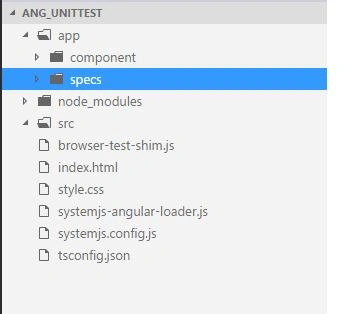
- App Folder contains both Angular and Unit Test Specs
- Component folder contains all the components which we need to unit test
- Specs folder contains all the Angular test bed unit test models
- {
- "compilerOptions": {
- "target": "es5",
- "module": "commonjs",
- "moduleResolution": "node",
- "sourceMap": true,
- "emitDecoratorMetadata": true,
- "experimentalDecorators": true,
- "lib": [
- "es2015",
- "dom"
- ],
- "noImplicitAny": true,
- "suppressImplicitAnyIndexErrors": true,
- "typeRoots": [
- "../node_modules/@types/"
- ]
- },
- "compileOnSave": true,
- "exclude": [
- "node_modules/*"
- ]
- }
- (function (global) {
- System.config({
- transpiler: 'ts',
- typescriptOptions: {
- "target": "es5",
- "module": "commonjs",
- "moduleResolution": "node",
- "sourceMap": true,
- "emitDecoratorMetadata": true,
- "experimentalDecorators": true,
- "lib": ["es2015", "dom"],
- "noImplicitAny": true,
- "suppressImplicitAnyIndexErrors": true
- },
- meta: {
- 'typescript': {
- "exports": "ts"
- }
- },
- paths: {
- // paths serve as alias
- 'npm:': 'https://unpkg.com/'
- },
- map: {
- 'app': 'app',
- // angular bundles
- '@angular/animations': 'npm:@angular/animations/bundles/animations.umd.js',
- '@angular/animations/browser': 'npm:@angular/animations/bundles/animations-browser.umd.js',
- '@angular/core': 'npm:@angular/core/bundles/core.umd.js',
- '@angular/common': 'npm:@angular/common/bundles/common.umd.js',
- '@angular/common/http': 'npm:@angular/common/bundles/common-http.umd.js',
- '@angular/compiler': 'npm:@angular/compiler/bundles/compiler.umd.js',
- '@angular/platform-browser': 'npm:@angular/platform-browser/bundles/platform-browser.umd.js',
- '@angular/platform-browser/animations': 'npm:@angular/platform-browser/bundles/platform-browser-animations.umd.js',
- '@angular/platform-browser-dynamic': 'npm:@angular/platform-browser-dynamic/bundles/platform-browser-dynamic.umd.js',
- '@angular/http': 'npm:@angular/http/bundles/http.umd.js',
- '@angular/router': 'npm:@angular/router/bundles/router.umd.js',
- '@angular/router/upgrade': 'npm:@angular/router/bundles/router-upgrade.umd.js',
- '@angular/forms': 'npm:@angular/forms/bundles/forms.umd.js',
- '@angular/upgrade': 'npm:@angular/upgrade/bundles/upgrade.umd.js',
- '@angular/upgrade/static': 'npm:@angular/upgrade/bundles/upgrade-static.umd.js',
- // other libraries
- 'rxjs': 'npm:[email protected]',
- 'rxjs/operators': 'npm:[email protected]/operators/index.js',
- 'tslib': 'npm:tslib/tslib.js',
- 'angular-in-memory-web-api': 'npm:[email protected]/bundles/in-memory-web-api.umd.js',
- 'ts': 'npm:[email protected]/lib/plugin.js',
- 'typescript': 'npm:[email protected]/lib/typescript.js',
- },
- // packages tells the System loader how to load when no filename and/or no extension
- packages: {
- app: {
- main: './main.ts',
- defaultExtension: 'ts',
- meta: {
- './*.ts': {
- loader: 'systemjs-angular-loader.js'
- }
- }
- },
- rxjs: {
- defaultExtension: 'js'
- }
- }
- });
- })(this);
- var templateUrlRegex = /templateUrl\s*:(\s*['"`](.*?)['"`]\s*)/gm;
- var stylesRegex = /styleUrls *:(\s*\[[^\]]*?\])/g;
- var stringRegex = /(['`"])((?:[^\\]\\\1|.)*?)\1/g;
- module.exports.translate = function(load){
- if (load.source.indexOf('moduleId') != -1) return load;
- var url = document.createElement('a');
- url.href = load.address;
- var basePathParts = url.pathname.split('/');
- basePathParts.pop();
- var basePath = basePathParts.join('/');
- var baseHref = document.createElement('a');
- baseHref.href = this.baseURL;
- baseHref = baseHref.pathname;
- if (!baseHref.startsWith('/base/')) { // it is not karma
- basePath = basePath.replace(baseHref, '');
- }
- load.source = load.source
- .replace(templateUrlRegex, function(match, quote, url){
- var resolvedUrl = url;
- if (url.startsWith('.')) {
- resolvedUrl = basePath + url.substr(1);
- }
- return 'templateUrl: "' + resolvedUrl + '"';
- })
- .replace(stylesRegex, function(match, relativeUrls) {
- var urls = [];
- while ((match = stringRegex.exec(relativeUrls)) !== null) {
- if (match[2].startsWith('.')) {
- urls.push('"' + basePath + match[2].substr(1) + '"');
- } else {
- urls.push('"' + match[2] + '"');
- }
- }
- return "styleUrls: [" + urls.join(', ') + "]";
- });
- return load;
- };
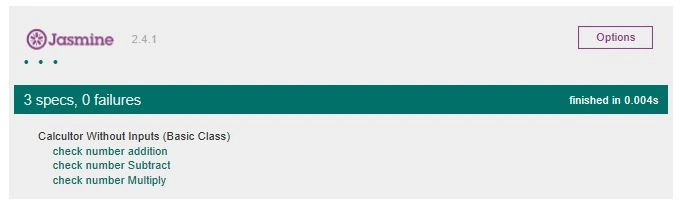
Asad IlyasPosted Mar 25, 2018, 2:28 AM
Https://www.c-sharpcorner.com/forums/error-resolved-a-angular is link me me ne post ki ha image sir
Asad IlyasPosted Mar 23, 2018, 3:28 PM
MdCardModule export member if you dont mind i have import but this cardmodule not import show error so please help me