

Introduction
This article provides a walkthrough of how to use forms authentication with Visual Studio LightSwitch. In my previous articles we saw how to get started by creating a LightSwitch application. You can get them from the following:
- Learn How to Configure Lightswitch With MVC
- Learn How to configure Lightswitch with MVC Part 2
- Learn How to configure Lightswitch with MVC Part 3
- Forms Authentication in Lightswitch With MVC: Part 1
Before we proceed please check the articles above since this is a continuation of them.
Add the controller
Step 1: Add a class called AccountController to the Controllers folder and use the following implementation.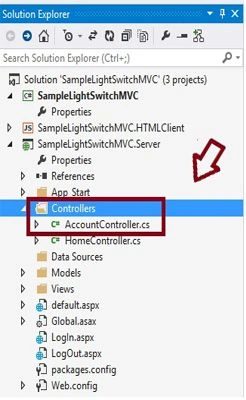
using System;
using System.Web.Mvc;
using System.Web.Security;
using Microsoft.LightSwitch.Security.ServerGenerated.Implementation;
using LightSwitchApplication.Models;
namespace LightSwitchApplication.Controllers
{
public class AccountController : Controller
{
// Register - Create a new user
public ActionResult Register()
{
return View(new Users());
}
[HttpPost]
public ActionResult Register(FormCollection collection)
{
try
{
var UserName = collection["UserName"];
var Password = collection["Password"];
var Email = collection["Email"];
if (UserName == "")
{
throw new Exception("No UserName");
}
if (Password == "")
{
throw new Exception("No Password");
}
// Keep our UserName as LowerCase
UserName = UserName.ToLower();
// Create LightSwitch user
MembershipUser objMembershipUser = Membership.CreateUser(UserName, Password, Email);
// Log User in
// Create a new instance of the LightSwitch Authentication Service
using (var authService = new AuthenticationService())
{
var LoggedInUser = authService.Login(
UserName,
Password,
false,
null);
// Successful login? If so, return the user
if (LoggedInUser != null)
{
return Redirect("~/Home");
}
else
{
ModelState.AddModelError(string.Empty, "Login failed.");
return View();
}
}
}
catch (Exception ex)
{
ModelState.AddModelError(
string.Empty, "Error: " + ex);
return View();
}
}
// ChangePassword - Change the password of an existing user
[Authorize]
public ActionResult ChangePassword()
{
return View(new ChangePassword());
}
[Authorize]
[HttpPost]
public ActionResult ChangePassword(FormCollection collection)
{
try
{
using (var authService = new AuthenticationService())
{
//checks whether new passowrd and confirm passowrd matches
if (collection["NewPassword"] != collection["ConfirmPassword"])
{
throw new Exception("New Password and Confirm Password must match");
Join the conversation! Your thoughts help the community grow.