

PUSH BUTTON:
- The push button is a component and connects the two points.
- The first pin the push button is connected to a 5 volt supply.
- The second pin the push button is connected to gnd.
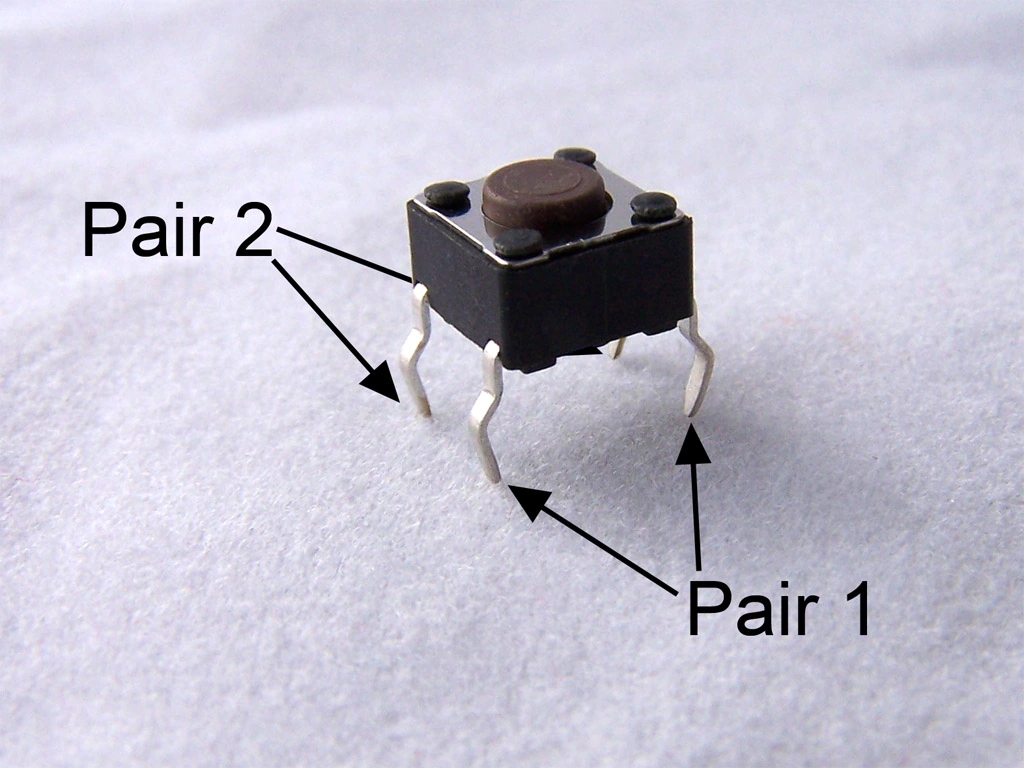
Figure1: PushButton
Required Materials
- Arduino Uno board
- Push-button
- Led
- Breadboard
- Hook up wires
- USB cable
Step 1: Push-button connection,
- The first pin the push button is connected to a 5 volt supply.
- The second pin the push button is connected to gnd and to digital pin 03.
- The LED has a positive and a negative point.
- The positive point of LED is connected to a digital pin 13.
- The negative points connected to a gnd
Connect the Arduino board to your computer with the USB cable and start sketching the following program,
Step 3: Programming
- int led = 13;
- int PinButton = 4;
- void setup()
- {
- pinMode(PinButton, INPUT);
- pinMode(led, OUTPUT);
- }
- void loop()
- {
- int stateButton = digitalRead(PinButton);
- if (stateButton == 1)
- {
- digitalWrite(led, HIGH); // Turn on led
- }
- else
- {
- digitalWrite(led, LOW); //Turn off led
- }
- delay(20);
- }
Explanation
Declare the variables: led, PinButtons and assign the value to that and in the setup() function set the button as the INPUT and led as the OUTPUT
and in the loop() function stateButton=digitalRead(PinButton). It reads the state of the push button value and if (stateButton==1) it means to check if the push button is pressed and if the button state will be HIGH, then the led will glow and if it is not that means led will not glow.
Vignesh ManiPosted Feb 6, 2016, 5:17 PM
Good one
Jaco ZwartsPosted Jan 30, 2016, 8:27 AM
Nice thank you for sharing
Sr KarthigaPosted Jan 6, 2016, 7:41 PM
Thanks to all
Joe WilsonPosted Jan 6, 2016, 5:00 AM
Thank you for sharing.
Santhakumar MunuswamyPosted Jan 5, 2016, 11:03 PM
Thanks for nice share
Gowtham RajamanickamPosted Jan 5, 2016, 7:22 AM
Good article
Karthikeyan KPosted Jan 5, 2016, 3:05 AM
Good one..Thanks for sharing
Ankur MistryPosted Jan 5, 2016, 2:53 AM
Nice share
Kumaresh RajalingamPosted Jan 5, 2016, 2:39 AM
Good one
Shridhar SharmaPosted Jan 5, 2016, 1:49 AM
nice share
Ankit BansalPosted Jan 5, 2016, 1:44 AM
nice..