

Background
Identifying the user that is authentication is a very important task in any application development and I have often read forum posts asking how to create the login page using a Stored Procedure. So by considering the above requirement I have decided to write this article to help beginners, students and who wants to learn how to create a Login page using a Stored Procedure.
So let us start with the walkthrough.
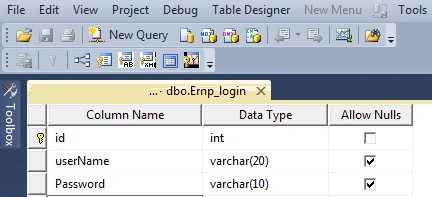
First create one table named Emp_Login in the SQL database which looks as in the following image:
Insert the One Record in the table as:
Insert into Emp_Login (userName,word) values ('vthal.wadje','vithal')
In the above table the usename column is used to store the User Name and word is for the user's word.
Now let us create a Stored Procedure named Emplogin as follows:
Create procedure Emplogin
(
@Usename Varchar (20),
@word varchar (10)
)
as
Begin
Select COUNT(*)from Emp_Login where username=@Usename and word=@word
End
In the above Stored Procedure named Emplogin the variable @Usename is used for the username and @word is used for the word. The select query that I have written in the beginning counts the number of users from the table whose name matches with the exact two variables; that is @Usename and @word which comes from the front end user input page.
Now create the project named Loginapplication or you can specify any name as:
- "Start" - "All Programs" - "Microsoft Visual Studio 2010".
- "File" - "New Project" - "C#" - "Empty Project" (to avoid adding a master page).
- Give the web site a name such as Loginapplication or another as you wish and specify the location.
- Then right-click on Solution Explorer - "Add New Item" - Default.aspx page for Login Credential and Welcome.aspx for redirecting after successful login.
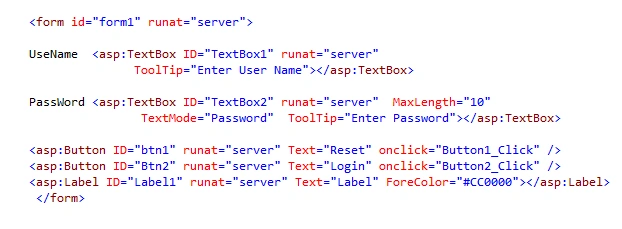
- Drag and drop two buttons, one Label and two textBoxes on the <form> section of the Default aspx page.
Then the <form> section of the Default aspx page looks as in the following:
Then double-click on btn2 and write the following code in the Button_click function as:
protected void Button2_Click (objectsender, EventArgs e)
{
connection();
query = "Emplogin"; //stored procedure Name
SqlCommand com = new SqlCommand(query, con);
com.CommandType= CommandType.StoredProcedure;
com.Parameters.AddWithValue("@Usename", TextBox1.Text.ToString()); //for username
com.Parameters.AddWithValue("@word", TextBox2.Text.ToString()); //for word
int usercount = (Int32)com.ExecuteScalar();// for taking single value
if (usercount == 1) // comparing users from table
{
Response.Redirect("Welcome.aspx"); //for sucsseful login
}
}
else
{
con.Close();
Label1.Text = "Invalid User Name or word"; //for invalid login
}
}
The most important part of the preceding code is the If condition part, I have used the one integer variable user count which is used to count the single value from the Stored Procedure using ExecuteScalar, if the records are found in the table it returns 1 then the page is redirected to the Welcome page otherwise it gives Invalid user Name or word.

Note
Now run the application.
our userName is- vithal.wadje
and word is - Vithal
Which we are already entered into the table at the creation of the table.
Enter an invalid user name or word; it gives an error as shown in the following:
Now enter the valid username and word, that is:
UserName: Vithal.wadje
and word: vithal
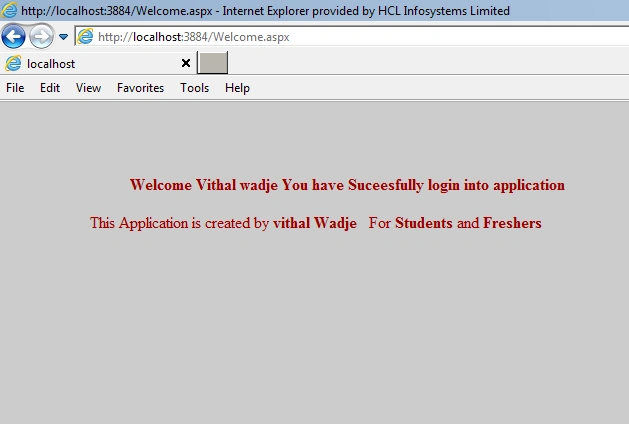
Then the page is redirected to the welcome page as shown in following:
Note
- For detailed code please download the sample zip file.
- Perform the changes in the connectionStrings which is Located in the Web.config file according to your server location.
- Set the Default.aspx page as Start page from project's Solution Explolar by right-clicking the mouse.
Summary
From all of the above examples we have learned how to create the Login page using a Stored Procedure. I have not used any Cookies method or any other method because my intent is to not make it too complicated so students and beginners are comfortable, so to increase the understandability for students I have not used any cookies or other methods.
I hope this article is useful for all readers, if you have a suggestion then please contact me.
dibyojoti chatterjeePosted Aug 25, 2017, 4:43 AM
The code is good ......but its not optimisable for case sensitiveness
jitendhra ramasamyPosted Aug 3, 2015, 12:08 AM
hi Vithal Wadje,am jitendhra am beginner in c#,asp.net,ajax,jquery,sql and oracle pls giude me,how i improve my self in all this.pls send me some materials also...emaildi:[email protected]
kiranPosted Aug 9, 2014, 10:08 AM
nice article
Vithal WadjePosted Jan 17, 2014, 10:02 PM
thanks RAHUL DEOLE sir
RAHUL DEOLEPosted Jan 16, 2014, 11:43 PM
Nice one
Vithal WadjePosted Nov 8, 2013, 1:22 PM
thanks Vishnukumar SR sir,can you give the sample code of sp that you are using
Vishnukumar SRPosted Nov 7, 2013, 2:32 PM
hi vithai.. u had nice articale.. but my self i cant Execute the SP..Shows Error as parameter is not supplied.. what can i do??
Vithal WadjePosted Jul 24, 2013, 3:21 PM
sajid decalare string type query variable;
sajid rajaPosted Jul 23, 2013, 2:29 PM
it shows error query does not exist in current context
Vithal WadjePosted May 15, 2013, 2:42 PM
yes soon i will be do it,KRayudu sir
KRayudu VPosted Apr 22, 2013, 2:41 AM
Nice article how add permissions from one table to another table
Vithal WadjePosted Apr 9, 2013, 1:00 AM
thanks Santosh sir for spending a time to read my article
Santosh YadavPosted Apr 8, 2013, 11:58 PM
Nice article.
Vithal WadjePosted Mar 12, 2013, 12:13 AM
thanks for reading my article,you can refer the shivprasad koirala Sir's articles on by searching on Google or one their official site,also i will write article on it soon
ToBeeditedPosted Mar 8, 2013, 2:18 PMEdited Mar 8, 2013, 2:19 PM
nice can you tell me how to add also permission level ? reading from another table ? like 1-->admin 2-->moderator 3-->user based on that permission the user will be able to open certain page
Vithal WadjePosted Feb 28, 2013, 11:18 PM
check path on your drive
Arun kumarPosted Feb 28, 2013, 5:28 AM
rectify this error"Error 4 Could not load type 'Loginapplication.Welcome'. F:\Projects\Loginapplication\Loginapplication\Welcome.aspx 1 "
Vithal WadjePosted Jan 25, 2013, 1:32 PM
no,krishna u r wrong n before comenting read full article,that why i hv written this article ,n answer about ur question is that u can nt be go directly to welcome page even if u follow above procedure try it, and i know checking in database means nt an login k,i hv used single login page for 10 projects ,so i hv huge experience about it
Krishna GaradPosted Jan 25, 2013, 6:24 AM
Real world scenarios does not include login like only checking into database and redirecting to users account. Agree with Honey Chawla anyhow like this we can bypass login page.
Vithal WadjePosted Jan 22, 2013, 4:52 AM
yes chwala sir,from the above procedure you can not be directly goes to welcome.aspx page try it, also you can set it from web.config file that which is start page.
Honey ChawlaPosted Jan 22, 2013, 3:17 AM
I just want that the user should not be able to enter directly into admin page 'welcome page' into url without passing login page.
Vithal WadjePosted Jan 19, 2013, 6:20 AM
thank you sanjeev sir for reading my article, i will soon write artilcle on it
SANJEEV MISHRAPosted Jan 19, 2013, 5:06 AM
sir i want a code that i send password if user forgot his password on his mobilenumaber please helpme...
Vithal WadjePosted Jan 17, 2013, 11:43 PM
Thank you Honey sir for reading my article,it is not possible to any user to go dirctly welcome.aspx page just set first default.aspx page as "start page" ,Set the Default.aspx page as Start page from project's Solution Explolar by right-clicking the mouse. pleae read note section of this article
Honey ChawlaPosted Jan 17, 2013, 9:30 AM
if i want to secure the login page from unauthorized access then how can i do it and how to prevent user to enter direct input in the url to go to welcome.aspx page. i mean ofcourse for the first time when a user logs in then he knows the page name and the second time if he tries to enter the page 'welcome.aspx' directly in the url then how we can stop those user. reply soon...
Vithal WadjePosted Jan 8, 2013, 8:36 AM
thanx sir for your valuable suggestion but which type of updation you want just a explain it
Must TryeditedPosted Jan 8, 2013, 3:54 AMEdited Jan 8, 2013, 3:54 AM
Thanks for this tutorial. hope you update it for the other's benefits.