
Introduction
In this article, I'll show you how can we find out the LPG gas using the MQ2 Gas sensor and print the value in LCD (Liquid Crystal Display).
Requirements:
- Arduino Mega
- Bread Board
- MQ2 Gas Sensor
- LCD 16*2
- Led
- Buzzer
Connection:
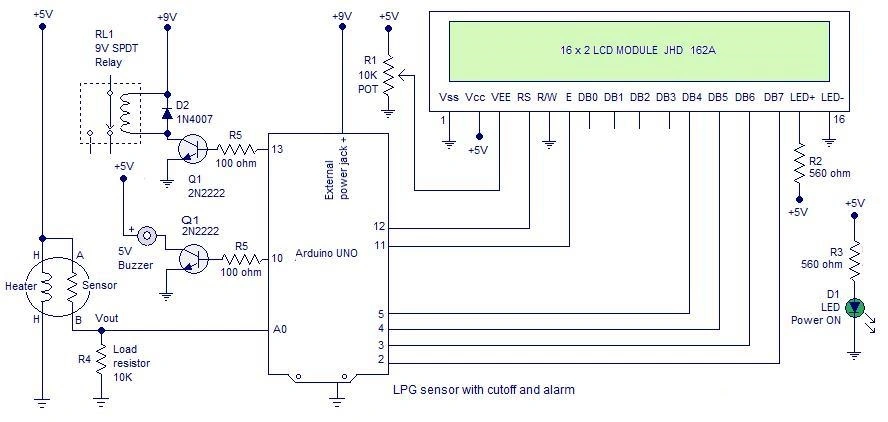
LED:
- Anode to Digital Pin 12
- Cathode to Gnd
Buzzer:
- Anode pin to Digital Pin10
- Cathode pin to the gnd
Programming
Explanation:
- #include < LiquidCrystal.h >
- int mq = A0;
- int led = 12;
- int buz = 10;
- int m;
- float p;
- LiquidCrystal lcd(2, 3, 4, 5, 6, 7);
- void setup()
- {
- pinMode(led, OUTPUT);
- pinMode(buz, OUTPUT);
- digitalWrite(led, LOW);
- digitalWrite(buz, LOW);
- lcd.begin(16, 2);
- }
- void loop()
- {
- d = analogRead(mq);
- lcd.setCursor(0, 0);
- lcd.print("LPG GAS SENSOR");
- if (m > 60)
- {
- p = 0;
- } else
- {
- p = (m - 60) / 9.64;
- }
- lcd.setCursor(0, 1);
- lcd.print(p);
- lcd.setCursor(5, 1);
- lcd.print("%");
- if (p >= 30)
- {
- digitalWrite(led, LOW);
- digitalWrite(buz, HIGH);
- lcd.setCursor(9, 1);
- lcd.print("Little Leakage");
- } else
- {
- digitalWrite(led, HIGH);
- digitalWrite(buz, LOW);
- }
- delay(500);
- lcd.clear();
- }
- The Gas Sensor is connected to the analog input pin A0.
- Digital pin 10 is used to control the buzzer.
- Digital Pin 12 is connected to the led.
- If the Gas sensor value is less than 60.
- The Buzzer and led is ON.
- Displays the result in liquid crystal display.
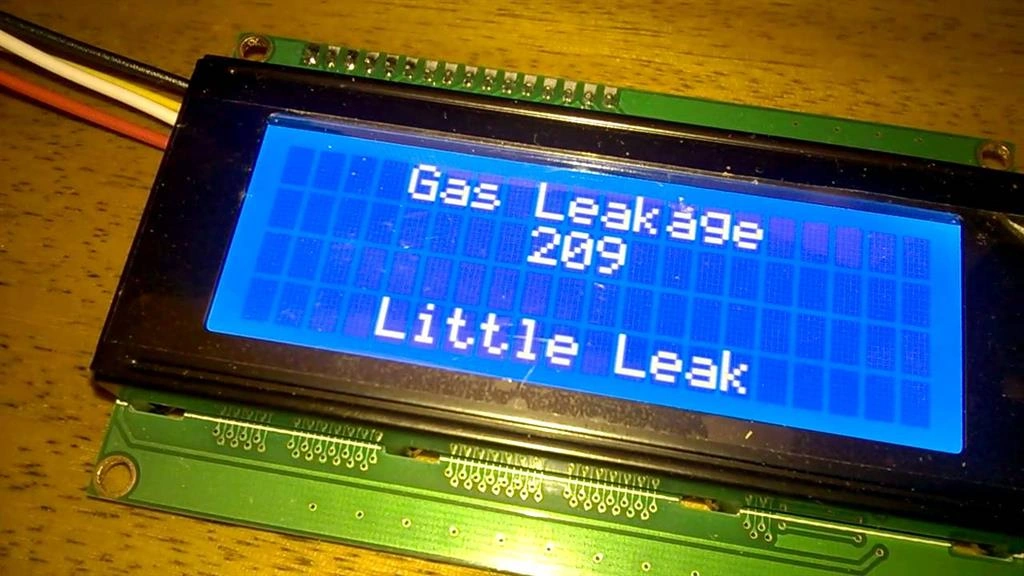
Output:
Read more articles on Arduino:
Delpin Susai RajPosted Aug 28, 2016, 4:38 AM
Nice
Gowtham KPosted Feb 17, 2016, 12:10 PM
Good One
Santhakumar MunuswamyPosted Feb 16, 2016, 2:56 PM
Thanks for nice work
Kumaresh RajalingamPosted Feb 15, 2016, 6:47 AM
Thank u Raja sir
Kumaresh RajalingamPosted Feb 15, 2016, 6:47 AM
Thank u shubham sir
Kumaresh RajalingamPosted Feb 15, 2016, 6:47 AM
Thank u sibeesh sir
Kumaresh RajalingamPosted Feb 15, 2016, 6:47 AM
Thnak u sibeesh sir
Kumaresh RajalingamPosted Feb 15, 2016, 6:47 AM
Thnak u Mohammed sir
Raja TPosted Feb 15, 2016, 3:00 AM
Nice,Thanks for sharing
Shubham KumarPosted Feb 15, 2016, 12:59 AM
nice
Sibeesh VenuPosted Feb 15, 2016, 12:35 AM
Nice Share
Mohammed IbrahimPosted Feb 14, 2016, 11:21 PM
nice
Kumaresh RajalingamPosted Feb 14, 2016, 8:53 PM
Thanks SR
Sr KarthigaPosted Feb 14, 2016, 8:20 PM
Good one