

How To Setup MVC Application With MongoDB Server?
Please reference the below link to understand how to connect to the MongoDB server & create a Database for our MVC application.
Please keep the MongoDB server in a running state while running the MVC application.
Part-1. Section includes steps to start the MongoDB server. Both command prompts need to be running ( mongod & mongo ).
Step 1: Create a new database.
ObjectId id = new ObjectId();

MongoClient client = null;
MongoServer server = null;
MongoDatabase database = null;
MongoCollection UserDetailscollection = null;

string connectionString = "mongodb://localhost";
private List<UserModel> _UserList = new List<UserModel>();

public UserRepositary()
{
    try
    {
        client = new MongoClient(connectionString);

        server = client.GetServer();

        database = server.GetDatabase("MVCDBTest");

        UserDetailscollection = database.GetCollection<UserModel>("UserModel");
    }
    catch (Exception ex)
    {
        Console.WriteLine(ex.Message);
    }
}
Firstly create MongoClient object. In this example we have MongoDB server installed on our machine so we pass local server connection string to MongoClient object. Using client object we get Server object.
database = server.GetDatabase("MVCDBTest");
Above line create database at MongoDB server.
UserDetailscollection = database.GetCollection<UserModel>("UserModel");
Above line create Collection inside MVCDBTest database. All data get inserted into this collection object as document. The following commands are used to check database is created or not.
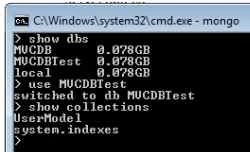
- Show DBS: Display List of database available at server. If Database is created successfully, above command list down database name in command prompt.
- Use MVCDBTest: We can switch to database now to check collection present in the current database.
- Show Collections: It lists down number of collection present into database. One database can have multiple collections present into it.
Step 2. UserModel Class. In this class we are going to define attributes for our MVC application. MVC support data Annotation for validation purpose, so I added some validation for class attributes.
using MongoDB.Bson;
using System;
using System.Collections.Generic;
using System.ComponentModel.DataAnnotations;
using System.Linq;
using System.Web;

namespace MvcRegistration.Models
{
    public class UserModel
    {
        public ObjectId _id { get; set; }

        [Required(ErrorMessage = "Please enter your name.")]
        public string UserName { get; set; }

        [Required(ErrorMessage = "Please enter your password.")]
        [DataType(DataType.Password)]
        public string Password { get; set; }

        [Required(ErrorMessage = "Please enter your Email.")]
        [DataType(DataType.EmailAddress)]
        public string Email { get; set; }

        [Required(ErrorMessage = "Please enter your PhoneNo.")]
        public string PhoneNo { get; set; }

        [Required(ErrorMessage = "Please enter your Address.")]
        public string Address { get; set; }
    }
}
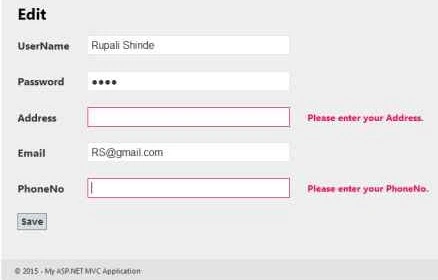
"Required" data Annotation indicate that this field is compulsory to enter to user otherwise MVC model return ModelState as invalid.
public ObjectId _id { get; set; }
Each record of MongoDB is having unique id associated with it like primary key of table. So we need to declare attribute _id with data type as ObjectId.

Step 3. Dashboard Page ( index.cshtml ).
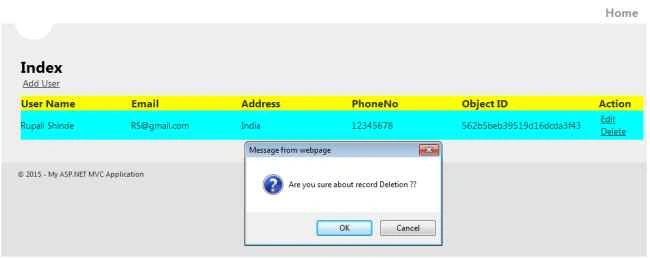
Application dashboard contain link to add New User. Below the link, database records are displayed in tabular format. Tabular format contain Edit & Delete button per record. RouteConfig - Set starting point of application i.e Index method of UserController.
public class RouteConfig
{
    public static void RegisterRoutes(RouteCollection routes)
    {
        routes.IgnoreRoute("{resource}.axd/{*pathInfo}");

        routes.MapRoute(
            name: "Default",
            url: "{controller}/{action}/{id}",
            defaults: new { controller = "User", action = "Index", id = UrlParameter.Optional }
        );
    }
}
Index.cshtml
@model IEnumerable<MvcRegistration.Models.UserModel>

@{
    ViewBag.Title = "User DashBoard";
}

<style type="text/css">
    table, tr {
        width:100%;
    }

    th, td {
        width:20%;
    }
    th {
        background-color:yellow;
    }

    td {
        background-color:aqua;
    }
</style>

<h2>Index</h2>
<div>
    <div>
        @Html.ActionLink("Add User","Registration", "User")
    </div>
    <div>
        @if (Model != null)
        {
            <table>
                <thead>
                    <tr>
                        <th>User Name</th>
                        <th>Email</th>
                        <th>Address</th>
                        <th>PhoneNo</th>
                        <th>Object ID</th>
                        <th colspan="2">Action</th>
                    </tr>
                </thead>
                <tbody>

                    @if (Model != null)
                    {
                        foreach (var UM in Model)
                        {
                        <tr>
                            <td>@UM.UserName</td>
                            <td>@UM.Email</td>
                            <td>@UM.Address</td>
                            <td>@UM.PhoneNo</td>
                            <td>@UM._id</td>
                            <td>
                                <a href="@Url.Action("Edit", "User", new { ID = @UM.UserName})">Edit</a>
                                <a onclick="return confirm('Are you sure about record Deletion ??');" href="@Url.Action("Delete", "User", new { ID = @UM.UserName })">Delete</a>
                            </td>
                        </tr>
                        }
                    }

                </tbody>
            </table>
        }
    </div>
</div>
Controller Level code : Index() Method
public ActionResult Index()
{
    return View("Index", Context.GetAllUsers());
}
Step 4. Registration.cshtml. Razor syntax is used to create view.
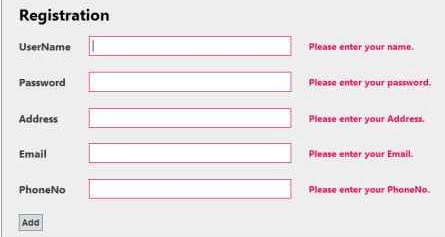
HTML helper classes are used to bind model with html tags.
@Html.ValidationMessageFor(model => model.UserName)
In order to show validation error message, the above syntax is used.
using (Html.BeginForm("Registration", "User"))
It indicate which ActionResult method to execute after form submission.
Source Code
@model MvcRegistration.Models.UserModel

@{
    ViewBag.Title = "Registration";
}

<script src="/Scripts/jquery-1.7.1.min.js" type="text/javascript"></script>
<script src="/Scripts/jquery.validate.min.js" type="text/javascript"></script>
<script src="/Scripts/jquery.validate.unobtrusive.min.js" type="text/javascript"></script>

<h2>Registration</h2>

@using (Html.BeginForm("Registration", "User"))
{


    <table>
        <tr>
            <td>@Html.LabelFor(model => model.UserName)</td>
            <td>@Html.TextBoxFor(model => model.UserName)</td>
            <td>@Html.ValidationMessageFor(model => model.UserName)</td>
        </tr>
        <tr>
            <td colspan="2"></td>
        </tr>
        <tr>
            <td>@Html.LabelFor(model => model.Password)</td>
            <td>@Html.PasswordFor(model => model.Password)</td>
            <td>@Html.ValidationMessageFor(model => model.Password)</td>
        </tr>
        <tr>
            <td colspan="2"></td>
        </tr>
        <tr>
            <td>@Html.LabelFor(model => model.Address)</td>
            <td>@Html.TextBoxFor(model => model.Address)</td>
            <td>@Html.ValidationMessageFor(model => model.Address)</td>
        </tr>
        <tr>
            <td colspan="2"></td>
        </tr>
        <tr>
            <td>@Html.LabelFor(model => model.Email)</td>
            <td>@Html.TextBoxFor(model => model.Email)</td>
            <td>@Html.ValidationMessageFor(model => model.Email)</td>
        </tr>
        <tr>
            <td colspan="2"></td>
        </tr>
        <tr>
            <td>@Html.LabelFor(model => model.PhoneNo)</td>
            <td>@Html.TextBoxFor(model => model.PhoneNo)</td>
            <td>@Html.ValidationMessageFor(model => model.PhoneNo)</td>
        </tr>
        <tr>
            <td colspan="2"></td>
        </tr>
        <tr>
            <td colspan="2">
               <input type="submit" value="Add" class="submitButton" />
            </td>
        </tr>
    </table>
} 

Bhuvanesh MohankumarPosted May 3, 2016, 11:46 AM
Good one...
Rahul Kumar SaxenaPosted Apr 16, 2016, 3:49 AM
Congrats Article Of The Day
Rupali ShindePosted Oct 27, 2015, 12:11 AM
Thank you all
Sibeesh VenuPosted Oct 26, 2015, 1:18 AM
Nice Share
Harshad PansuriyaPosted Oct 26, 2015, 12:34 AM
Nice one
Rupali ShindePosted Oct 26, 2015, 12:01 AM
Thank you all ..
Humayun Kabir MamunPosted Oct 25, 2015, 11:29 PM
Nice...
Mohammed IbrahimPosted Oct 25, 2015, 10:55 PM
nice
Nilesh JadavPosted Oct 25, 2015, 9:39 PM
Good Share Rupali Shinde
Afzaal Ahmad ZeeshanPosted Oct 25, 2015, 3:51 PM
Isn't it "ASP.NET MVC Application", instead of "MVC Application"? Because ASP.NET MVC is not MVC, MVC is a separate pattern for programming.
Mukesh KumarPosted Oct 25, 2015, 2:58 PM
Nice One
Gowtham KPosted Oct 25, 2015, 12:46 PM
Good One
Pankaj BajajPosted Oct 25, 2015, 11:53 AM
nice artilce rupali.