

Introduction
In this article I explain the MySQL cheat sheet in PHP. I will use common MySQL commands during this article to assist you to apply with MySQL and effectively. Here, first is a discussion of working with a database. Using the following queries, you can approriately work on MySQL. The following queries describe that.
Working with Database
When a database does not exist the database server creates a new database. Such as:
<?php
$con = mysql_connect ("localhost","root","");
$db="Vinod";
if (!$con)
{
die ('Could not connect: ' . mysql_error());
}
if (mysql_query ("CREATE DATABASE If Not exists $db",$con))
{
echo "Your Database Created Which Name is : $db";
}
else
{
echo "Error creating database: " . mysql_error();
}
mysql_close ($con);
?>
To drop the database use this query:
<?php
$con = mysql_connect ("localhost","root","");
$db="Vinod";
if (!$con)
{
die ('Could not connect: ' . mysql_error());
}
if (mysql_query ("DROP DATABASE IF EXISTS $db",$con))
{
echo "Your Database removed Which Name is : $db";
}
else
{
echo "Your database $db not extst: " . mysql_error();
}
mysql_close ($con);
?>
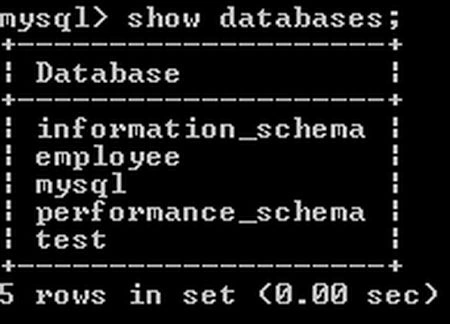
To show all the databases in your database server use:
Working with table
To list all tables in your database, you can use this query:
Create table in your database.

CREATE table IF NOT EXISTS table_name(create_clause) [table_options]
Join the conversation! Your thoughts help the community grow.