

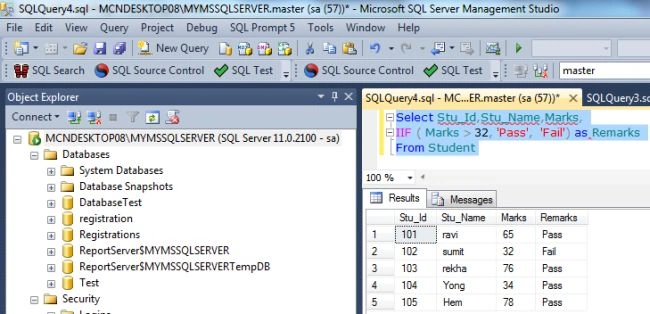
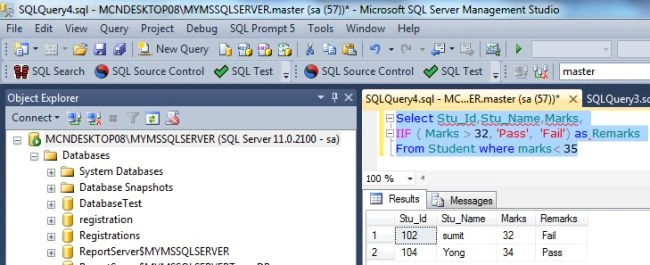
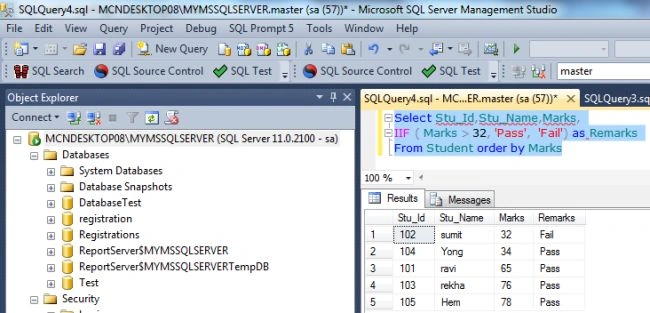
In this article, I would like to show the new built-in function IIF in SQL Server. IIF is a shorthand way for writing a CASE statement. The IIF Function returns a single value based on the evaluation of a statement. An IIF function is mostly used in SQL stored procedures or as a formula for a particular column, which optimizes the SQL statements. So let's have a look at a practical example of how to use an IIF statement in SQL Server 2012. The example is developed in SQL Server 2012 using the SQL Server Management Studio.
We'll start by walking through a simple IIF function.
IIF Function with simple expression
The Simple IIF Function checks a Boolean value; if it is true then the True_Value is returned otherwise the False_Value is returned. The general syntax of the Simple IIF expression is:
IIF (Boolean_expression, true_value, false_value)
Example
DECLARE @Name varchar(50)
SET @Name = 'Rohatash'
SELECT @Name,
IIF(@Name= 'Deepak', 'Name Rohatash', 'Name Found Rohatash')
Output
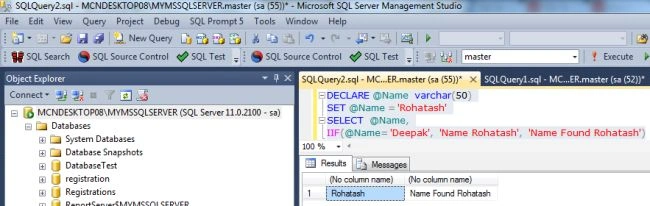
Now replace the name Rohatash kumar in place of Deepak.
Example
DECLARE @Name varchar(50)
SET @Name = 'Rohatash'
SELECT @Name,
IIF(@Name= 'Rohatash', 'Name Rohatash', 'Name Found Rohatash')
Output
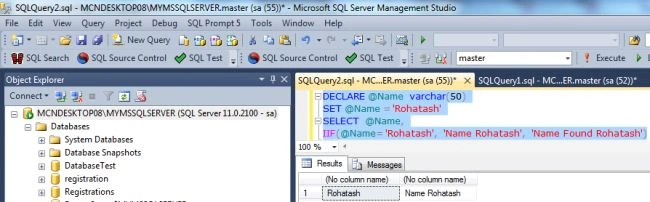
Creating a table in SQL Server
create table student
(
stu_id int,
stu_name varchar(20),
marks int
);
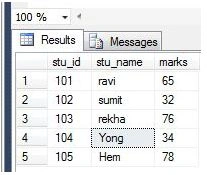
Now inserting rows values into the student table:
Insert into student values('101','ravi','65');
Insert into student values('102','sumit','32');
Join the conversation! Your thoughts help the community grow.