

Introduction
In computer science, there are various programming languages available for instructing systems or computing devices. OOP is one of the fundamental concepts for every computer language to provide a clear modular structure and effective way of solving problems.
OOPs
Object-oriented programming (OOP) is a programming paradigm that deals with various fundamentals of its concepts. After the procedural language revolution, the OOPs concept has become an essential part of our programming world to achieve better productivity, flexibility, user-friendliness, and rapid code management. Python is the best OOPs supported programming language since its existence It can solve programming problems where computation is done by the object. In the series of articles, we will learn the essential concepts available in Python OOPs.
List of OOPs concepts
- Class
- Object
- Method
- Inheritance
- Polymorphism
- Encapsulation
- Data abstraction
Class and objects in Python
Consider a class in OOPS as a user-defined prototype or blueprint of program attributes, instance methods and its set of instructions. It performs a way of binding a collection of objects to itself to lead large programs in a more understandable and manageable way.
Defining a Class in Python
- To create a class, use the “class” keyword followed by the class name.
- The end of the Class name must declare a colon.
- To declare a documentation string it is useful to get some more information about the class.
- Using constructor in a class, we will be smoothly handling a large program.
Syntax
Class classname:
<Statement 1 >
.
.
<Statement N >
Example
Create a class named fruits with their instances.
- class fruits: #Class declaration
- Name="Apple"
- No=A1
- def deisplay(self): #Instance method
- print(self.Name, self.No)
Here, we declare a class named fruits which contains two fields as fruit Name and No.
Creating a class instance
When we need to use the class attributes in another class or method, it is available by creating class instance attributes.
Example
- class employee:
- salutation="Wellcome All" #class instance attribute
- def __init__(self):
- self.Name = 'Kokila'
- self.Id = 101
- def display(self): #class instance method
- print("Employee Name: %s \nId: %d" %(self.Name, self.Id))
- Emp=employee()
- print(Emp.salutation) #call instance attribute
- Emp.display() #call instance method
- Above the code, we declared class instance attributes under the class named “employee” and followed by the constructor.
- Next, we declared an instance method named as the display () and created an object named as Emp. Then the “Emb.display()” statement will call the instance method to prints statements itself.
Output

Python Constructor
In program construction, every statement like data attributes, class members, methods, and other objects must be present within the class boundary.
A constructor is a special type of method that helps to initialize a newly created object. Depending on __init__ method we can pass any number of the arguments while creating the class object.
There are two types of constructed available in Python programs in order to initialize instance members of the class. Given below,
- Non-parameterized constructer
- Parameterized constructor
In python programming, A constructor can declare like "__init__ ()" method. The underscore indicates it is a special method then followed by the “init” is represents the acronym of initialization.
Example
- class fruits: #Class declaration
- total=0
- def __init__(self,fno,fname,fcolor): #Constructor declaration
- self.fno=fno
- self.fname=fname
- self.fcolor=fcolor
Non-parameterized constructor
Nonparameterized constructor, we cannot pass any arguments by its parameter.
Example
- class Csharpcorner:
- community=""
- def __init__(self): #constructor declared without any arguments
- self.community="Wellcome to C# corner"
- def display(self):
- print(self.community)
- obj=Csharpcorner() #Constructor automatically execute by the object creation
- obj.display()
Output

Parameterized constructor
A constructor with arguments is known as the parameterized constructor used for setting up properties of the object. So, we can initialize an object with some values while declaring. In python, the first argument considers as a reference to the instance known as the “self” keyword.
Example
- class fruits:
- total=0
- def __init__(self,fno,fname,fcolor): #Constructor declared with number of arguments
- self.fno=fno
- self.fname=fname
- self.fcolor=fcolor
- fruits.total+=1
- def displaytotal(self):
- print("No:",self.fno,"Fruite Name:",self.fname,",Fruite color:",self.fcolor)
- def displayfruit(self):
- print("No:",self.fno,"Fruite Name:",self.fname,",Fruite color:",self.fcolor)
- f1=fruits(1,"Apple","Red")
- f2=fruits(2,"lemon","Yellow")
- f1.displaytotal()
- f2.displayfruit()
- print("Total Number of Fruites %d" % fruits.total)
For the parameterized constructor example, we declared three arguments within the parameter named as fno, fname, and fcolor.
Output

Object in Python
In a programming language, objects considered as a value or variable of the Class simulates a real-world entity to enhance their accessibility and understandability. It allows us to create an instance of the class using the class name, and it is able to access all the methods of the specified class like “__init__” method. In Python, everything consists of an Object to deal with itself.
Syntax
<object-name> = <class-name>(<arguments>)
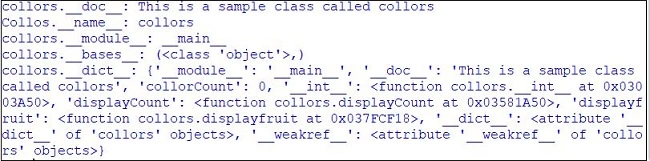
For creating an object, we can use the class named calculation to achieve that.





Vidyadharran GPosted Sep 21, 2019, 3:04 AM
Nice article Elavarasan keep sharing ....
Sarathlal SaseendranPosted Sep 19, 2019, 3:06 PM
Very good article elavarasan. Keep going.
Pradeep RajPosted Sep 19, 2019, 11:50 AM
Great. very useful to me. keep sharing further.
Kokila RaniPosted Sep 19, 2019, 9:14 AM
Awesome article...clear explanation...easy to understand for me..keep sharing.. All the best.....
Pankajkumar PatelPosted Sep 18, 2019, 11:33 PM
Nice article
Rajanikant HawaldarPosted Sep 18, 2019, 10:24 PM
Very good Elavarasan R, nice article
Guest UserPosted Sep 18, 2019, 8:07 PM
Nice explanation.. I can understand easliy.. this article very useful for me.. thank you elavarasan. Thanks for sharing...