

Introduction
In this article we will start with a basic LINQ to SQL example and then see how we can implement one-many and one-one relationship using 'Entityref' and 'EntitySet'. We have also attached a source which demonstrates the same in a practical manner.
Catch my videos for WCF, WPF, WWF, LINQ , Silverlight,Design patterns , UML and lot on http://www.questpond.com
Previous LINQ,Silverlight,WCF,WPF and WWF articles
Below are some of my old articles which you would like to refer in case you are not acquainted with .NET 3.5 basic concepts.
-
This article talks about a complete 3 tier implementation using LINQ :- http://www.c-sharpcorner.com/UploadFile/shivprasadk/SaPe03262009072217AM/SaPe.aspx?ArticleID=f18c3c3b-523b-4c1c-9ad0-e51476115e4a
-
WCF FAQ series covering simple to advance concepts :- http://www.c-sharpcorner.com/UploadFile/shivprasadk/122345601022009064602AM/1223456.aspx?ArticleID=d88a04d5-633c-44f8-85fa-09941f2064dd
-
WPF and Silverlight FAQ series covering layout, animation and bindings. :- http://www.c-sharpcorner.com/UploadFile/shivprasadk/21FAQ04242009031713AM/21FAQ.aspx?ArticleID=1d54da18-1050-4832-905b-0b058a1313fb
-
Windows work flow FAQ series covering state machines and sequential work flow in detail. :- http://www.c-sharpcorner.com/UploadFile/shivprasadk/12334512312008070235AM/123345.aspx?ArticleID=bd393908-36cc-45c0-b899-30aa44fcf64d
Simplest LINQ to SQL example
So let's first start with a simple LINQ to SQL example and then we will try to understand how we can establish relationship in LINQ entities.
Step 1:- Define Entity classes using LINQ
When we design project using tiered approach like 3-tier or N-tier we need to create business classes and objects. For instance below is a simple class which defines a class which is mapped to a country table as shown below. You can see we how the class properties are mapped in one to one fashion with the table. These types of classes are termed as entity classes.
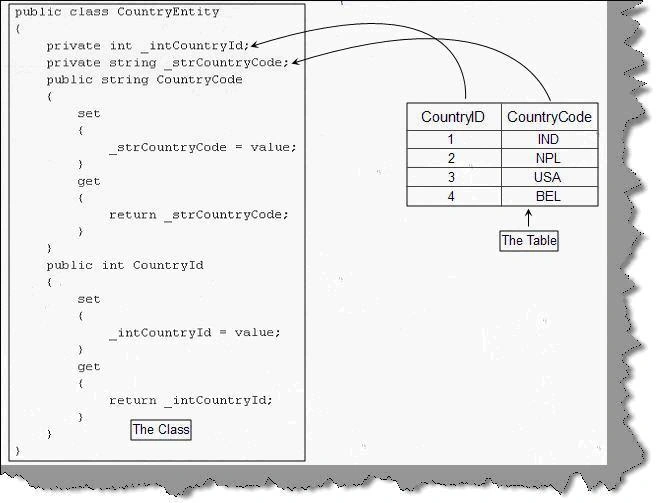
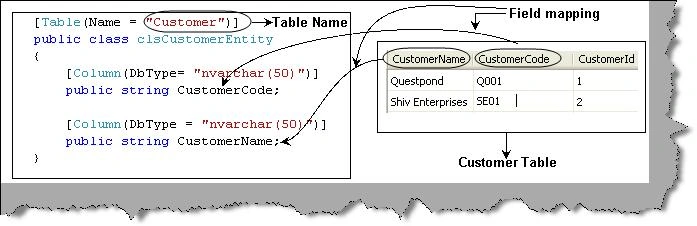
In LINQ we need to first define these entity classes using attribute mappings. You need to import "System.Data.Linq.Mapping;" namespace to get attributes for mapping. Below is the code snippet which shows how the 'Table' attribute maps the class with the database table name 'Customer' and how 'Column' attributes helps mapping properties with table columns.
[Table(Name = "Customer")]
public class clsCustomerEntityWithProperties
{
private int _CustomerId;
private string _CustomerCode;
private string _CustomerName;
[Column(DbType = "nvarchar(50)")]
public string CustomerCode
{
set
{
_CustomerCode = value;
}
get
{
return _CustomerCode;
}
}
[Column(DbType = "nvarchar(50)")]
public string CustomerName
{
set
{
_CustomerName = value;
}
get
{
return _CustomerName;
}
}
[Column(DbType = "int", IsPrimaryKey = true)]
public int CustomerId
{
set
{
_CustomerId = value;
}
get
{
return _CustomerId;
}
}
}
}
Below is a more sophisticated pictorial view of the entity classes mapping with the customer table structure.
Step 2:- Use the datacontext to bind the table data with the entity objects.
The second step is use the data context object of LINQ to fill your entity objects. Datacontext acts like a mediator between database objects and your LINQ entity mapped classes.
So the first thing is to create the object of datacontext and create a active connection using the SQL connection string.
DataContext objContext = new DataContext(strConnectionString);
The second thing is to get the entity collection using the table data type. This is done using the 'gettable' function of the datacontext.
Table<clsCustomerEntity> objTable = objContext.GetTable<clsCustomerEntity>()

Once we get all the data in table collection it's time to browse through the table collection and display the record.

            foreach
                (clsCustomerEntity objCustomer in objTable)
                {
                Response.Write(objCustomer.CustomerName + "<br>");
            }
You can get the above source code which is attached with this article.
Encapsulated LINQ classes with Set and Get
In the previous example we had exposed the entity class properties as public properties, which violate the basic rule of encapsulation. You can define setter and getter functions which encapsulate the private properties.
[Table(Name = "Customer")]
public class clsCustomerEntityWithProperties
{
private int _CustomerId;
private string _CustomerCode;
private string _CustomerName;
[Column(DbType = "nvarchar(50)")]
public string CustomerCode
{
set
{
_CustomerCode = value;
}
get
{
return _CustomerCode;
}
}
[Column(DbType = "nvarchar(50)")]
public string CustomerName
{
set
{
_CustomerName = value;
}
get
{
return _CustomerName;
}
}
[Column(DbType = "int", IsPrimaryKey = true)]
public int CustomerId
{
set
{
_CustomerId = value;
}
get
{
return _CustomerId;
}
}
}
One-Many and One-One relationship
LINQ helps you define relationships using 'EntitySet' and 'EntityRef'. To understand how we can define relationships using LINQ, let's consider the below example where we have a customer who can have many addresses and every address will have phone details. In other words customer and address has one-many relationship while address and phone has one-one relationship.
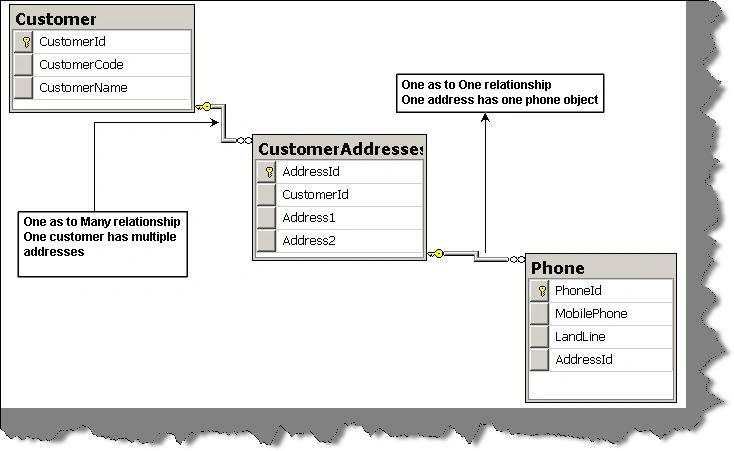
To define one-many relationship between customer and address classes we need to use 'EntitySet' attribute. To define one-one relationship between address and phone class we need to use 'EntityRef' attribute.
Note :- You need to define primary key attribute for every entity class or else the mapping relationship will not work.

So below is the class entity snippet for customer class which shows how it has used 'EntitySet' to define one-many relationship with address class. Association is defined using 'Association' attribute. 'Association' attribute has three important properties storage , thiskey and otherkey. 'storage' defines the name of private variable where the address object is stored, currently it is '_CustomerAddresses'. 'ThisKey' and 'OtherKey' defines which property will define the linkage , for this instance it is 'CustomerId'. In other words both 'Customer' class and 'Address' class will have 'CustomerId' property in common.'ThisKey' defines the name of property for customer class while 'OtherKey' define the property of addresses class.
[Table(Name = "Customer")]
public class clsCustomerWithAddresses
{
private EntitySet<clsAddresses> _CustomerAddresses;
[Association(Storage = "_CustomerAddresses", ThisKey = "CustomerId", OtherKey = "CustomerId")]
public EntitySet<clsAddresses> Addresses
{
set
{
_CustomerAddresses = value;
}
get
{
return _CustomerAddresses;
}
}
}
Below is the complete code snippet with other properties of customer class.
Join the conversation! Your thoughts help the community grow.