

In this article, you will learn about how to pass data from one page to other page. You can understand it better when I will use ASP.NET MVC terms here. Yes, that is right. I am talking about passing the data from controller to view, controller to other controller and controller to action.
As we know in ASP.NET, we used lots of way to pass the data from one page to other page or store the data and access it on another page. These are Session, ViewState, QueryString, Cross Page Posting, etc. So, these are the ways in ASP.NET, but what about the ways ASP.NET MVC.
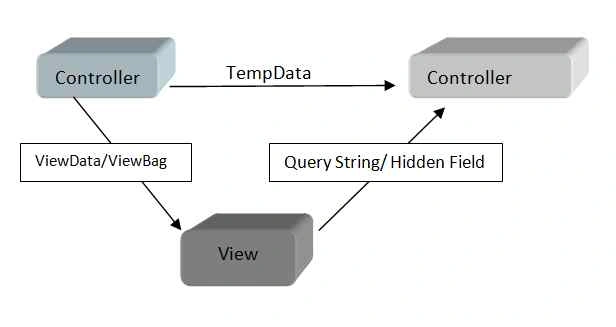
ASP.NET MVC provides us more flexibility compared to ASP.NET. As we know that ASP.NET MVC is pure html base, so here we use three ASP.NET MVC objects for passing the data or we can say transferring the data.
The following are the object which store the value and transfer it from one place to other place.
- ViewData
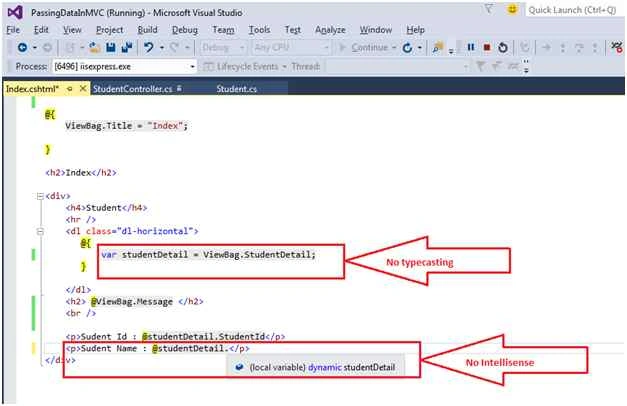
- ViewBag
- TempData
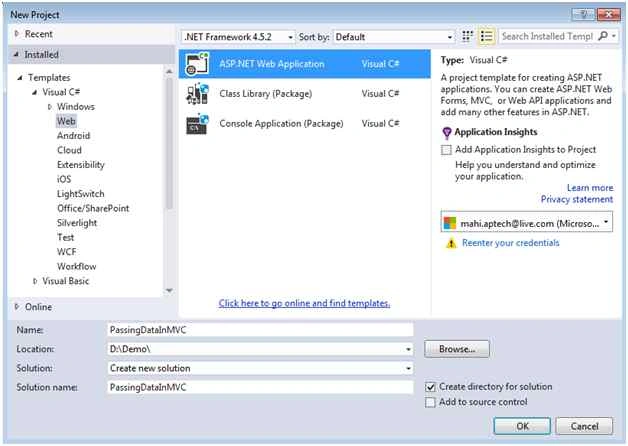
Create an empty ASP.NET MVC application to understand the ViewData, ViewBag and TempData with example step by step. Open Visual Studio and choose File Menu, then New and click on Project.
It will give you a New Project dialog window where you need to choose the ASP.NET Web Application and provide the name of the application and click on OK.
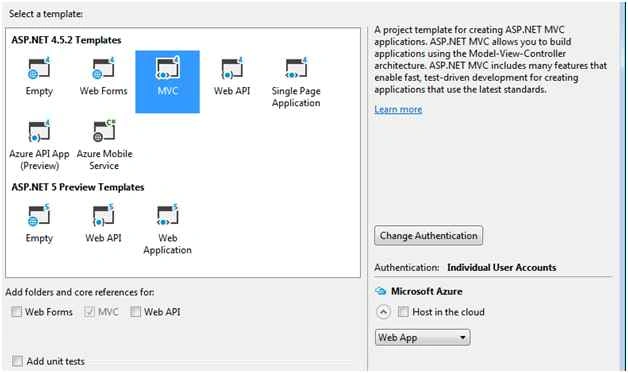
It will give you one more dialog to add the MVC application with some specific template. You need to choose the MVC and click on OK.
Add a model class “Student.cs” with the following properties.
- using System;
- using System.Collections.Generic;
- using System.Linq;
- using System.Web;
- namespace PassingDataInMVC.Models
- {
- public class Student
- {
- public int StudentId { get; set; }
- public string StudentName { get; set; }
- public string Address { get; set; }
- }
- }
ViewData
It was introduced with MVC 1.0 and MVC 2.0. It is basically a dictionary object and stores the data with object type. It is derived from ViewDataDictionary. The data for ViewData exists only for current request. As soon as the corresponding view is going to render on browser, the ViewData is emptied.
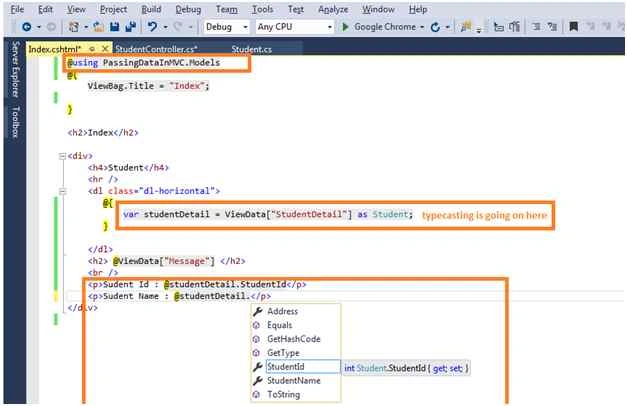
It is used to transfer the data from controller to its corresponding view. It uses typecasting for getting the data and also you can check the data for null.
The following are the syntax to pass the data using ViewData.
- ViewData[“name”]=value;
- ViewContext.ViewData[“name”]=value;
- ViewContext.Controller.ViewData[“name”]=value;
<h2> my value is: @ViewData[“name”]</h2>
Controller
- @using PassingDataInMVC.Models
- @{
- ViewBag.Title = "Index";
- }
- <h2>Index</h2>
- <div>
- <h4>Student</h4>
- <hr />
- <dl class="dl-horizontal">
- @{
- var studentDetail = ViewData["StudentDetail"] as Student;
- }
- </dl>
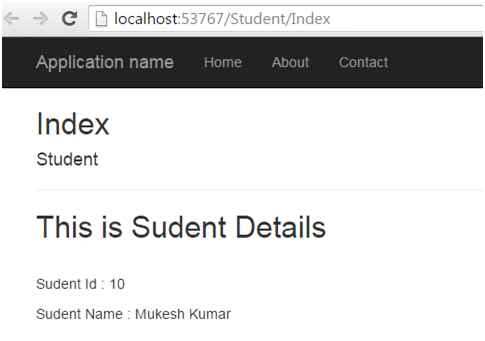
- <h2> @ViewData["Message"] </h2>
- <br />
- <p>Sudent Id : @studentDetail.StudentId</p>
- <p>Sudent Name : @studentDetail.StudentName</p>
- </div>
- @using PassingDataInMVC.Models
- @{
- ViewBag.Title = "Index";
- }
- <h2>Index</h2>
- <div>
- <h4>Student</h4>
- <hr />
- <dl class="dl-horizontal">
- @{
- var studentDetail = ViewData["StudentDetail"] as Student;
- }
- </dl>
- <h2> @ViewData["Message"] </h2>
- <br />
- <p>Sudent Id : @studentDetail.StudentId</p>
- <p>Sudent Name : @studentDetail.StudentName</p>
- </div>
IMAD AYOUBPosted May 24, 2020, 12:20 PM
Perfect. Thanks a lot for your usual professional articles. Appreciate it.
Suman VermaPosted Nov 30, 2015, 5:46 AM
nice one
Yaduveer SainiPosted Nov 30, 2015, 4:14 AM
Very nice article mukesh
Amandeep singhPosted Nov 30, 2015, 4:14 AM
nice
Aishwarya DPosted Nov 30, 2015, 1:43 AM
nice
Banketeshvar NarayanPosted Nov 30, 2015, 1:27 AM
Nice Share
Santhakumar MunuswamyPosted Nov 29, 2015, 11:44 PM
Good one
Raja TPosted Nov 29, 2015, 10:41 PM
Nice one, thanks for sharing
Mukesh KumarPosted Nov 29, 2015, 12:47 PM
Thanks Ankur and Ajay for your support
Ajay GandhiPosted Nov 29, 2015, 12:44 PM
Awesome
Ankur MistryPosted Nov 29, 2015, 5:59 AM
good one