

Introduction
Most developers I’ve encountered when playing with strings and/or bytes are always interested to see what is really inside the physical device. They always imagine, “What’s really inside?” Even I sometimes ask myself, “Do we really need to see the ones and zeroes?”
Basically, you can play with bytes, bits and strings and see the represented byte-string. In this article will try to explore the different ways to manipulate byte-arrays to string and string to byte-arrays. Lastly, we are going to tackle a bit about the “Encodings”, and focus more on the methods such as “GetyBytes”,“GetByteCount” and “BitConverter”.
Background
So before we play with strings and bytes. I want to introduce you a summary basic concept of ASCII and Unicode. Here are some lists to take note of,
- ASCII (American Standard Code for Information Interchange) and Unicode are used for communication, wherein a computer can possibly transfer data from one computer to another.
- ASCII uses 7 bits to represent a character and have been extended to 8 bits “extended ASCII” which solves the Latin alphabet while Unicode represents more languages in the world. That’s wherein the “Unicode Encoding” comes into play because most characters don’t fit into the 8-bits size.
- Unicode encodings come into play because we need numerous ways to store a character in a byte sequence. See the different type of Encodings: UTF8, UTF-16, and UTF-32.
For more information about the difference of ASCII and Unicode, please see my LinkedIn article.
.NET Encoding
Before we start with the examples, I would like to introduce you to the “System.Text.Encoding”. It is basically an abstract class which is intended to represent a character encoding. It also provides methods to convert arrays to strings of Unicode characters to and from arrays of bytes. Here are the list of the derived classes,
- ASCIIEncoding
- UTF7Encoding
- UTF8Encoding
- UnicodeEncoding
- UTF32Encoding
See the figure 1 below to visualize the hierarchy of the inheritance.
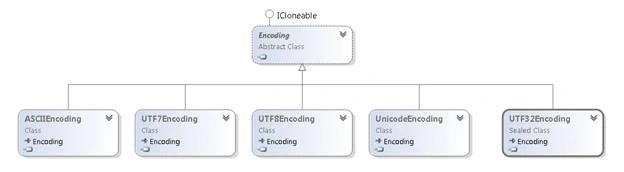
Figure 1
If you want to programmatically get the derived encoding classes, see the sample code below,
- [TestMethod]
- public void Test_Types_Of_Derived_Encoding_Classes()
- {
- var type = typeof(Encoding);
- var assembly = Assembly.GetAssembly(type);
- var types = assembly.GetTypes();
- var derivedClasses =
- types.Where(t => t.IsSubclassOf(type) && t.IsPublic == true).ToList();
- foreach (var @class in derivedClasses)
- {
- Console.WriteLine(@class.Name);
- }
- }
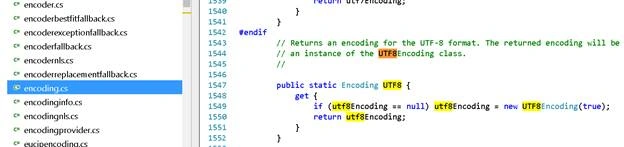
Just some notes to keep in mind, when using those properties to use different encodings from the abstract class “System.Text.Encoding” such as ASCII, UTF8, UTF7, etc. It actually creates a new instance of that derived class. Please see the code below,
Note
The code is based from here.
Therefore you can create a new instance of a certain encoding type or you can use the abstract class and choose a property-encoding type specific for your needs.
- var utf8 = new UTF8Encoding(); //you can use this
- var utf8_2 = Encoding.UTF8; //or you can use this
Let us try to see if the concept is true, see the code example below:
- [TestMethod]
- public void Test_If_Encodings_Are_Same_Type() {
- Assert.IsInstanceOfType(Encoding.ASCII, typeof(ASCIIEncoding)); //true
- Assert.IsInstanceOfType(Encoding.UTF7, typeof(UTF7Encoding)); //true
- Assert.IsInstanceOfType(Encoding.UTF8, typeof(UTF8Encoding)); //true
- Assert.IsInstanceOfType(Encoding.Unicode, typeof(UnicodeEncoding));
- //true
- Assert.IsInstanceOfType(Encoding.UTF32, typeof(UTF32Encoding)); //true
- }
String to Byte Array
In order to convert string to byte array you need a specific Encoding, then use the “GetBytes” method. As it converts a string into byte array let us also see the character and its equivalent numerical ASCII/Unicode value. Just a note using the ASCII-encoding uses 7 bits while UTF8-encoding uses 8 bits to represent a character.
See the example below,
Praneet RanePosted Aug 22, 2019, 11:56 AM
Nice article.
Pankajkumar PatelPosted Aug 20, 2019, 12:17 AM
Good article
Amit MohantyPosted Aug 19, 2019, 11:18 PM
Nice article
Rajanikant HawaldarPosted Aug 19, 2019, 8:08 PM
nice article