

Introduction
- 2 Red Led
- 2 Blue Led
- Arduino Uno
- Potentiometer
- Bread Board
- Jumper Wires.
Connection
Step 1: Connect the Arduino Uno board to the pc using a USB cable.
Step 2: Fix LEDs and potentiometer in the bread board
Step 3:
POTENTIOMETER CONNECTION
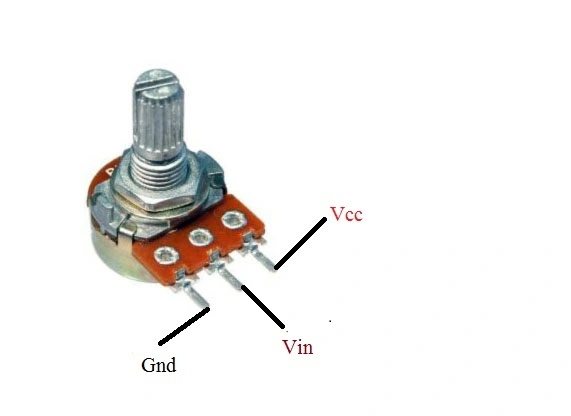
Figure 1: Potentiometer
Step 4: Connect the potentiometer to the Arduino Board as in the preceding figure 1.
Step 5: Potentiometer Centre leads to Analog 0 pin in Arduino Board.
Step 6: Fix the 2 red LEDs in the bread board, then commonly connect the positive pins (+) together and negative pins (-) together.
Step 7: Take an Anode pin to digital pin 11 and Cathode to gnd.
Step 8: Fix the 2 blue LEDs in the bread board, and then connect the positive pins (+) together and negative pins (-) together.
Step 9: Take an Anode pin to digital pin 12 and Cathode to gnd.
Programming
- const int analogInPin = A0; // Analog input pin in potentiometer to be attached.
- int sensorvalue = 0;
- int timer = 0;
- void setup()
- {
- pinMode(12, OUTPUT);
- pinMode(11, OUTPUT);
- }
- void loop()
- {
- sensorValue = analog Read(analogInPin);
- timer = map(sensorValue, 0, 1023, 10, 500); //time delay.
- digitalWrite(12, HIGH);
- delay(timer);
- digitalWrite(12, LOW);
- delay(timer);
- digitalWrite(12, HIGH);
- delay(timer);
- digitalWrite(12, LOW);
- delay(timer);
- digitalWrite(11, HIGH);
- delay(timer);
- digitalWrite(11, LOW);
- delay(timer);
- digitalWrite(11, HIGH);
- delay(timer);
- digitalWrite(11, LOW);
- delay(timer);
- }

Figure 2: Police Strobe Light
Explanation
- LEDs can blink lightly one by one automatically, we can adjust the potentiometer and see the changes in LEDs blink.
- const int analogInPin = The input from the potentiometer to the Arduino board.
- The strobe lights are used in Ambulance, Fire engine in Emergency situation.
Sr KarthigaPosted Apr 19, 2016, 7:14 AM
"thank you gowtham rajamanickam sir"
Gowtham RajamanickamPosted Apr 19, 2016, 6:42 AM
Good oe
Sr KarthigaPosted Jan 14, 2016, 8:13 PM
thanks to all
Shridhar SharmaPosted Jan 14, 2016, 1:50 AM
nice share
Arul RPosted Jan 13, 2016, 11:11 AM
Nice share
Ehsan SajjadPosted Jan 13, 2016, 10:31 AM
Very Good
Santhakumar MunuswamyPosted Jan 13, 2016, 9:56 AM
Thanks for nice article
Mohammed IbrahimPosted Jan 13, 2016, 8:23 AM
nice
Kumaresh RajalingamPosted Jan 13, 2016, 2:28 AM
Good one
Ankit BansalPosted Jan 13, 2016, 1:09 AM
very nice..