

Micro Focus released VisualCOBOL R4 earlier this year and it has turned out to be an awesome addition to Visual Studio 2010. The development teams have done a great job in delivering a very usable product. To help you learn about VisualCOBOL and COBOL.NET in a managed environment we’d like to provide some example solutions. Now there are great samples that come with VisualCOBOL but they don’t define or detail one specific control, they show a finished application and the user has to read through the code to figure out how the code was created.
Our examples will focus on a single control. We’ll show you how to manipulate the properties of that control programmatically. We may have to include one additional control but the focus on each project will be on a single control with a supporting role for the additional control. This article is about the DateTimePicker control.
Micro Focus has always tried to provide a full, in-depth development environment for COBOL developers. In previous releases of Micro Focus NetExpress it was possible to send files to the printer and have them print in duplex mode. The technique used was to call a Micro Focus supplied process using the following format.
Our examples will focus on a single control. We’ll show you how to manipulate the properties of that control programmatically. We may have to include one additional control but the focus on each project will be on a single control with a supporting role for the additional control. This article is about the DateTimePicker control.
Micro Focus has always tried to provide a full, in-depth development environment for COBOL developers. In previous releases of Micro Focus NetExpress it was possible to send files to the printer and have them print in duplex mode. The technique used was to call a Micro Focus supplied process using the following format.

and passing it a series of parameters similar to the following,
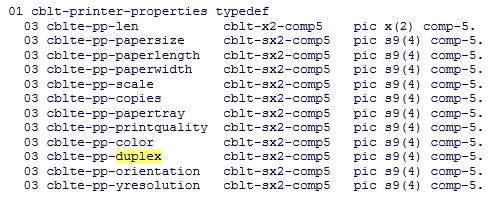
Unfortunately this process applies to a non-managed environment. More and more clients are moving to a managed environment under .NET. How then does one translate the above Micro Focus specific implementation of duplex printing to managed-COBOL?
The following article shows how to use the properties available in the Print Document class to enable duplex printing in .NET and adapt the Microsoft approach to handling printers.
Print Document Class
Before we dig into the specifics of implementing duplex printing we need to review the Print Document class. According to Microsoft the Print Document class “Defines a reusable object that sends output to a printer, when printing from a Windows Forms application.” I used this link to obtain information on the class. It is a part of the System.Drawing.Printing namespace.
The class we are going to be most concerned with is ‘PrinterSettings’ and the link for the properties to the class in MSDN. The PrinterSettings class, as the name implies, enables control of the settings related to a printer. Reviewing the class you’ll see there are over 20 properties you can access and alter. We are going to be concentrating on the ‘Duplex’ property.
If you click on the ‘Duplex’ property in the above link you’ll be redirected to a page that explains the Duplex property contains an enumeration of available settings to enable duplexing. Wonderful! But what are these values? In the description of the Duplex property is a link to the enumerated values and selecting it yields a table with the following values:
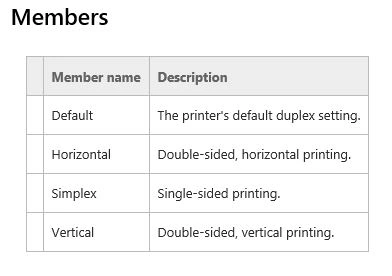
By default “most” printers are set to simplex. To enable duplex printing you simply need to readjust the setting prior to sending a file to the printer. Let’s see how to do that.
WinForm
If you’re familiar with my articles you know I like to use a WinForm as a container for the information to be presented. The information in this article however can be used without a WinForm by simply instantiating the classes found in our example. Yes I still used a WinForm because it does lend a way to walk through the information and present the ideas.
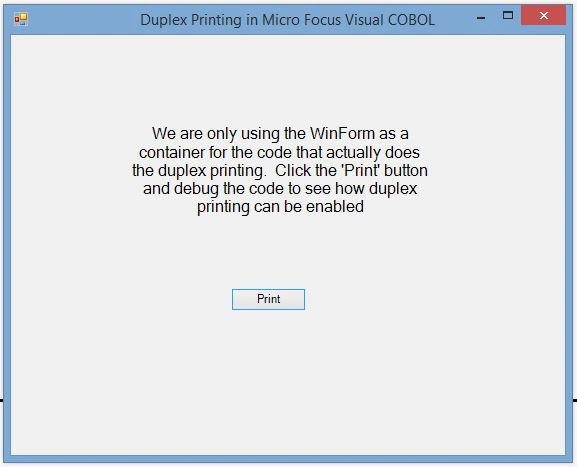
Our form is a very simple screen with a label and button. The button has a ‘Click’ event that will begin our process of setting up the environment to enable duplex printing.
Preparation
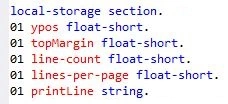
For our example we are going to read in a file that has a sufficient number of pages to generate a multi-page printout. We will need to setup a StreamReader to read the file in. The StreamReader is actually only used to get our data for printing, it isn’t necessary to enable the duplex printing. We also need to establish some variables that are going to be used by the PrintDocument methods when invoked. The variables we will need apply to the font to be used when the document is printed as well as what color the document will be printed in. These variables will be established as ‘global’ variables for the class, established in the class working-storage section as:
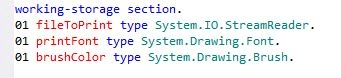
Notice the use of the ‘type’ identifier? This construct enables us to define variables as different object types as used in .NET. Distributed developers have been using this technique for a long time and Micro Focus has enabled this technique in Visual COBOL.
Button Click Event
Our process is started when the user clicks on the button, or a button-click-event. When this occurs the first thing we are going to do is a bit more housekeeping to prepare for the actual print event. The housekeeping details we are going to take care of are select the file we are going to print, set the font to be used for printing and set the font color. These three tasks are accomplished with the following code:

We next need to set the duplexing mode for the document to be printed. This is done in the ‘printDocument’ object we added to the form. Taking a look at the properties for this control show we have used the default name of ‘printDocument1’.
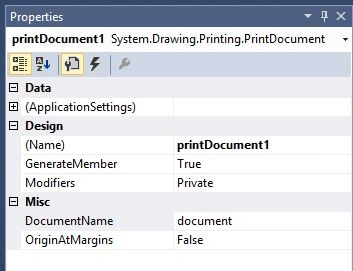
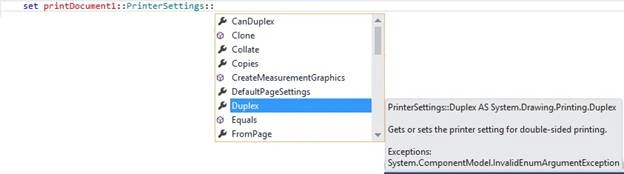
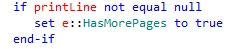
The properties we are going to set are not visible in the standard properties window. This is because the properties are actually part of an inherited class (PrinterSettings) the printDocument object uses. Let’s look at the code to set the duplex mode and then explain.







Debasis SahaPosted Jun 24, 2016, 9:04 AM
Good One..
RajaPosted Jun 24, 2016, 12:14 AM
Good One...
Kuppurasu NagarajPosted Jun 23, 2016, 1:25 PM
Nice Sharing..
Prasanna MuraliPosted Jun 23, 2016, 10:05 AM
Nice one
Rick MalekPosted Jun 23, 2016, 9:35 AM
Brendan, I see that and apologize. Not sure what happened to it. I'll reattach as soon as possible
Brendan GriffinPosted Jun 22, 2016, 10:29 AM
I would like to download this sample but I do not see the link to the zip file...
Asfend YarPosted Feb 29, 2016, 1:37 PM
Is visual studio supports cobol language
Asfend YarPosted Feb 29, 2016, 1:37 PM
good
Santhakumar MunuswamyPosted Jan 27, 2016, 1:51 PM
Thanks for nice share
Ankit BansalPosted Jan 27, 2016, 6:15 AM
Nice share..thanks..
Mohammed IbrahimPosted Jan 27, 2016, 3:23 AM
nice