Introduction
In this article, I am going to explain how to create a web application in ASP.NET Core using Razor pages and ADO.NET. We will be creating a sample Employees Record Management System.
We will be using Visual Studio 2017 (Version 15.3.5 or above) and SQL Server.
Prerequisites
- Install .NET Core 2.0.0 or above SDK from here.
- Install Visual Studio 2017 Community Edition (Version 15.3.5 or above) from here.
Now, we are ready to proceed with the creation of our web application.
Creating Table and Stored Procedures
We will be using a DB table to store all the records of employees.
Open SQL Server and use the following script to create tblEmployee table.
- Create table tblEmployee(
- EmployeeId int IDENTITY(1,1) NOT NULL,
- Name varchar(20) NULL,
- City varchar(20) NULL,
- Department varchar(20) NULL,
- Gender varchar(6) NULL
- )
Now, we will create stored procedures to add, delete, update, and get employee data.
To insert an Employee Record
- Create procedure spAddEmployee
- (
- @Name VARCHAR(20),
- @City VARCHAR(20),
- @Department VARCHAR(20),
- @Gender VARCHAR(6)
- )
- as
- Begin
- Insert into tblEmployee (Name,City,Department, Gender)
- Values (@Name,@City,@Department, @Gender)
- End
To update an Employee Record
- Create procedure spUpdateEmployee
- (
- @EmpId INTEGER ,
- @Name VARCHAR(20),
- @City VARCHAR(20),
- @Department VARCHAR(20),
- @Gender VARCHAR(6)
- )
- as
- begin
- Update tblEmployee
- set Name=@Name,
- City=@City,
- Department=@Department,
- Gender=@Gender
- where EmployeeId=@EmpId
- End
To delete an Employee Record
- Create procedure spDeleteEmployee
- (
- @EmpId int
- )
- as
- begin
- Delete from tblEmployee where EmployeeId=@EmpId
- End
To view all Employee Records
- Create procedure spGetAllEmployees
- as
- Begin
- Select *
- from tblEmployee
- End
Now, our Database part is completed. So, we will move on to create the web application with Visual Studio.
Create Razor Page Web Application
Open Visual Studio and select File >> New >> Project.
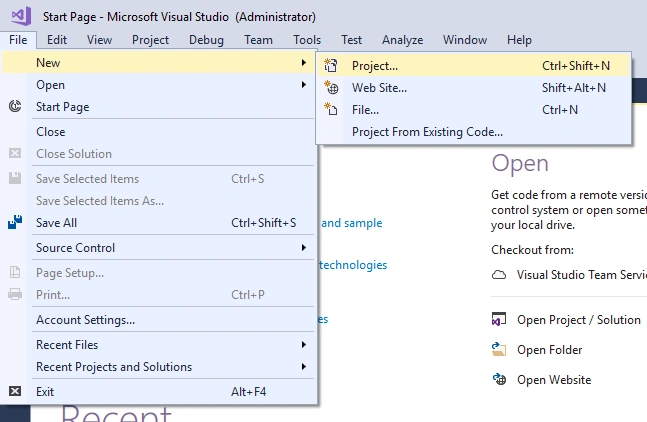
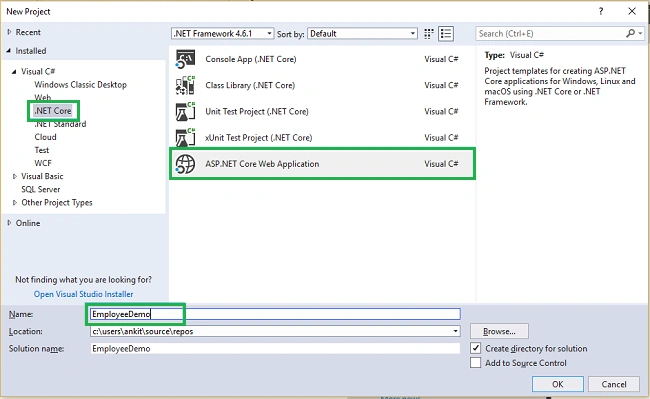
After selecting the project, a new dialog will open. Select .NET Core inside Visual C# menu from the left panel.
Then, select “ASP.NET Core Web Application” from available project types. Put the name of project as EmployeeDemo and press OK. Refer to this image.
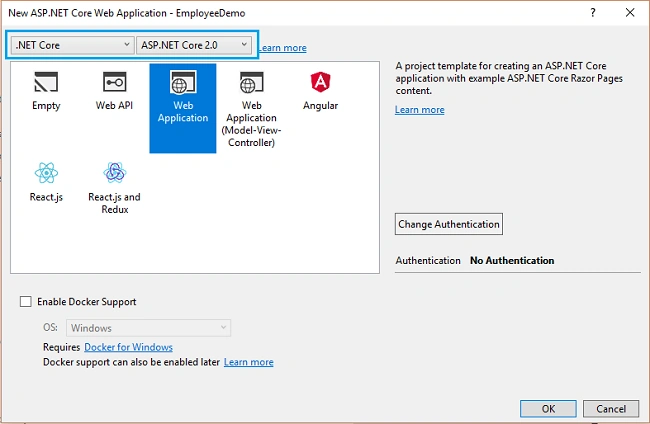
After clicking on OK, a new dialog will open asking to select the project template. You can observe two drop-down menus at the top left of the template window. Select “.NET Core” and “ASP.NET Core 2.0” from these dropdowns. Then, select “Web application” template.
Now, our project will open. You can see the project files in Solution Explorer. Note that there are no Model, View, and Controller folders by default but we do have a Pages folder which contains all the default Razor pages. We will be creating our own Razor pages inside this folder.
Adding A Model to the Application
We will add a folder with name Models inside our project. Right click on Project and select Add >> New Folder. A new folder will be created inside the project. Rename it as Models.
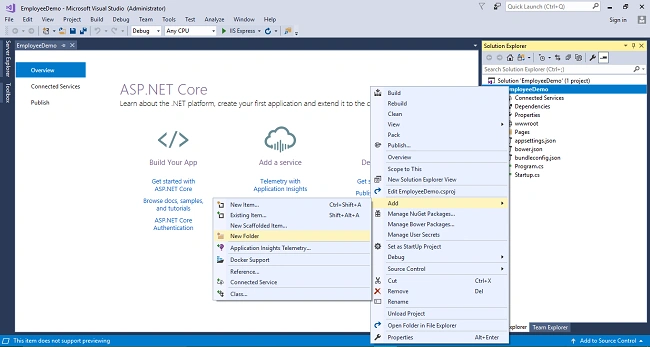
Now, we will be adding our class files to Models folder. Right click on Models folder and select Add >> Class. Name your class Employee.cs. This class will contain our Employee model properties.
Add one more class file to Models folder. Name it as EmployeeDataAccessLayer.cs . This class will contain our Database related operations.
Now, the Models folders has the following structure.
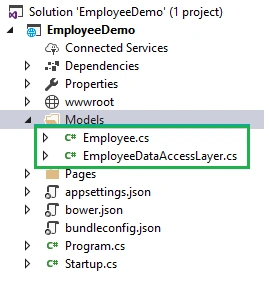
Open Employee.cs and put the following code in it. Since we are adding the required validators to the fields of Employee class, so we need to use System.ComponentModel.DataAnnotations at the top.
- using System;
- using System.Collections.Generic;
- using System.Linq;
- using System.Threading.Tasks;
- using System.ComponentModel.DataAnnotations;
-
- namespace EmployeeDemo.Models
- {
- public class Employee
- {
- public int ID { get; set; }
- [Required]
- public string Name { get; set; }
- [Required]
- public string Gender { get; set; }
- [Required]
- public string Department { get; set; }
- [Required]
- public string City { get; set; }
- }
- }
Open EmployeeDataAccessLayer.cs and put the following code to handle database operations. Make sure to put your connection string.
- using System;
- using System.Collections.Generic;
- using System.Data;
- using System.Data.SqlClient;
-
- namespace EmployeeDemo.Models
- {
- public class EmployeeDataAccessLayer
- {
- string connectionString = "Your Connection string here";
-
-
- public IEnumerable<Employee> GetAllEmployees()
- {
- List<Employee> lstemployee = new List<Employee>();
-
- using (SqlConnection con = new SqlConnection(connectionString))
- {
- SqlCommand cmd = new SqlCommand("spGetAllEmployees", con);
- cmd.CommandType = CommandType.StoredProcedure;
-
- con.Open();
- SqlDataReader rdr = cmd.ExecuteReader();
-
- while (rdr.Read())
- {
- Employee employee = new Employee();
-
- employee.ID = Convert.ToInt32(rdr["EmployeeID"]);
- employee.Name = rdr["Name"].ToString();
- employee.Gender = rdr["Gender"].ToString();
- employee.Department = rdr["Department"].ToString();
- employee.City = rdr["City"].ToString();
-
- lstemployee.Add(employee);
- }
- con.Close();
- }
- return lstemployee;
- }
-
-
- public void AddEmployee(Employee employee)
- {
- using (SqlConnection con = new SqlConnection(connectionString))
- {
- SqlCommand cmd = new SqlCommand("spAddEmployee", con);
- cmd.CommandType = CommandType.StoredProcedure;
-
- cmd.Parameters.AddWithValue("@Name", employee.Name);
- cmd.Parameters.AddWithValue("@Gender", employee.Gender);
- cmd.Parameters.AddWithValue("@Department", employee.Department);
- cmd.Parameters.AddWithValue("@City", employee.City);
-
- con.Open();
- cmd.ExecuteNonQuery();
- con.Close();
- }
- }
-
-
- public void UpdateEmployee(Employee employee)
- {
- using (SqlConnection con = new SqlConnection(connectionString))
- {
- SqlCommand cmd = new SqlCommand("spUpdateEmployee", con);
- cmd.CommandType = CommandType.StoredProcedure;
-
- cmd.Parameters.AddWithValue("@EmpId", employee.ID);
- cmd.Parameters.AddWithValue("@Name", employee.Name);
- cmd.Parameters.AddWithValue("@Gender", employee.Gender);
- cmd.Parameters.AddWithValue("@Department", employee.Department);
- cmd.Parameters.AddWithValue("@City", employee.City);
-
- con.Open();
- cmd.ExecuteNonQuery();
- con.Close();
- }
- }
-
-
- public Employee GetEmployeeData(int? id)
- {
- Employee employee = new Employee();
-
- using (SqlConnection con = new SqlConnection(connectionString))
- {
- string sqlQuery = "SELECT * FROM tblEmployee WHERE EmployeeID= " + id;
- SqlCommand cmd = new SqlCommand(sqlQuery, con);
-
- con.Open();
- SqlDataReader rdr = cmd.ExecuteReader();
-
- while (rdr.Read())
- {
- employee.ID = Convert.ToInt32(rdr["EmployeeID"]);
- employee.Name = rdr["Name"].ToString();
- employee.Gender = rdr["Gender"].ToString();
- employee.Department = rdr["Department"].ToString();
- employee.City = rdr["City"].ToString();
- }
- }
- return employee;
- }
-
-
- public void DeleteEmployee(int? id)
- {
-
- using (SqlConnection con = new SqlConnection(connectionString))
- {
- SqlCommand cmd = new SqlCommand("spDeleteEmployee", con);
- cmd.CommandType = CommandType.StoredProcedure;
-
- cmd.Parameters.AddWithValue("@EmpId", id);
-
- con.Open();
- cmd.ExecuteNonQuery();
- con.Close();
- }
- }
- }
- }
Now, we will proceed to create our Razor pages.
Adding Razor Pages
First, we will be creating a page to create Employee records and as I have mentioned we will be adding our Razor pages inside Pages folder, just right click on Pages folder and select Add >> New item.
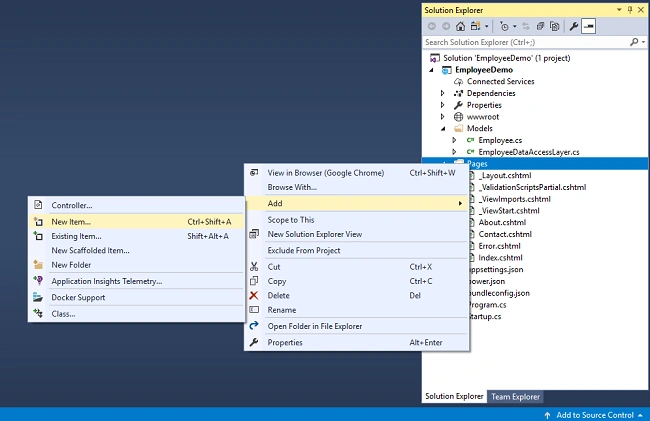
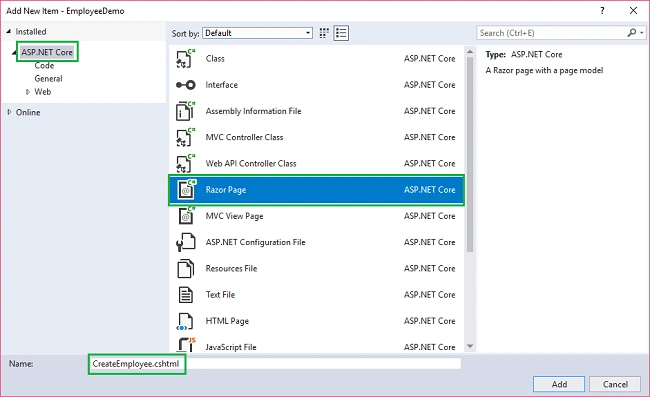
A new dialog box will open. Select ASP.NET Core from the left panel, then select “Razor Pages” from templates panel, and put the name as
CreateEmployee.cshtml. Press OK.
Now, you can observe that our Razor page has been added to Pages folder. You can also observe that the Razor page has code behind file with extension .cshtml.cs also, just the same as webforms (aspx.cs). The code behind page will be used to handle business logic.
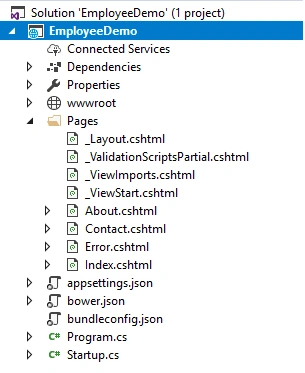
Similarly, we will add 4 more Razor pages to Pages folder, DeleteEmployee.cshtml, EditEmployee.cshtml, EmployeeDetails.cshtml andEmployeeIndex.cshtml to perform the CRUD operations.
Now, our Pages folder will look like this showing all the five newly created Razor pages.
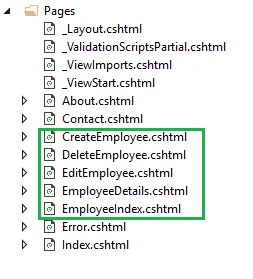
Now, the pages have been created, so we will put codes in them.
Create Employee
In this Razor page, we will be creating a new employee record.
Open CreateEmployee.cshtml and put the following code in it.
- @page
- @model CreateEmployeeModel
- @{
- ViewData["Title"] = "Create";
- }
-
- <h2>Create Employee Record</h2>
- <hr />
- <div class="row">
- <div class="col-md-4">
- <form method="post">
- <div asp-validation-summary="ModelOnly" class="text-danger"></div>
- <div class="form-group">
- <label asp-for="employee.Name" class="control-label"></label>
- <input asp-for="employee.Name" class="form-control" />
- <span asp-validation-for="employee.Name" class="text-danger"></span>
- </div>
- <div class="form-group">
- <label asp-for="employee.Gender" class="control-label"></label>
- <select asp-for="employee.Gender" class="form-control">
- <option value="">-- Select Gender --</option>
- <option value="Male">Male</option>
- <option value="Female">Female</option>
- </select>
- <span asp-validation-for="employee.Gender" class="text-danger"></span>
- </div>
- <div class="form-group">
- <label asp-for="employee.Department" class="control-label"></label>
- <input asp-for="employee.Department" class="form-control" />
- <span asp-validation-for="employee.Department" class="text-danger"></span>
- </div>
- <div class="form-group">
- <label asp-for="employee.City" class="control-label"></label>
- <input asp-for="employee.City" class="form-control" />
- <span asp-validation-for="employee.City" class="text-danger"></span>
- </div>
- <div class="form-group">
- <input type="submit" value="Create" class="btn btn-default" />
- </div>
- </form>
- </div>
- </div>
- <div>
- <a asp-page="EmployeeIndex">Back to List</a>
- </div>
- @section Scripts {
- @{await Html.RenderPartialAsync("_ValidationScriptsPartial");}
- }
Open CreateEmployee.cshtml.cs and put the following code in it.
- using System;
- using System.Collections.Generic;
- using Microsoft.AspNetCore.Mvc;
- using Microsoft.AspNetCore.Mvc.RazorPages;
- using EmployeeDemo.Models;
-
- namespace EmployeeDemo.Pages
- {
- public class CreateEmployeeModel : PageModel
- {
- EmployeeDataAccessLayer objemployee = new EmployeeDataAccessLayer();
-
- [BindProperty]
- public Employee employee { get; set; }
-
- public ActionResult OnPost()
- {
- if (!ModelState.IsValid)
- {
- return Page();
- }
-
- objemployee.AddEmployee(employee);
-
- return RedirectToPage("./EmployeeIndex");
- }
- }
- }
You can observe that we are using [BindProperty] attribute on employee object we have created in CreateEmployee.cshtml.cs file. This will help to capture the data posted by the form in our object. If we remove [BindProperty] attribute, then the employee object will be null as it won’t capture any data from post request.
Employee index
In this Razor page, we will be displaying all the employee records available in the database. Additionally, we will be providing action methods Edit, Delete, and View on each record.
Open
EmployeeIndex.cshtml and put the following code in it.
- @page
- @model EmployeeIndexModel
- @{
- ViewData["Title"] = "Index";
- }
- <h2>Index</h2>
- <p>
- <a asp-page="CreateEmployee">Create New</a>
- </p>
- <table class="table">
- <thead>
- <tr>
- <th>
- @Html.DisplayNameFor(model => model.employee[0].ID)
- </th>
- <th>
- @Html.DisplayNameFor(model => model.employee[0].Name)
- </th>
- <th>
- @Html.DisplayNameFor(model => model.employee[0].Gender)
- </th>
- <th>
- @Html.DisplayNameFor(model => model.employee[0].Department)
- </th>
- <th>
- @Html.DisplayNameFor(model => model.employee[0].City)
- </th>
- <th></th>
- </tr>
- </thead>
- <tbody>
- @foreach (var item in Model.employee)
- {
- <tr>
- <td>
- @Html.DisplayFor(modelItem => item.ID)
- </td>
- <td>
- @Html.DisplayFor(modelItem => item.Name)
- </td>
- <td>
- @Html.DisplayFor(modelItem => item.Gender)
- </td>
- <td>
- @Html.DisplayFor(modelItem => item.Department)
- </td>
- <td>
- @Html.DisplayFor(modelItem => item.City)
- </td>
- <td>
- <a asp-page="./EditEmployee" asp-route-id="@item.ID">Edit</a> |
- <a asp-page="./EmployeeDetails" asp-route-id="@item.ID">Details</a> |
- <a asp-page="./DeleteEmployee" asp-route-id="@item.ID">Delete</a>
- </td>
- </tr>
- }
- </tbody>
- </table>
Open EmployeeIndex.cshtml.cs and put the following code in it.
- using System;
- using System.Collections.Generic;
- using System.Linq;
- using System.Threading.Tasks;
- using Microsoft.AspNetCore.Mvc;
- using Microsoft.AspNetCore.Mvc.RazorPages;
- using EmployeeDemo.Models;
-
- namespace EmployeeDemo.Pages
- {
- public class EmployeeIndexModel : PageModel
- {
- EmployeeDataAccessLayer objemployee = new EmployeeDataAccessLayer();
- public List<Employee> employee { get; set; }
-
- public void OnGet()
- {
- employee = objemployee.GetAllEmployees().ToList();
- }
- }
- }
Employee Details
In this Razor page, we will be displaying the details of a particular employee. This page can be invoked by clicking on Details action method on EmployeeIndex page.
Open EmployeeDetails.cshtml and put the following code in it.
- @page
- @model EmployeeDetailsModel
-
- @{
- ViewData["Title"] = "Details";
- }
-
- <div>
- <h4>Employee</h4>
- <hr />
- <dl class="dl-horizontal">
- <dt>
- @Html.DisplayNameFor(model => model.employee.Name)
- </dt>
- <dd>
- @Html.DisplayFor(model => model.employee.Name)
- </dd>
- <dt>
- @Html.DisplayNameFor(model => model.employee.Gender)
- </dt>
- <dd>
- @Html.DisplayFor(model => model.employee.Gender)
- </dd>
- <dt>
- @Html.DisplayNameFor(model => model.employee.Department)
- </dt>
- <dd>
- @Html.DisplayFor(model => model.employee.Department)
- </dd>
- <dt>
- @Html.DisplayNameFor(model => model.employee.City)
- </dt>
- <dd>
- @Html.DisplayFor(model => model.employee.City)
- </dd>
- </dl>
- </div>
- <div>
- <a asp-page="./EditEmployee" asp-route-id="@Model.employee.ID">Edit</a> |
- <a asp-page="./EmployeeIndex">Back to List</a>
- </div>
Open EmployeeDetails.cshtml.cs and put the following code in it.
- using System;
- using System.Collections.Generic;
- using System.Linq;
- using System.Threading.Tasks;
- using Microsoft.AspNetCore.Mvc;
- using Microsoft.AspNetCore.Mvc.RazorPages;
- using EmployeeDemo.Models;
-
- namespace EmployeeDemo.Pages
- {
- public class EmployeeDetailsModel : PageModel
- {
- EmployeeDataAccessLayer objemployee = new EmployeeDataAccessLayer();
- public Employee employee { get; set; }
-
- public ActionResult OnGet(int? id)
- {
- if (id == null)
- {
- return NotFound();
- }
- employee = objemployee.GetEmployeeData(id);
-
- if (employee == null)
- {
- return NotFound();
- }
- return Page();
- }
- }
- }
Edit Employee
This Razor page will enable us to edit the record of an existing employee. This page can be invoked by clicking on Edit action method on EmployeeIndex page.
Open EditEmployee.cshtml and put the following code in it.
- @page
- @model EditEmployeeModel
- @{
- ViewData["Title"] = "Edit";
- }
-
- <h2>Edit</h2>
- <h4>Employee</h4>
- <hr />
- <div class="row">
- <div class="col-md-4">
- <form method="post">
- <div asp-validation-summary="ModelOnly" class="text-danger"></div>
- <input type="hidden" asp-for="employee.ID" />
- <div class="form-group">
- <label asp-for="employee.Name" class="control-label"></label>
- <input asp-for="employee.Name" class="form-control" />
- <span asp-validation-for="employee.Name" class="text-danger"></span>
- </div>
- <div class="form-group">
- <label asp-for="employee.Gender" class="control-label"></label>
- <select asp-for="employee.Gender" class="form-control">
- <option value="">-- Select Gender --</option>
- <option value="Male">Male</option>
- <option value="Female">Female</option>
- </select>
- <span asp-validation-for="employee.Gender" class="text-danger"></span>
- </div>
- <div class="form-group">
- <label asp-for="employee.Department" class="control-label"></label>
- <input asp-for="employee.Department" class="form-control" />
- <span asp-validation-for="employee.Department" class="text-danger"></span>
- </div>
- <div class="form-group">
- <label asp-for="employee.City" class="control-label"></label>
- <input asp-for="employee.City" class="form-control" />
- <span asp-validation-for="employee.City" class="text-danger"></span>
- </div>
- <div class="form-group">
- <input type="submit" value="Save" class="btn btn-default" />
- </div>
- </form>
- </div>
- </div>
- <div>
- <a asp-page="./EmployeeIndex">Back to List</a>
- </div>
- @section Scripts {
- @{await Html.RenderPartialAsync("_ValidationScriptsPartial");}
- }
Open EditEmployee.cshtml.cs and put the following code in it.
- using System;
- using System.Collections.Generic;
- using System.Linq;
- using System.Threading.Tasks;
- using Microsoft.AspNetCore.Mvc;
- using Microsoft.AspNetCore.Mvc.RazorPages;
- using EmployeeDemo.Models;
-
- namespace EmployeeDemo.Pages
- {
- public class EditEmployeeModel : PageModel
- {
- EmployeeDataAccessLayer objemployee = new EmployeeDataAccessLayer();
-
- [BindProperty]
- public Employee employee { get; set; }
-
- public ActionResult OnGet(int? id)
- {
- if (id == null)
- {
- return NotFound();
- }
- employee = objemployee.GetEmployeeData(id);
-
- if (employee == null)
- {
- return NotFound();
- }
- return Page();
- }
-
- public ActionResult OnPost()
- {
- if (!ModelState.IsValid)
- {
- return Page();
- }
- objemployee.UpdateEmployee(employee);
-
- return RedirectToPage("./EmployeeIndex");
- }
- }
- }
Delete Employee
This Razor page will enable us to delete the record of an existing employee. This page can be invoked by clicking on Delete action method on EmployeeIndex page
Open DeleteEmployee.cshtml and put the following code in it.
- @page
- @model DeleteEmployeeModel
-
- @{
- ViewData["Title"] = "Delete";
- }
-
- <h2>Delete</h2>
- <h3>Are you sure you want to delete this?</h3>
- <div>
- <h4>Employee</h4>
- <hr />
- <dl class="dl-horizontal">
- <dt>
- @Html.DisplayNameFor(model => model.employee.Name)
- </dt>
- <dd>
- @Html.DisplayFor(model => model.employee.Name)
- </dd>
- <dt>
- @Html.DisplayNameFor(model => model.employee.Gender)
- </dt>
- <dd>
- @Html.DisplayFor(model => model.employee.Gender)
- </dd>
- <dt>
- @Html.DisplayNameFor(model => model.employee.Department)
- </dt>
- <dd>
- @Html.DisplayFor(model => model.employee.Department)
- </dd>
- <dt>
- @Html.DisplayNameFor(model => model.employee.City)
- </dt>
- <dd>
- @Html.DisplayFor(model => model.employee.City)
- </dd>
- </dl>
-
- <form method="post">
- <input type="hidden" asp-for="employee.ID" />
- <input type="submit" value="Delete" class="btn btn-default" /> |
- <a asp-page="./EmployeeIndex">Back to List</a>
- </form>
- </div>
Open DeleteEmployee.cshtml.cs and put the following code in it.
- using System;
- using System.Collections.Generic;
- using System.Linq;
- using System.Threading.Tasks;
- using Microsoft.AspNetCore.Mvc;
- using Microsoft.AspNetCore.Mvc.RazorPages;
- using EmployeeDemo.Models;
-
- namespace EmployeeDemo.Pages
- {
- public class DeleteEmployeeModel : PageModel
- {
- EmployeeDataAccessLayer objemployee = new EmployeeDataAccessLayer();
-
- public Employee employee { get; set; }
-
- public ActionResult OnGet(int? id)
- {
- if (id == null)
- {
- return NotFound();
- }
- employee = objemployee.GetEmployeeData(id);
-
- if (employee == null)
- {
- return NotFound();
- }
- return Page();
- }
-
- public ActionResult OnPost(int? id)
- {
- if (id == null)
- {
- return NotFound();
- }
-
- objemployee.DeleteEmployee(id);
-
- return RedirectToPage("./EmployeeIndex");
- }
- }
- }
Note that we have two methods, OnGet and OnPost in DeleteEmployee.cshtml.cs. When we click on Delete link on the EmployeeIndex page, it will send a Get request and return a View of the employee using OnGet method. When we click on Delete button on this page, it will send a Post request to delete the record which is handled by the OnPost method. Performing a delete operation in response to a Get request (or for that matter, performing an edit operation, create operation, or any other operation that changes data) opens up a security hole. Hence we have two separate methods.
And that’s it. We have created our first ASP.NET Core application using Razor pages. Now, we will proceed to perform CRUD operations.
Launch the application and to access any page, put the Razor page name in the URL. Open EmployeeIndex page as http://localhost:xxxx/EmployeeIndex
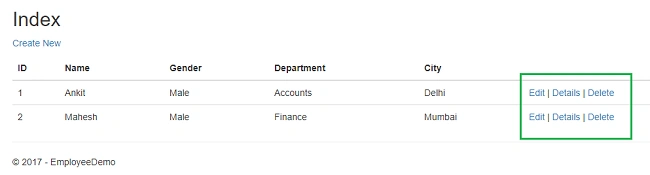
You can see the page as shown below.
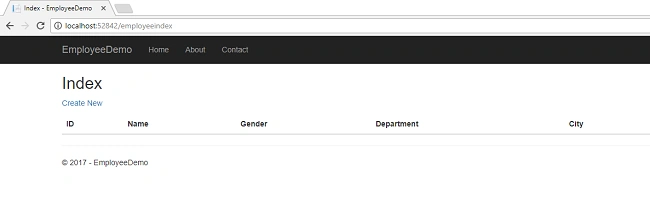
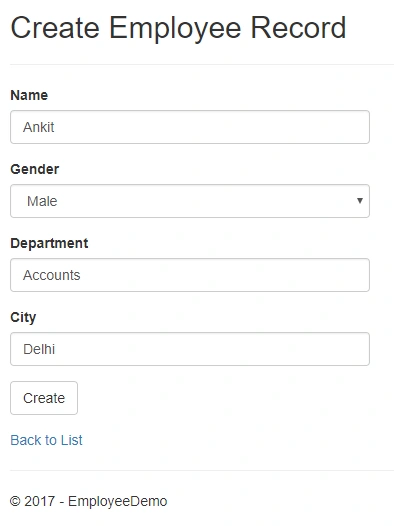
Click on CreateNew to create a new Employee record. Add a new Employee record as shown in the image below.
If we miss the data in any field while creating employee record, we will get a required field validation error message.
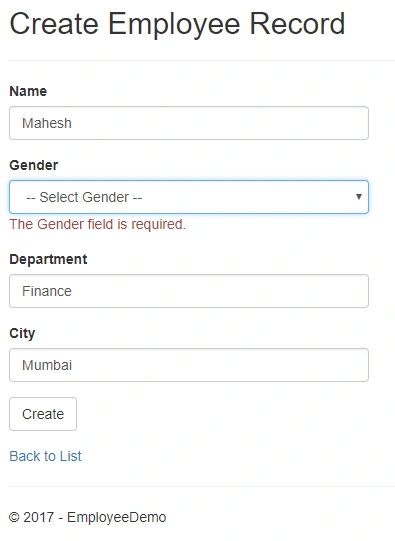
After inserting the data in all the fields, click on "Create" button. The new employee record will be created and you will be redirected to the EmployeeIndex page, having records of all the employees. Here, we can also see action methods Edit, Details and Delete.
The corresponding records in Database will be like this
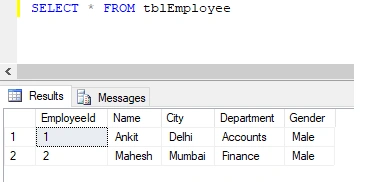
If we want to edit an existing employee record, then click on Edit action link. It will open EditEmployee page as below where we can change the employee data.
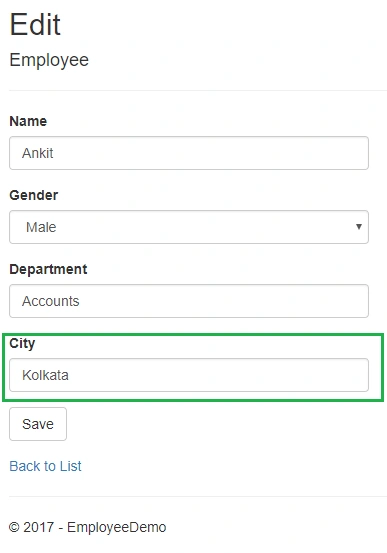
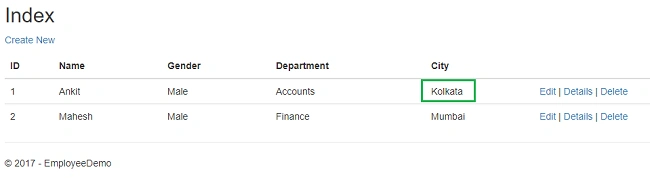
Here, we have changed the city of an employee named Ankit from Delhi to Kolkata. Click on "Save" to return to the EmployeeIndex page to see the updated changes as highlighted in the image below.
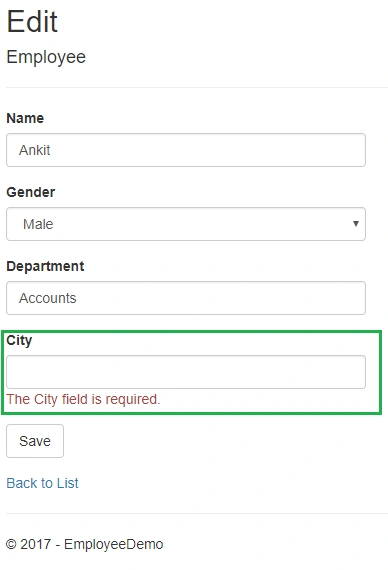
If we miss any fields while editing employee records, then the Edit page will also throw required field validation error message.
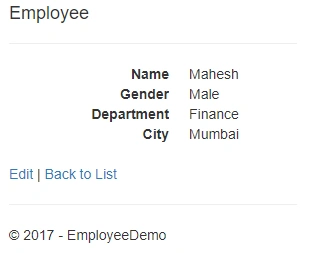
If you want to see the details of any Employee, then click on Details action link, which will open the EmployeeDetails page as shown in the image below.
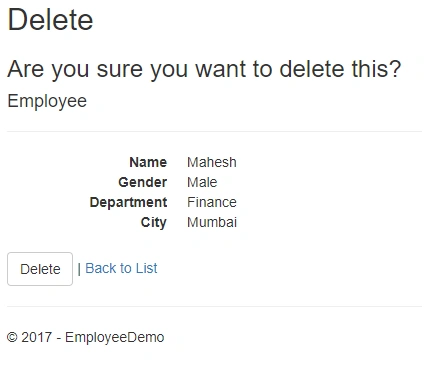
Click on "Back to List" to go back to the EmployeeIndex page. Now, we will perform Delete operation on an employee named Mahesh. Click on Delete action link which will open DeleteEmployee page asking for a confirmation to delete.
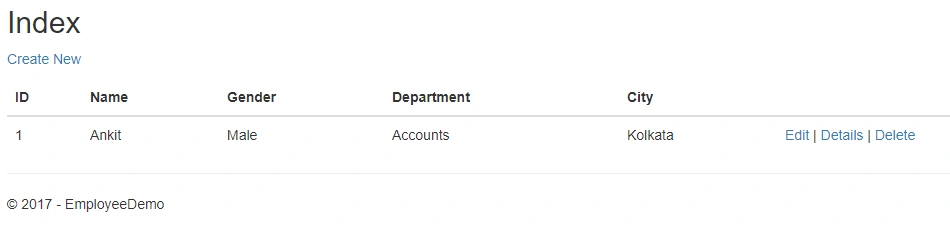
Once we click on Delete button, the employee record gets deleted and we will be redirected to the Employee Index page. Here, we can see that the employee with name Mahesh has been removed from our record.
Conclusion
We have learned how to create a Razor page web application with ASP.NET Core using ADO.NET. We have also performed CRUD operations on it. Please refer to the attached code for better understanding.
See Also


manu vPosted Dec 20, 2019, 6:43 AM
Hi Ankit, i have a question... How to pass multiple models / multiple List objects from different get handlers from the same page to Razor page..?? Need your help badly ...I have to display two sections on the same page with two different data coming from two different model list...
bob kennellyPosted Nov 16, 2019, 8:33 PM
Excellent example, very straight forward and understandable!
Babu ThomasPosted Sep 26, 2019, 1:05 AM
Very good example for beginners
Benjamin PPosted Aug 15, 2019, 2:02 PM
Hi Ankit, great article. Very helpful. Just one quick question and hope not too much trouble. How would we add a search and filter and sort the columns?
JOhn WilsonPosted Jul 12, 2018, 4:23 AM
Hi. I've built an app based on this article and now I want to put a sort, search box and pagination into it. Is there an article out there to help me do this?
Tridip BhattacharjeePosted Feb 5, 2018, 3:54 AM
I like to know what is the difference between two template called asp.net mvc and razor page? when i should choose razor page instead of asp.net mvc template?
Tridip BhattacharjeePosted Feb 5, 2018, 3:16 AM
It will be good if you share bit info like what is razor page and how this template is different from asp.net mvc template ? thanks
Junk JunkPosted Jan 30, 2018, 8:07 PM
This is really a great article! It is simple to follow and easy to learn from. Would you happen to have a working example of pulling the connection string from the appsettings.json file?