

Introduction
In our previous articles, we built an AI-powered task management agent using Microsoft Agent Framework, secured it with Azure Content Safety, added production-grade observability, and separated the frontend with Next.js. However, all those implementations used a traditional request-response pattern—the user waits for the complete response before seeing anything.
In this article, we'll transform our agent into a real-time streaming experience, similar to ChatGPT. Users will see text appearing progressively as the AI generates it, creating a more engaging and responsive user experience.
What you'll learn
How Server-Sent Events (SSE) enable real-time streaming from backend to frontend
Implementing a custom AG-UI endpoint with state persistence
Building progressive UI rendering in React (ChatGPT-like experience)
Managing conversation continuity with serialized state
Handling content filter events gracefully in the streaming flow
The Problem: Waiting for Complete Responses
In v2.0.0 of TaskAgent, the chat flow looked like this:
User sends message → Backend processes (3-5 seconds) → User sees complete responseDuring those seconds of processing, the user stares at a loading spinner. For complex tasks that involve multiple function calls (create task, update task, get summary), this wait time compounds. Users have no visibility into what's happening.
The solution? Stream the response as it's generated.
Understanding Server-Sent Events (SSE)
Server-Sent Events provide a standardized way for servers to push updates to clients over a single HTTP connection. Unlike WebSockets, SSE is:
Unidirectional: Server → Client only (perfect for AI streaming)
Built on HTTP: Works with existing infrastructure, proxies, and load balancers
Auto-reconnect: Browser handles reconnection automatically
Simple protocol: Plain text format, easy to debug
The protocol is remarkably simple:
HTTP/1.1 200 OK
Content-Type: text/event-stream
Cache-Control: no-cache
Connection: keep-alive

data: {"type":"TEXT_MESSAGE_CONTENT","delta":"Hello"}

data: {"type":"TEXT_MESSAGE_CONTENT","delta":" world!"}

data: [DONE]
Each line starting with data: is an event. The frontend parses these incrementally.

Browser DevTools Network tab showing SSE connection with streaming events
Architecture Overview
Our streaming implementation consists of three main components:
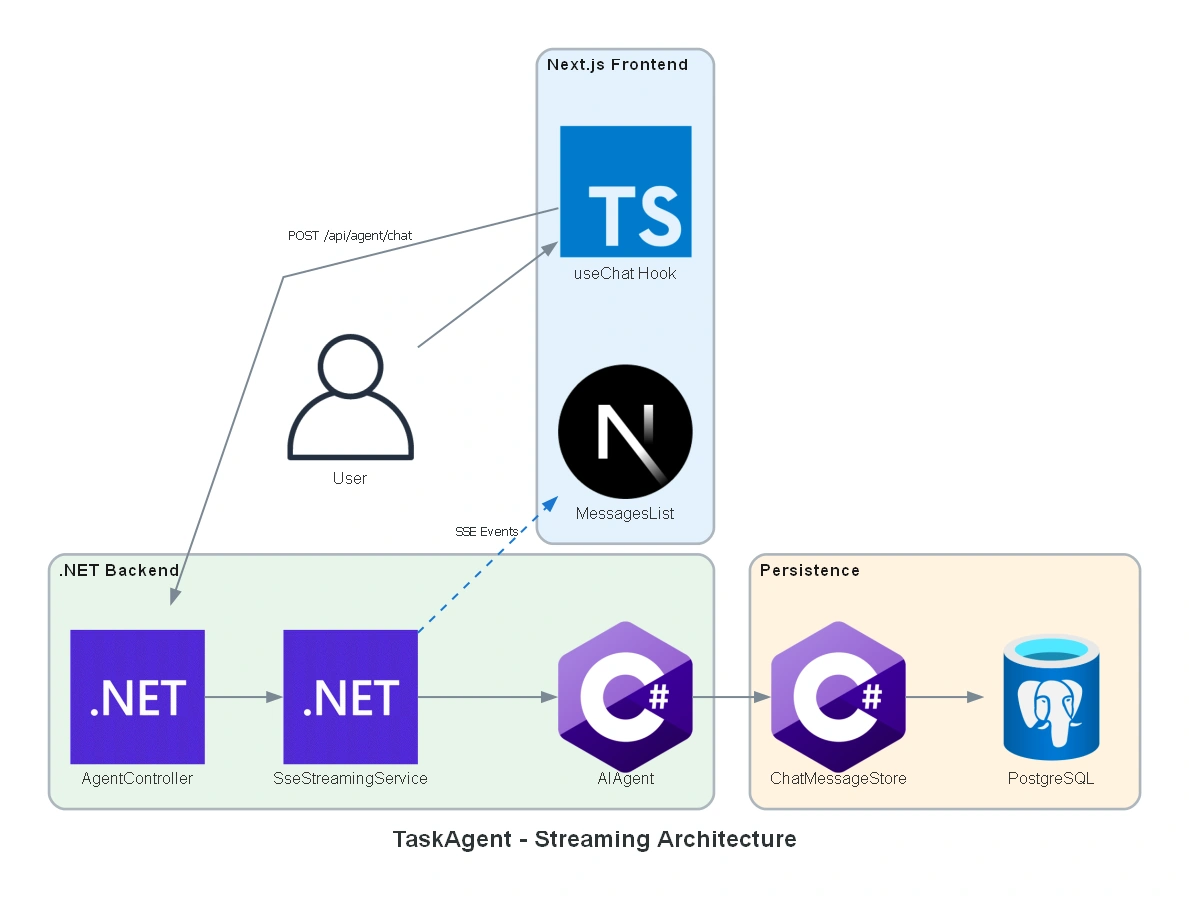
Components
| Layer | Component | Responsibility |
|---|---|---|
| Frontend | useChat Hook | Manages state, sends requests, processes callbacks |
| Frontend | MessagesList | Renders messages with progressive updates |
| Backend | AgentController | Entry point, configures SSE headers |
| Backend | SseStreamingService | Orchestrates streaming to HTTP response |
| Backend | AIAgent | Microsoft Agent Framework with function tools |
| Persistence | ChatMessageStore | Factory pattern for PostgreSQL persistence |
Backend Implementation
Event Types
First, we define the SSE event types our agent will emit:
public static class AgentConstants
{
    // SSE protocol headers
    public const string SSE_CONTENT_TYPE = "text/event-stream";
    public const string SSE_CACHE_CONTROL = "no-cache";
    public const string SSE_CONNECTION = "keep-alive";

    // Event types - AG-UI compatible naming
    public const string EVENT_TEXT_MESSAGE_CONTENT = "TEXT_MESSAGE_CONTENT";
    public const string EVENT_TOOL_CALL_START = "TOOL_CALL_START";
    public const string EVENT_TOOL_CALL_RESULT = "TOOL_CALL_RESULT";
    public const string EVENT_THREAD_STATE = "THREAD_STATE";
    public const string EVENT_CONTENT_FILTER = "CONTENT_FILTER";
    public const string EVENT_RUN_ERROR = "RUN_ERROR";

    // AG-UI Lifecycle events (for real-time status updates)
    public const string EVENT_STEP_STARTED = "STEP_STARTED";
    public const string EVENT_STATUS_UPDATE = "STATUS_UPDATE";
    public const string EVENT_STEP_FINISHED = "STEP_FINISHED";
}
These event types follow the AG-UI protocol naming convention, making our implementation compatible with CopilotKit and other AG-UI clients. The STEP_* events provide real-time visibility into function execution.
The Agent Controller
The AgentController is the entry point for streaming requests:
[HttpPost("chat")]
public async Task ChatAsync(
    [FromBody] AgentRequest request,
    CancellationToken cancellationToken)
{
    // Configure SSE headers BEFORE any response is written
    ConfigureSseResponse();

    string? serializedState = request.SerializedState;

    try
    {
        List<ChatMessage> messages = request.Messages?
            .Select(MapToChatMessage)
            .ToList() ?? [];

        await _streamingService.StreamToResponseAsync(
            Response,
            messages,
            serializedState,
            cancellationToken);
    }
    catch (ClientResultException ex) when (IsContentFilterError(ex))
    {
        // Content filter - send event but maintain conversation continuity
        await HandleContentFilterAsync(serializedState, cancellationToken);
    }
}
Key insight: We configure SSE headers before writing any content. Once we call ConfigureSseResponse(), we commit to the SSE protocol—no turning back to JSON error responses.
SSE Streaming Service
The SseStreamingService orchestrates the streaming flow:
public async Task StreamToResponseAsync(
    HttpResponse response,
    IEnumerable<ChatMessage> messages,
    string? serializedState,
    CancellationToken cancellationToken)
{
    ConfigureSseResponse(response);

    // Stream agent responses
    await foreach (var update in _agentStreamingService.StreamResponseAsync(
        messages, serializedState, cancellationToken))
    {
        string eventJson = SerializeEvent(update);
        await WriteEventAsync(response, eventJson, cancellationToken);
    }

    // Always send thread state for conversation continuity
    var thread = _agentStreamingService.GetCurrentThread();
    if (thread != null)
    {
        await SendThreadStateEventAsync(response, thread, cancellationToken);
    }

    await WriteDoneEventAsync(response, cancellationToken);
}
Event Mapping
The AgentEventMapper translates Microsoft Agent Framework updates to our SSE events:
public static string GetEventType(AgentRunResponseUpdate update)
{
    if (update.Contents.Any(c => c is TextContent))
        return AgentConstants.EVENT_TEXT_MESSAGE_CONTENT;

    if (update.Contents.Any(c => c is FunctionCallContent))
        return AgentConstants.EVENT_TOOL_CALL_START;

    if (update.Contents.Any(c => c is FunctionResultContent))
        return AgentConstants.EVENT_TOOL_CALL_RESULT;

    return AgentConstants.EVENT_RUN_UPDATE;
}
This separation keeps the streaming service focused on HTTP concerns while the mapper handles the Agent Framework specifics.
Dynamic Status Messages with FunctionDescriptionProvider
A key challenge was providing meaningful status updates without hardcoding messages for each function. We solved this by extracting [Description] attributes via reflection:
public class FunctionDescriptionProvider
{
    private readonly ConcurrentDictionary<string, string> _statusMessages = new();

    public void RegisterFunctionType(Type functionType)
    {
        foreach (var method in functionType.GetMethods())
        {
            var descAttr = method.GetCustomAttribute<DescriptionAttribute>();
            if (descAttr != null)
            {
                // Convert "Creates a new task" → "Creating a new task..."
                string status = ConvertToGerund(descAttr.Description);
                _statusMessages.TryAdd(method.Name, status);
            }
        }
    }

    public string GetStatusMessage(string functionName)
        => _statusMessages.GetValueOrDefault(functionName, $"Processing {functionName}...");
}
Why this matters for multi-agent systems:
No hardcoded status mappings per agent
New functions automatically get status messages from their
[Description]Single source of truth: the attribute serves both AI understanding AND user feedback
State Persistence with ChatMessageStore
One challenge with streaming is maintaining conversation continuity. Microsoft Agent Framework provides the ChatMessageStore pattern for this.
The PostgresChatMessageStore
We implemented a custom store that persists messages to PostgreSQL:
public class PostgresChatMessageStore : ChatMessageStore
{
    public string? ThreadDbKey { get; private set; }

    public override async Task AddMessagesAsync(
        IEnumerable<ChatMessage> messages,
        CancellationToken cancellationToken = default)
    {
        // Generate ThreadDbKey on first message
        ThreadDbKey ??= Guid.NewGuid().ToString("N");

        foreach (var message in messages)
        {
            var entity = ConversationMessage.Create(
                messageId: message.MessageId ?? Guid.NewGuid().ToString("N"),
                threadId: ThreadDbKey,
                role: message.Role.ToString(),
                content: SerializeContents(message.Contents));

            await _context.Messages.AddAsync(entity, cancellationToken);
        }

        await _context.SaveChangesAsync(cancellationToken);
    }
}
Factory Pattern for Scoped Persistence
The agent is a singleton, but DbContext must be scoped. We use a factory pattern:
ChatMessageStore MessageStoreFactory(
    ChatClientAgentOptions.ChatMessageStoreFactoryContext ctx)
{
    IServiceScope scope = serviceProvider.CreateScope();
    var dbContext = scope.ServiceProvider
        .GetRequiredService<ConversationDbContext>();

    return new PostgresChatMessageStore(
        dbContext,
        ctx.SerializedState,
        ctx.JsonSerializerOptions);
}
This factory creates a fresh DbContext for each conversation thread, avoiding the "DbContext already disposed" issues common with singleton services.

Database view showing conversation_messages table with thread_id groupings
Frontend Implementation
The useChat Hook
The heart of our frontend streaming is the useChat hook with streaming callbacks:
export function useChat(options: UseChatOptions = {}): UseChatReturn {
    const [messages, setMessages] = useState<ChatMessage[]>([]);
    const [isStreaming, setIsStreaming] = useState(false);
    const [serializedState, setSerializedState] = useState<string | null>(null);

    const streamingMessageIdRef = useRef<string | null>(null);

    const sendMessageInternal = useCallback(async (message: string) => {
        // 1. Add user message immediately (optimistic update)
        const userMessage: ChatMessage = {
            id: `temp-${Date.now()}`,
            role: "user",
            content: message,
            createdAt: new Date().toISOString(),
        };
        setMessages(prev => [...prev, userMessage]);

        // 2. Create placeholder for streaming assistant message
        const streamingMsgId = `streaming-${Date.now()}`;
        streamingMessageIdRef.current = streamingMsgId;

        setMessages(prev => [...prev, {
            id: streamingMsgId,
            role: "assistant",
            content: "", // Will be updated progressively
            createdAt: new Date().toISOString(),
        }]);
        setIsStreaming(true);

        // 3. Define streaming callbacks
        const callbacks: StreamingCallbacks = {
            onTextChunk: (_delta, fullText) => {
                // Progressive UI update - the magic!
                setMessages(prev => prev.map(msg =>
                    msg.id === streamingMessageIdRef.current
                        ? { ...msg, content: fullText }
                        : msg
                ));
            },
            onComplete: (newSerializedState) => {
                setIsStreaming(false);
                if (newSerializedState) {
                    setSerializedState(newSerializedState);
                }
            },
        };

        // 4. Send message with streaming
        await sendMessageWithStreaming(
            { message, serializedState: serializedState || undefined },
            callbacks
        );
    }, [serializedState]);

    // ... rest of hook implementation
}
Key insight: We create a placeholder message with empty content, then update its content progressively as chunks arrive. React's state updates batch efficiently, creating smooth text animation.
Parsing the SSE Stream
The chat service parses the SSE stream:
export async function sendMessageWithStreaming(
    request: SendMessageRequest,
    callbacks: StreamingCallbacks = {}
): Promise<SendMessageResponse> {
    const response = await fetch(`${API_BASE_URL}/api/agent/chat`, {
        method: "POST",
        headers: {
            "Content-Type": "application/json",
            "Accept": "text/event-stream",
        },
        body: JSON.stringify({
            messages: [{ role: "user", content: request.message }],
            serializedState: request.serializedState,
        }),
    });

    const reader = response.body?.getReader();
    const decoder = new TextDecoder();
    let buffer = "";
    let fullMessage = "";

    while (true) {
        const { done, value } = await reader.read();
        if (done) break;

        buffer += decoder.decode(value, { stream: true });
        const lines = buffer.split("\n");
        buffer = lines.pop() || ""; // Keep incomplete line in buffer

        for (const line of lines) {
            if (line.startsWith("data: ")) {
                const data = line.slice(6);
                if (data === "[DONE]") break;

                const event = JSON.parse(data);

                if (event.type === "TEXT_MESSAGE_CONTENT" && event.delta) {
                    fullMessage += event.delta;
                    callbacks.onTextChunk?.(event.delta, fullMessage);
                }

                if (event.type === "THREAD_STATE" && event.serializedState) {
                    callbacks.onComplete?.(event.serializedState);
                }

                if (event.type === "CONTENT_FILTER") {
                    fullMessage = event.message;
                    callbacks.onTextChunk?.(event.message, fullMessage);
                }
            }
        }
    }

    return { message: fullMessage, serializedState };
}
Demo

Content Safety in Streaming
A unique challenge with streaming is handling content filter events. We can't just return an error—we're already streaming!
Backend Handling
private async Task HandleContentFilterAsync(
    string? serializedState,
    CancellationToken cancellationToken)
{
    // Send content filter event (immediate UI feedback)
    await WriteContentFilterEventAsync(cancellationToken);

    // Return original serializedState to maintain conversation continuity
    // The blocked message is displayed but NOT persisted
    await WriteThreadStateEventAsync(serializedState, cancellationToken);
    await WriteDoneEventAsync(cancellationToken);
}
Frontend Handling
if (event.type === "CONTENT_FILTER") {
    const filterMessage = event.message ||
        "I'm unable to assist with that request.";
    fullMessage = filterMessage;

    // Trigger text chunk callback - message appears in chat naturally
    callbacks.onTextChunk?.(filterMessage, filterMessage);
    // Don't throw - continue to get thread state
}
This creates a ChatGPT-like experience: blocked messages appear as normal assistant responses, maintaining conversation flow. The user can continue chatting without disruption.

Event Flow Diagram
Here's the SSE event types and their sequence:

Event sequence for a typical interaction:
| Step | Event | Full Name | Purpose |
|---|---|---|---|
| 1 | Request | POST /api/agent/chat | Client sends message with serializedState |
| 2 | MSG_START | TEXT_MESSAGE_START | Streaming begins (includes messageId) |
| 3 | MSG_CONTENT | TEXT_MESSAGE_CONTENT | Text chunks arrive (delta updates) |
| 4 | STEP_STARTED | STEP_STARTED | Function execution begins (e.g., CreateTaskAsync) |
| 5 | STATUS_UPDATE | STATUS_UPDATE | Dynamic status message (e.g., "Creating a new task...") |
| 6 | TOOL_CALL | TOOL_CALL_START | Function invoked with parameters |
| 7 | TOOL_RESULT | TOOL_CALL_RESULT | Function returns result |
| 8 | STEP_FINISHED | STEP_FINISHED | Function execution completes |
| 9 | MSG_CONTENT | TEXT_MESSAGE_CONTENT | More text after tool execution |
| 10 | THREAD_STATE | THREAD_STATE | Updated serializedState for next request |
| 11 | [DONE] | [DONE] | Stream complete |
Special events:
CONTENT_FILTER- Azure OpenAI blocked the content (handled gracefully)RUN_ERROR- Agent execution failed (includes error details)STATUS_UPDATE- Dynamic status from[Description]attributes (multi-agent ready)
Key Lessons Learned
1. Configure SSE Headers First
// ❌ Wrong - headers after contentawait Response.WriteAsync("data: ...");
Response.Headers.Add("Content-Type", "text/event-stream"); // Too late!

// ✅ Correct - headers before any content
Response.ContentType = "text/event-stream";
Response.Headers.Append("Cache-Control", "no-cache");
await Response.WriteAsync("data: ...");
2. Handle Partial Reads
// ❌ Wrong - assumes complete linesconst events = buffer.split("\n");
for (const event of events) { ... }

// ✅ Correct - keep incomplete line in bufferconst lines = buffer.split("\n");
buffer = lines.pop() || ""; // Last line might be incomplete
3. State Must Survive Content Filters
When content is blocked, we still send THREAD_STATE. This ensures:
Conversation continuity (user can retry)
No state corruption between frontend and database
Natural chat flow (blocked = assistant message, not error)
4. Factory Pattern for Scoped Dependencies
// ❌ Wrong - singleton DbContext
services.AddSingleton<PostgresChatMessageStore>();

// ✅ Correct - factory creates scoped instancesChatMessageStore factory(FactoryContext ctx) {
    var scope = serviceProvider.CreateScope();
    var dbContext = scope.ServiceProvider.GetRequiredService<DbContext>();
    return new PostgresChatMessageStore(dbContext, ctx.SerializedState);
}
5. Dynamic Status from [Description] Attributes
Instead of maintaining separate status message dictionaries, extract them dynamically:
// ❌ Wrong - hardcoded status per function (doesn't scale)public static readonly Dictionary<string, string> StatusMessages = new()
{
    { "CreateTaskAsync", "Creating task..." },
    { "ListTasksAsync", "Retrieving tasks..." },
    // Must add entry for EVERY function in EVERY agent
};

// ✅ Correct - extract from existing [Description] attributespublic void RegisterFunctionType(Type functionType)
{
    foreach (var method in functionType.GetMethods())
    {
        var descAttr = method.GetCustomAttribute<DescriptionAttribute>();
        if (descAttr != null)
        {
            string status = ConvertToGerund(descAttr.Description);
            _statusMessages.TryAdd(method.Name, status);
        }
    }
}
This approach scales to multi-agent systems without code duplication.
Performance Considerations
| Metric | Request-Response | SSE Streaming |
|---|---|---|
| Time to First Byte | 3-5 seconds | ~200ms |
| Perceived Latency | High (waiting) | Low (progressive) |
| Connection Overhead | New per request | Single, long-lived |
| Server Memory | Lower | Higher (connection held) |
| Scalability | Easier | Requires sticky sessions or Redis |
For TaskAgent's single-user scenario, SSE streaming is ideal. For multi-tenant production, consider:
Connection pooling with Azure SignalR Service
Redis for distributed state
Azure Front Door for sticky sessions
Testing the Implementation
Backend Integration Test
[Fact]
public async Task ChatAsync_StreamsEventsCorrectly()
{
    // Arrange
    var request = new AgentRequest
    {
        Messages = [new { Role = "user", Content = "Create a task called Test" }]
    };

    // Act
    var response = await _client.PostAsJsonAsync("/api/agent/chat", request);
    var content = await response.Content.ReadAsStringAsync();

    // Assert
    content.Should().Contain("TEXT_MESSAGE_CONTENT");
    content.Should().Contain("THREAD_STATE");
    content.Should().EndWith("[DONE]\n\n");
}
Frontend E2E Test (Playwright)
test('streams message progressively', async ({ page }) => {
    await page.goto('/');
    await page.fill('[data-testid="chat-input"]', 'Create a task');
    await page.click('[data-testid="send-button"]');

    // Verify streaming indicator appears
    await expect(page.locator('[data-testid="streaming-indicator"]'))
        .toBeVisible();

    // Wait for response to complete
    await expect(page.locator('.assistant-message'))
        .toContainText('Task created', { timeout: 10000 });
});
Summary
In this article, we transformed TaskAgent from a traditional request-response system to a real-time streaming experience using the AG-UI protocol:
SSE Protocol - Simple, HTTP-based, perfect for AI streaming
AG-UI Event Types - Standard lifecycle events (
STEP_STARTED,STATUS_UPDATE,STEP_FINISHED) for tool execution visibilityCustom AG-UI Endpoint -
/api/agent/chatwith state persistenceChatMessageStore Pattern - PostgreSQL persistence with factory pattern
Dynamic Status Messages -
FunctionDescriptionProviderextracts[Description]attributes for multi-agent scalabilityProgressive UI - ChatGPT-like text appearance with React hooks
Content Safety Flow - Graceful handling without breaking conversation
The result is a much more engaging user experience—users see the AI "thinking" in real-time, function calls executing with status updates, and text appearing progressively.
Architecture Documentation
For a complete view of the system architecture, the repository includes C4 Model diagrams:
| Level | Diagram | Description |
|---|---|---|
| 1. Context | c4-1-context.png | System in relation to users and external services |
| 2. Container | c4-2-container.png | Technical building blocks (Frontend, Backend, DBs) |
| 3. Component | c4-3-component-backend.png | Components inside the .NET Backend |
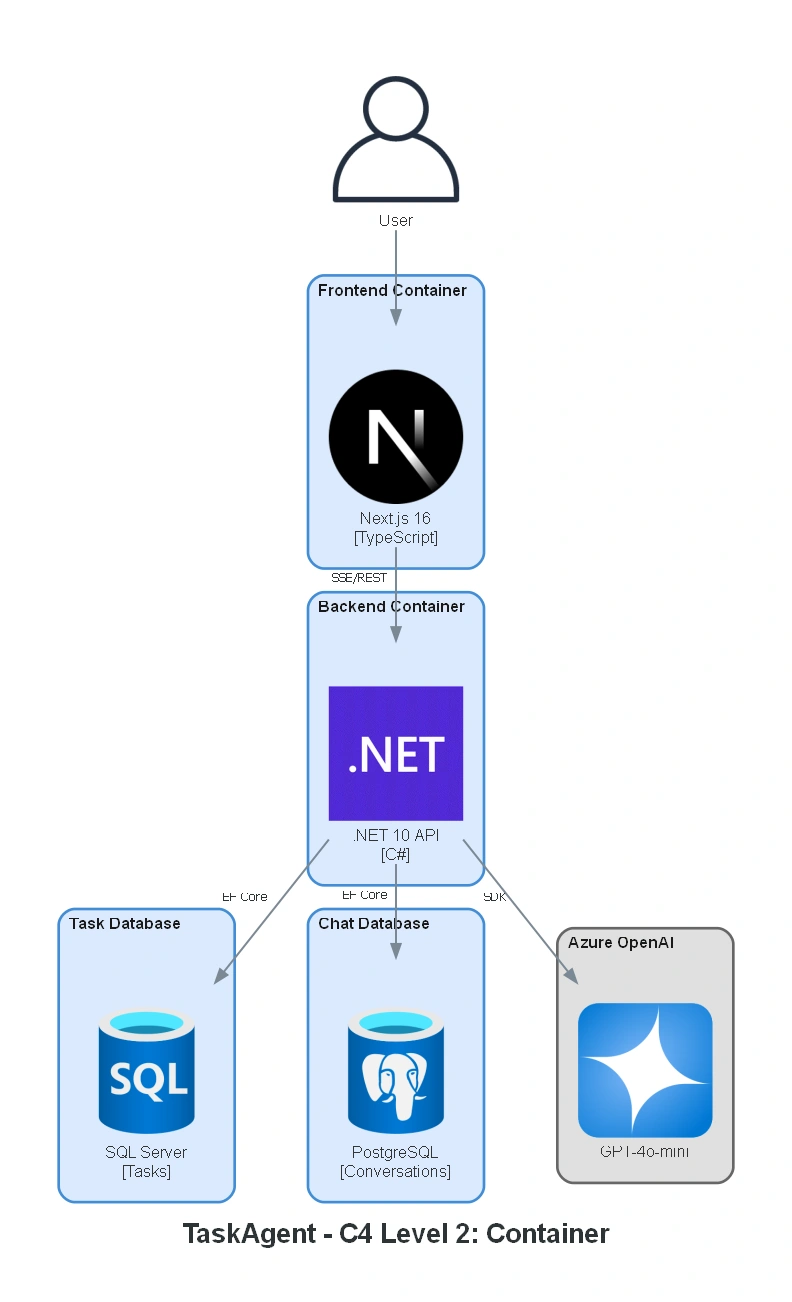
All diagrams are auto-generated using Python and can be regenerated with:
python scripts/generate_architecture_diagram.pyResources
C4 Model - Visualizing software architecture
Join the conversation! Your thoughts help the community grow.