

In past 3 articles we build the foundation. Store. Slice. Hooks. Provider.
Redux simplified part 1: Fundamentals
Redux simplified part 2: Slice and Store
Redux simplified part 3: Custom Hooks and UI Shell
Now we use it.
This article is about two things, writing to the store when a user clicks a button, and reading from the store to update the UI. By the end, the cart works. Completely. End to end.
Writing first. Then reading.
Check out the full implementation and give the repo a star on redux-simplified
Writing: Dispatching Actions
1. Product.tsx: "Add to cart" button
The "Add to Cart" button in Product.tsx has been empty since Article 3. handleAddToCart was a stub. Now it does something.
const dispatch = useCartDispatch();

function handleAddToCart() {
  dispatch(addToCart({ id, title, price }));
}
useCartDispatch() gives you the dispatch function.
addToCart({ id, title, price }) builds the action. Notice what's in the payload, id, title, price. Not quantity. The reducer sets quantity: 1 on first add, and increments it on subsequent adds. The component doesn't decide that. The reducer does. Components describe what happened. Reducers decide what changes.
Wired to the button:
<button onClick={handleAddToCart}>Add to Cart</button>When the user clicks Add to Cart:
handleAddToCartfiresdispatchsends the action to the storeThe
addToCartreducer incart-slice.tsrunsState updates
Every component reading that state re-renders
That's the full write cycle.
2. CartItems.tsx: Plus and Minus buttons
The cart panel has two buttons per item. Plus adds one more. Minus removes one or removes the item entirely if quantity is already 1.
const dispatch = useCartDispatch();

function handleAddToCart(item: CartItem) {
  dispatch(addToCart(item));
}

function handleRemoveFromCart(id: string) {
  dispatch(removeFromCart(id));
}
handleAddToCart here passes the full CartItem because the item already exists in the cart, so we have all its data.
handleRemoveFromCart only needs the id. The reducer finds the item by id, decrements the quantity, or removes it entirely if it hits zero. The component doesn't make that decision. It just says, this item should be removed.
Wired to the buttons:
<button onClick={() => handleRemoveFromCart(item.id)}>-</button>
<span>{item.quantity}</span>
<button onClick={() => handleAddToCart(item)}>+</button>
Reading: Selectors
Writing pushes data into the store. Reading pulls it out. Two components need to read Header for the cart count badge, CartItems for the full item list and total price.
3. Header.tsx: The Cart Count
const cartQuantity = useCartSelector((state) => state.cart.items.reduce((total, item) => total + item.quantity, 0));useCartSelector reads from the store. The callback receives the full state. state.cart.items is the array of cart items you defined in cart-slice.ts.
reduce walks through every item and adds up the quantities. Start at 0, add item.quantity for each item, return the total.
If the cart has 3 rotors and 2 pistons cartQuantity is 5.
That number goes straight into the button:
<button onClick={handleOpenCartClick}>Cart ({cartQuantity})</button>That hardcoded {0} from Article 3 is gone.
4. CartItems.tsx: Items and Total Price
CartItems is the only component in this app that both reads and writes at the same time. We already saw writing part of CartItems, now let's see reading part.
const cartItems = useCartSelector((state) => state.cart.items);

const totalPrice = cartItems.reduce(
  (total, item) => total + item.price * item.quantity,
  0
);

const formattedTotalPrice = `$${totalPrice.toFixed(2)}`;
cartItems is the raw array straight from the store. That's all the store holds the items. Nothing more.
totalPrice is derived from that array at read time. Price multiplied by quantity, summed across all items. The store never holds a total. Totals are calculated when needed, from the source data.
toFixed(2) formats it to two decimal places. $ prepended. Done.
The UI then renders conditionally based on what the selector returns:
{cartItems.length === 0 && <p>No items in cart!</p>}
{cartItems.length > 0 && (
  <ul id="cart-items">
    {cartItems.map((item) => {
      const formattedPrice = `$${item.price.toFixed(2)}`;
      return (
        <li key={item.id}>
          <div>
            <span>{item.title}</span>
            <span> ({formattedPrice})</span>
          </div>
          <div className="cart-item-actions">
            <button onClick={() => handleRemoveFromCart(item.id)}>-</button>
            <span>{item.quantity}</span>
            <button onClick={() => handleAddToCart(item)}>+</button>
          </div>
        </li>
      );
    })}
  </ul>
)}
<p id="cart-total-price">
  Cart Total: <strong>{formattedTotalPrice}</strong>
</p>
Empty cart, shows the message. Items in cart, renders the list. cartItems from the selector drives both. The component just reacts.
The Full Picture
Here's the complete flow, start to finish:
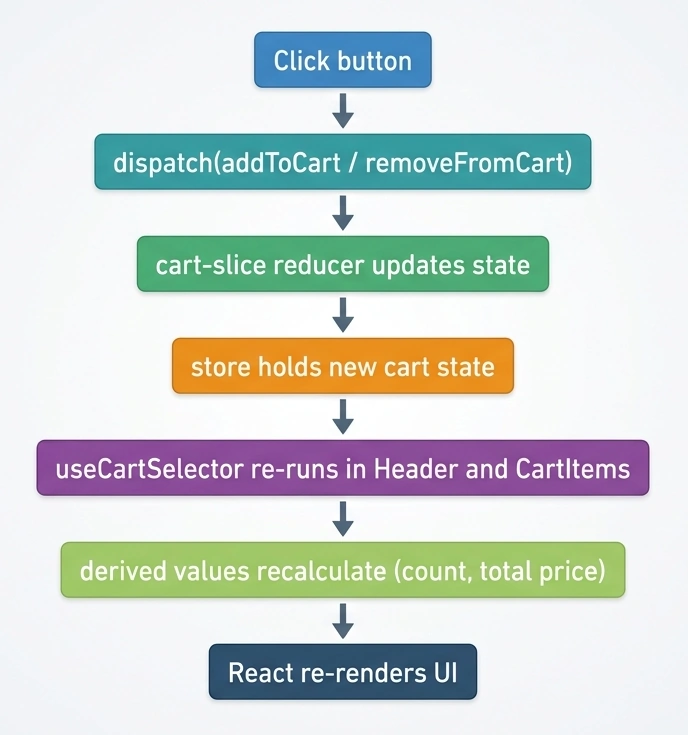
One click at the top. Automatic update at the bottom. Nothing in between needs to be managed manually.
This is why Redux scales. The component doesn't coordinate with other components. It talks to the store. The store broadcasts the change. Everyone who's listening updates.
What You Built Across This Series
cart-slice.ts state shape, initial state, add and remove reducers, exported actions.
store.ts configured global store, RootState and AppDispatch types.
hooks.ts useCartDispatch for writing, useCartSelector for reading.
App.tsx Provider wrapping the entire tree.
Product.tsx dispatches addToCart on button click.
CartItems.tsx reads items, derives total, dispatches add and remove.
Header.tsx reads cart quantity, always accurate.
Where to Go Next
You now know the full Redux pattern. Slice → Store → Hooks → Dispatch → Select.
The best way to solidify it add one more slice yourself.
A wishlist. A recently viewed list. A product comparison panel. Anything with state that multiple components need to share.
Follow the same sequence. Define the shape. Write the reducers. Export the actions. Wire the hooks. Dispatch from components. Select in the UI.
That's the series. Redux simplified, hope it helped.
Redux Simplified: The Complete Series
This series walks you through Redux from scratch by building a real car parts e-commerce store in React + TypeScript.
If you want to see the 'moving parts' in action, the code is waiting for you on redux-simplified
Join the conversation! Your thoughts help the community grow.