

.NET can extend its influence beyond the reaches of your keyboard. The .NET remoting library is a well-architected library with some sophisticated internal plumbing allowing you to connect to assemblies remotely, and transparently over a network. In earlier versions of Windows, remoting was accomplished with that sibling of COM known as DCOM (Distributed COM). You could also communicate remotely using various third party ActiveX controls (and still can). The .NET remoting architecture, however, makes it so simple to create remote applications that it will have you wondering what you might be missing when you are finished.

Figure 1 - Remote Sensing Satellite for Oceanographic Research
In this article, we will revisit the GP-3 board (which we have employed in a few other hardware projects on C# Corner) and use the GP-3 to measure temperature in a remote location. The temperature from the GP-3 will be queried over TCPIP to our client location. We will also sound an alarm over the internet through the GP-3 if the temperature falls below freezing.
A little bit about the Remote Architecture
The .NET remoting library is actually quite extensive including the capability for http, ftp, and tcp. The part of the .NET remoting architecture that we will be using in this article takes advantage of tcp communication and consists of two pieces, a server piece that reads the temperature at the location we are interested, and a client piece that will remotely access the temperature.
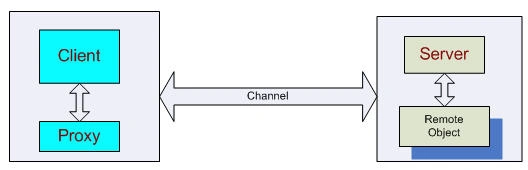
Figure 2 - Client/Server Remoting Architecture
The client piece in our application is a Windows Form that contains a timer that requests a temperature reading every 5 seconds. It uses a proxy to call the remote object on the server side and the call is made as if the remote object were living on the same machine as the client. Another words, the call to the remote object is transparent to the client. The client can call on any method of the remote object that is publicly visible. The remote object in our example takes the form of a instance of a class. The servers job is simply to register the the remote object and a channel to the remote object so that the client knows about them. The Remote Object does all the important work by controlling and sensing the hardware through the GP3 board. To get a little more detailed idea of the architecture for the current project, take a look at the UML diagram in figure 3 showing the three individual assemblies needed to complete the remoting picture. Note that the Client piece (on the left side) lives on the client machine and the remote object and the server piece live on the server machine.
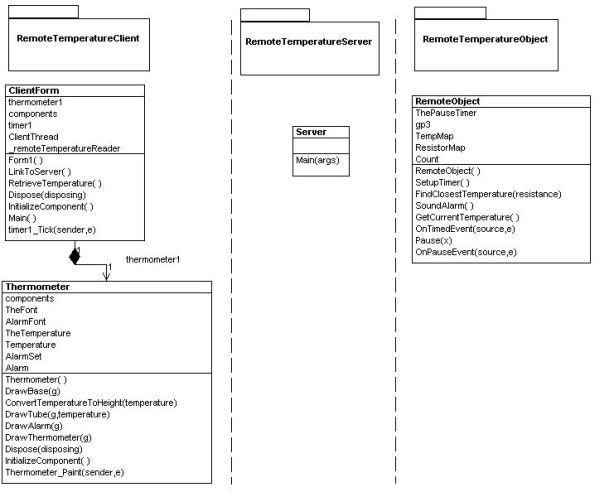
Figure 3 - UML Diagram of the temperature sensing system reverse engineered using WithClass
Sensing Temperature
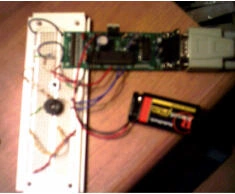
Figure 4 - GP-3 Board interfaced to temperature sensing circuitry and the serial port of the computer
Before we go any further, let's get a look at how we measure temperature. There are a few devices used to measure temperature electronically. The one we picked can be picked up in Radio Shack for a couple of bucks and is known as a thermistor. The thermistor has the uncanny behavior of increasing its resistance as the temperature drops. At -50 degrees Celsius the thermistor measures about 320K ohm and at 110 degrees Celsius it measures about 750 ohms. Room temperature gives us a resistance reading of about 10K ohm. By no means is this a linear scale so we need to interpolate between values listed on the back of the Radio Shack thermistor packaging to determine our temperature.
We can measure the resistance in one of two ways using the GP3. One way is to put a capacitor across the resistor and determine what is known as the RC time (Resistance-Capacitance time). The way this works is that it takes a certain determinable amount of time for a capacitor to become charged and that time is determined by the product of the resistance into the charging capacitor and the capacitance of the capacitor. If we use our thermistor as the R and a known capacitance (say .01 microfarads), we can determine the unknown resistance of the thermistor by dividing the time it takes to charge by the capacitance and a constant. The formula is shown below:
|
time to charge = R thermistor
|
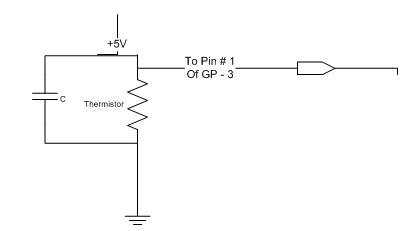 |
Figure 5 - Measuring the thermistor resistance using the RC time
It so happens that the PIC microcontroller on the GP-3 board has a command called rctime that allows us to measure how long it takes to charge the capacitor across the thermistor.
Another method for determining the resistance of the thermistor (and the one we chose) is simply to put a known voltage across a divider circuit and measure the voltage drop. A divider circuit consists of the thermistor and a known resistor value in series with a known voltage across the circuit. The formula for determining the resistance of the thermistor across the divider is shown below:
|
(voltage)( 1000 ohms) = Rthermistor
|
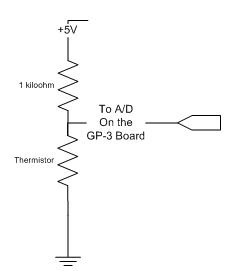 |
Figure 6 - Measuring the thermistor resistance using the divider voltage
Once we've calculated the resistance of the thermistor, we can do a table look up from the specifications of the thermistor to determine the corresponding temperature. If the resistance measured does not fall exactly in the table, we simply interpolate between the two closest values.
Sounding the Alarm
Our particular client wants to warn the people in the remote area when the temperature drops below freezing (These days in Manhattan, just below freezing is a welcome balmy day), but the people on the remote site have certain sensitive equipment that cannot withstand freezing temperatures for long. The client monitoring the remote site will trigger the alarm over tcpip to the remote object so that people can shutdown their temperature-sensitive equipment. Below is the circuit hooked to the GP-3 board to set off the alarm. The alarm also comes with a kill switch that will shut off the annoying buzzing sound when the remote users have been made aware of the temperature-sensitive problem. If you want your alarm to be louder, you can attach an opamp circuit (such as an LM386) to the alarm in order to amplify the sound.
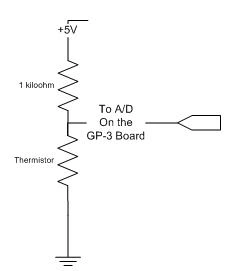
Figure 7 - Alarm and kill switch circuits controlled through the GP-3
The .NET Code
Now we are ready to take a look at the .NET code involved in running this remote system. As stated earlier, our .NET solution consists of three assemblies: a client, a server, and a remote object. First, we will examine the remote object piece which talks directly to the GP-3 board and through a proxy to our client.
Remote Object
The remote object takes the form of a class library project and compiles into a dll. The assembly consists of a single class that inherits from the MarshalByRefObject class. This inheritance mechanism helps set up our remote object to communicate across application domains. Other than inheriting from MarshalByRefObject class, there is not much more we have to do to the class to enable its remoting capabilities. We simply fill in the methods and properties we want our other application domains to access. Below is the method GetCurrentTemperature for reading the temperature of the divider circuit. This is the method we will call directly from our remote client to read temperature from the GP-3 board.
Listing 1 - Measuring the temperature of the thermistor
- public double GetCurrentTemperature() {
- // send voltage across the thermistor divider circuit
- gp3.high(1);
- // get a/d voltage reading across divider
- long tmp1 = gp3.a2d(0);
- // pause 200 milliseconds to debounce
- Pause(2);
- // convert the a/d reading from a count to a voltage
- float voltage = ((float) tmp1 * 5.0 f / 1024.0 f);
- // calculate thermistor resistance from voltage across the thermistor
- // therm /(1k + therm) * 5 V = voltage
- // therm = (voltage * 1000 ohms)/(5 volts - voltage);
- float therm = (voltage * 1000) / (5 - voltage);
- // convert to a celcius temperature using the chart
- double temperature = FindClosestTemperature(therm);
- // convert to fahrenheit
- temperature = (temperature * 9 / 5) + 32;
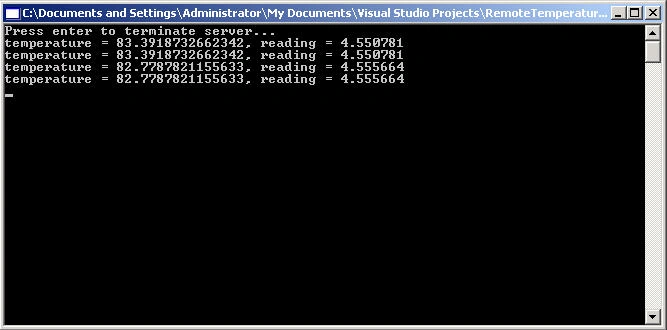
- Console.WriteLine("{0}, reading = {1}", temperature, voltage);
- // stop current flow across the divider to save the battery
- gp3.low(1);
- return temperature;
- }
The alarm is also sounded in the remote object through the GP-3 board. The SoundAlarm method takes advantage of the PIC's freq command that allows you to send a specific oscillating frequency voltage wave for a specific duration through the speaker alarm. The alarm is sounded continually until the pushbutton is pressed. The pushbutton state is polled by input pin RB-3 on the GP-3 board. When this pin goes high, the while loop is terminated.
Listing 2 - Sound the Alarm until the pushbutton is pressed
Muthu Kumaran TPosted Feb 8, 2009, 1:44 PM
Thanks a lot.
bouslah brahimPosted Aug 28, 2007, 6:27 PM
Mr Gold you are the hero marging "pic programming & .net" it's great