

Table of Contents
- Table of Contents
- Introduction
- Roadmap
- Routing
- Existing Design and Problem
- Attribute Routing
- Setup REST endpoint / WebAPI project to define Routes
- More Routing Constraints
- Range
- Regular Expression
- Optional Parameters and Default Parameters
- RoutePrefix: Routing at Controller level
- RoutePrefix: Versioning
- RoutePrefix: Overriding
- Disable Default Routes
- Running the application
- Conclusion
- References
Introduction
We have already learned a lot about WebAPIs. I have already explained how to create a WebAPI application, connect it with a database using the Entity Framework, resolve dependencies using a Unity Container as well as using MEF. In all our sample applications we were using the default route that MVC provides us for CRUD operations. This article explains how to write your own custom routes using Attribute Routing. We'll deal with Action-level routing as well as Controller-level routing. I'll explain this in detail using a sample application. My new readers can use any Web API sample they have, else you can also use the sample applications we developed in my previous articles.
Roadmap
Let's revisit the road map that I began on the Web API.

Here is my roadmap for learning RESTful APIs.
- RESTful Day #1: Enterprise-level application architecture with Web APIs using Entity Framework, Generic Repository pattern, and Unit of Work.
- RESTful Day #2: Inversion of control using dependency injection in Web APIs using Unity Container and Bootstrapper.
- RESTful Day #3: Resolve dependency of dependencies using Inversion of Control and dependency injection in ASP.Net Web APIs with Unity Container and Managed Extensibility Framework (MEF).
- RESTful Day #4: Custom URL Re-Writing/Routing using Attribute Routes in MVC 4 Web APIs.
- RESTful Day #5: Basic Authentication and Token-based Custom Authorization in Web APIs using Action Filters.
- RESTful Day #6: Request logging and Exception handing/logging in Web APIs using Action Filters, Exception Filters, and NLog.
- RESTful Day #7: Unit Testing and Integration Testing in WebAPI using NUnit and Moq framework (Part 1).
- RESTful Day #8: Unit Testing and Integration Testing in WebAPI using NUnit and Moq framework (Part 2).
- RESTful Day #9: Extending OData support in ASP.NET Web APIs.
I'll intentionally use Visual Studio 2010 and the .NET Framework 4.0 because there are a few implementations that are very hard to find in .NET Framework 4.0, but I'll make it easy by showing how to do it.
Routing

Image credit: routing
Routing, in generic terms for any service, API, or website, is a kind of pattern defining a system that tries to map all the requests from the clients and resolves that request by providing some response to that request. In the WebAPI we can define routes in the WebAPIConfig file, these routes are defined in an internal Route Table. We can define multiple sets of Routes in that table.
Existing Design and Problem
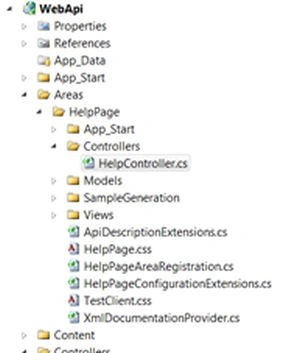
We already have an existing design. If you open the solution, you'll get to see the structure as specified in the following.
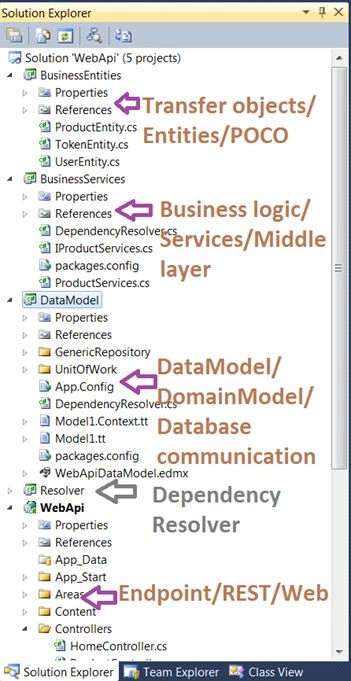
In our existing application, we created a WebAPI with default routes as specified in the file named WebApiConfig in the App_Start folder of the WebAPI project. The routes were specified in the Register method as,
config.Routes.MapHttpRoute(
    name: "DefaultApi",
    routeTemplate: "api/{controller}/{id}",
    defaults: new { id = RouteParameter.Optional }
);
Do not be confused by MVC routes, since we are using an MVC project we also get MVC routes defined in the RouteConfig.cs file as in the following.
public static void RegisterRoutes(RouteCollection routes)
{
    routes.IgnoreRoute("{resource}.axd/{*pathInfo}");

    routes.MapRoute(
        name: "Default",
        url: "{controller}/{action}/{id}",
        defaults: new { controller = "Home", action = "Index", id = UrlParameter.Optional }
    );
}
We need to focus on the first one, the WebAPI route. You can see in the following image what each property signifies.
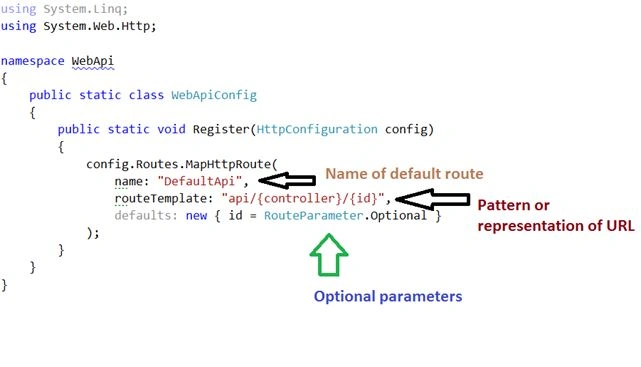
We have a route name, we have a common URL pattern for all routes, and an option to provide optional parameters as well.
Since our application does not have specific action names and we were using HTTP VERBS as action names, we didn't bother much with routes. Our Action names were like.
public HttpResponseMessage Get()
public HttpResponseMessage Get(int id)
public int Post([FromBody] ProductEntity productEntity)
public bool Put(int id, [FromBody] ProductEntity productEntity)
public bool Delete(int id)
The default route defined does not take HTTP Verb action names into consideration and treat them as default actions, therefore it does not specify {action} in routeTemplate. But that's not a limitation, we can have our own routes defined in WebApiConfig. For example, check out the following routes.
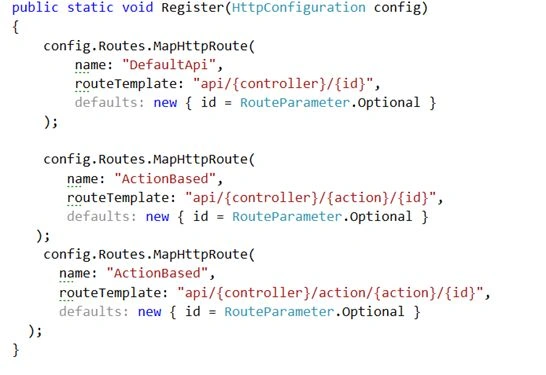
public static void Register(HttpConfiguration config)
{
    config.Routes.MapHttpRoute(
        name: "DefaultApi",
        routeTemplate: "api/{controller}/{id}",
        defaults: new { id = RouteParameter.Optional }
    );

    config.Routes.MapHttpRoute(
        name: "ActionBased",
        routeTemplate: "api/{controller}/{action}/{id}",
        defaults: new { id = RouteParameter.Optional }
    );

    config.Routes.MapHttpRoute(
        name: "ActionBased",
        routeTemplate: "api/{controller}/action/{action}/{id}",
        defaults: new { id = RouteParameter.Optional }
    );
}
In the preceding routes, we can have action names as well, if we have custom actions.
So there is no limit to defining routes in the WebAPI. But there are a few limitations to this. Note that we are talking about WebAPI 1 which we use with .NET Framework 4.0 in Visual Studio 2010. Web API 2 has overcome those limitations by including the solution that I'll explain in this article. Let's check out the limitations of these routes.
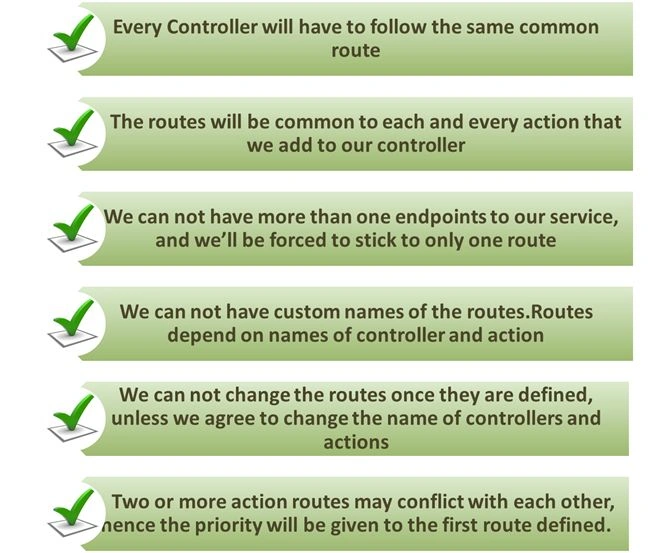
Yes, these are the limitations that I am talking about in Web API 1.
If we have a route template like route template: "API/{controller}/{id}" or route template: "API/{controller}/{action}/{id}" or route template: "API/{controller}/action/{action}/{id}", then we can never have custom routes and will need to stick to the old route convention provided by MVC. Assume your client of the project wants to expose multiple endpoints for the service, he can't do that. We also cannot have our own defined names for the routes, there are so many limitations.
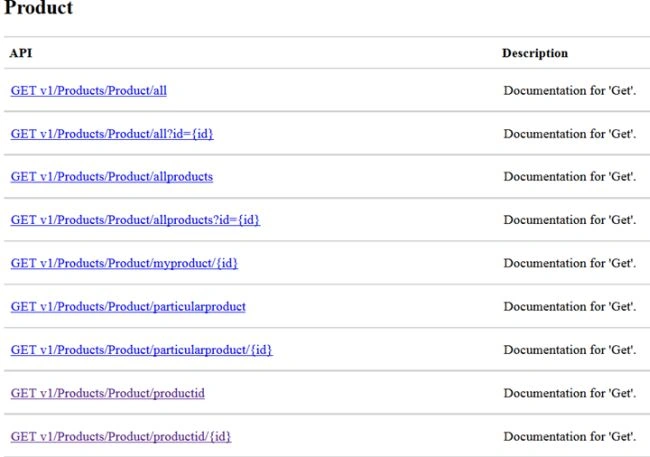
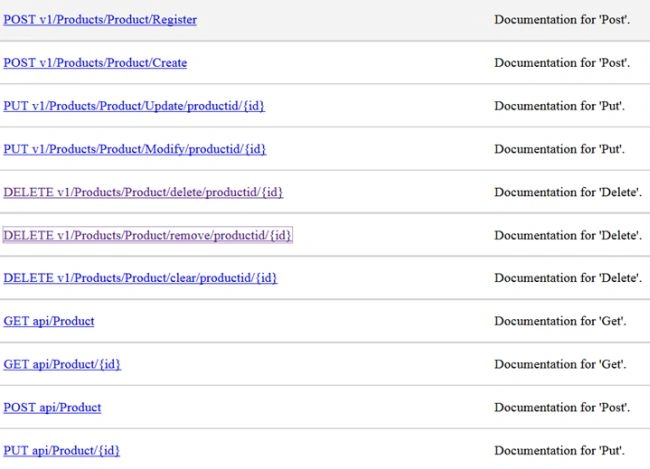
Let's assume we want to have the following kinds of routes for my web API endpoints, where I can define versions too.
v1/Products/Product/allproducts
v1/Products/Product/productid/1
v1/Products/Product/particularproduct/4
v1/Products/Product/myproduct/<with a range>
v1/Products/Product/create
v1/Products/Product/update/3
And so on. Then we cannot do this with the existing model. Fortunately, these things have been taken care of in WebAPI 2 with MVC 5, but for this situation, we have AttributeRouting to resolve and overcome these limitations.
Attribute Routing
Attribute Routing is all about creating custom routes at the controller level and the action level. We can have multiple routes using Attribute Routing. We can have versions of routes as well, in short, we have the solution for our existing problems. Let's straight away jump on how to implement this in our existing project. I am not explaining how to create a WebAPI, for that, you can refer to my first post of the series.
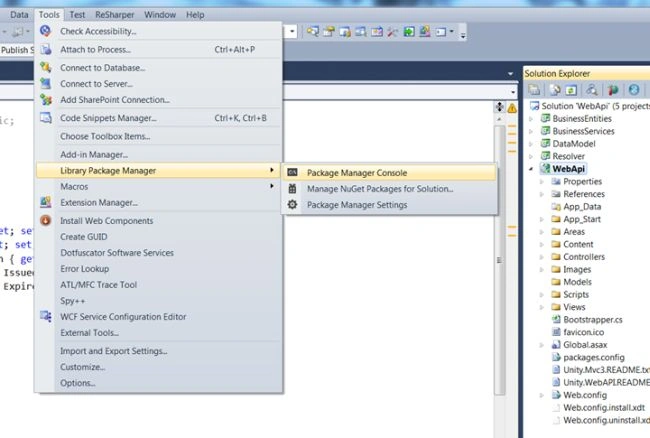
Step 1. Open the solution and open the Package Manage Console as shown in the following figure.
Go to Tools -> Library Packet Manage -> Packet Manager Console.
Step 2. In the package manager console window at the left corner of Visual Studio. type "Install-Package AttributeRouting.WebApi" and choose the project WebApi or your own API project. If you are using any other code sample, then press Enter.

Step 3. As soon as the package is installed, you'll get a class named AttributeRoutingHttpConfig.cs in your App_Start folder.

This class has its own method for RegisterRoutes that internally maps attribute routes. It has a start method that picks Routes defined from GlobalConfiguration and calls the RegisterRoutes method as in the following.
using System.Web.Http;
using AttributeRouting.Web.Http.WebHost;

[assembly: WebActivator.PreApplicationStartMethod(typeof(WebApi.AttributeRoutingHttpConfig), "Start")]

namespace WebApi
{
    public static class AttributeRoutingHttpConfig
    {
        public static void RegisterRoutes(HttpRouteCollection routes)
        {
            // See http://github.com/mccalltd/AttributeRouting/wiki for more options.
            // To debug routes locally using the built in ASP.NET development server, go to /routes.axd

            routes.MapHttpAttributeRoutes();
        }

        public static void Start()
        {
            RegisterRoutes(GlobalConfiguration.Configuration.Routes);
        }
    }
}
We don't even need to touch this class, our custom routes will automatically be taken care of using this class. We just need to focus on defining routes. No coding. You can now use route-specific stuff like route names, verbs, constraints, optional parameters, default parameters, methods, route areas, area mappings, route prefixes, route conventions, and so on.
Setup REST endpoint / WebAPI project to define Routes
90% of the job is done.

We now need to set up our WebAPI project and define our routes.
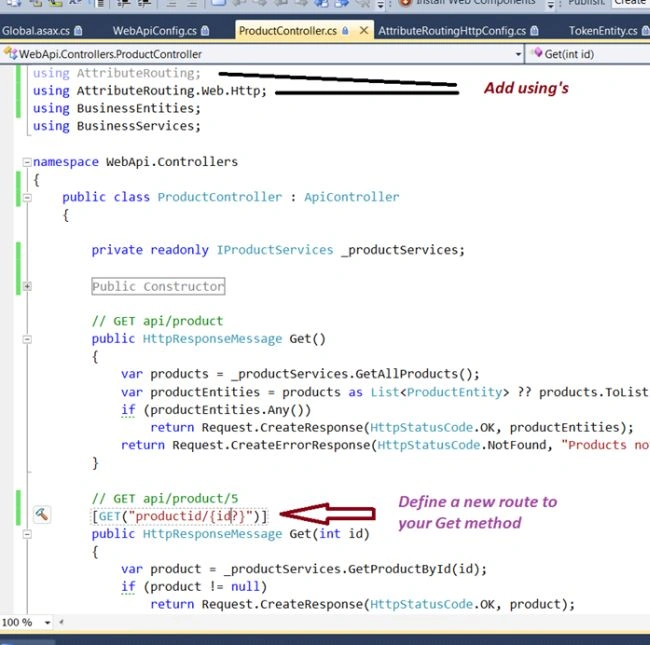
Our existing ProductController class looks something as shown in the following.
using System.Collections.Generic;
using System.Linq;
using System.Net;
using System.Net.Http;
using System.Web.Http;
using BusinessEntities;
using BusinessServices;

namespace WebApi.Controllers
{
    public class ProductController : ApiController
    {
        private readonly IProductServices _productServices;

        #region Public Constructor

        /// <summary>
        /// Public constructor to initialize product service instance
        /// </summary>
        public ProductController(IProductServices productServices)
        {
            _productServices = productServices;
        }

        #endregion

        // GET api/product
        public HttpResponseMessage Get()
        {
            var products = _productServices.GetAllProducts();
            var productEntities = products as List<ProductEntity> ?? products.ToList();
            if (productEntities.Any())
                return Request.CreateResponse(HttpStatusCode.OK, productEntities);
            return Request.CreateErrorResponse(HttpStatusCode.NotFound, "Products not found");
        }

        // GET api/product/5
        public HttpResponseMessage Get(int id)
        {
            var product = _productServices.GetProductById(id);
            if (product != null)
                return Request.CreateResponse(HttpStatusCode.OK, product);
            return Request.CreateErrorResponse(HttpStatusCode.NotFound, "No product found for this id");
        }

        // POST api/product
        public int Post([FromBody] ProductEntity productEntity)
        {
            return _productServices.CreateProduct(productEntity);
        }

        // PUT api/product/5
        public bool Put(int id, [FromBody] ProductEntity productEntity)
        {
            if (id > 0)
            {
                return _productServices.UpdateProduct(id, productEntity);
            }
            return false;
        }

        // DELETE api/product/5
        public bool Delete(int id)
        {
            if (id > 0)
                return _productServices.DeleteProduct(id);
            return false;
        }
    }
}






Hadshana KamalanathanPosted Jul 22, 2018, 1:33 AM
Nice article..
rahul rathorePosted May 1, 2016, 6:20 AM
nice article
Debasis SahaPosted Mar 31, 2016, 1:08 AM
Good One..
Asfend YarPosted Mar 1, 2016, 11:35 AM
good
Santhakumar MunuswamyPosted Jun 2, 2015, 3:12 PM
Keep it up..
Santhakumar MunuswamyPosted Jun 2, 2015, 3:12 PM
Thanks for excellent work
NitinPosted Jun 2, 2015, 5:05 AM
nice
ad codersPosted Jun 2, 2015, 1:51 AM
Much needed article.Thanks.
Akash NaginaPosted Jun 1, 2015, 1:27 PM
Nice article..
Sibeesh VenuPosted Jun 1, 2015, 11:26 AM
Great Effort.