

In this article, I would like to show how to get the name of all columns of a table in SQL Server. In some cases, you need to get the columns of a specific table. You can write many queries to return all the column names for a table in my database. So let's have a look at a practical example of how to retrieve column names of a table in SQL Server 2012. The example is developed in SQL Server 2012 using the SQL Server Management Studio.
Creating table in SQL Server
Now we create a table named News. The following is the sample data for the News Table:
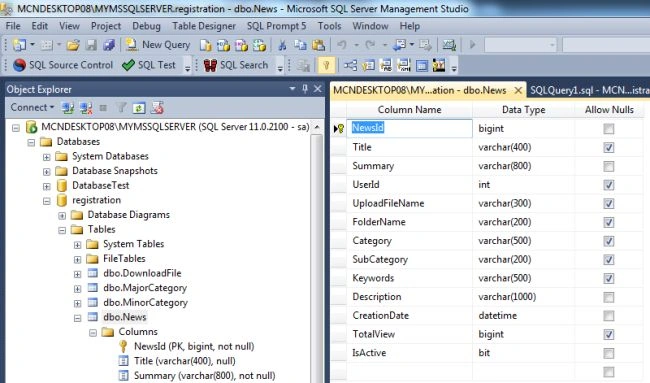
The following queries will give the table's column names in SQL Server.
1. sp_help procedure
The sp_help procedure is used to get information about a current database object. The database object may be a table, view or stored procedure. To get a column name of a table we use sp_help with the name of the object or table name. sp_help will return all the column names of the object. The following query will return the table's column names.
- sp_help News
Output

2. Simple Select Query
It is a simple way to get the column names of a table using the top clause. You can use the following select statement to retrieve a table's columns from the news object or table:
- SELECT TOP 5 * FROM News


PANDIYARAJAN NPosted Apr 27, 2017, 3:33 AM
Dear sir , i want all columns names except userID,please give SQL query
Arvind PandeyPosted May 28, 2015, 3:06 AM
Dear Sir, how to merge two column in single result..
Arvind PandeyPosted May 28, 2015, 3:05 AM
very nice