

First things first. SOLID is an acronym of acronyms. Which means that S is an acronym for SRP and SRP is acronym for Single Responsibility Principle and so for the other 4 letters.
SOLID stands for
- S - Acronym for SRP.
- O - Acronym for OCP.
- L - Acronym for LSP.
- I - Acronym for ISP.
- D - Acronym for DIP.
Note: This article is divided into 5 peices, one for each principle. The code for each article will be available and all the 5 articles work on the same code base. But at the end of each article I have taken a backup of the code base for clarity and you should be able to download the code.
This part explains the acronyms for SOLID and a brief introduction to Cohesion and Coupling is provided for a better understanding of SOLID principles.
Now for a more detailed description of what the preceding acronyms stand for:
- SRP - Single Responsibility Principle: a class should be designed only to support one purpose or responsibility.
- OCP - Open/Closed Principle: "Software entities should be open for extensions, closed for Modifications".
- LSP - Liskov substitution Principle: "objects in a program should be replaceable with instances of their subtypes without altering the correctness of that program".
- ISP - Interface Segregation Principle: "many client-specific interfaces are better than one general-purpose interface."
- DIP - Dependency Inversion Principle: one should "Depend upon Abstractions. Do not depend upon concretions."
Any project that follows OOPs have to identify and design the classes and interfaces first and then define the methods and write the code to accomplish various functionalities. But developers often prefer to show their programming skills first and then think of design principles. That is so common in many projects and they end up writing redundant code for the same functionality or design classes in such a way that by the end of the project the addition of new functionality without disturbing existing code becomes highly impossible. That is because we did not spend at least a few hours on analyzing what we are coding.
For the preceding principles to be clearer we need to understand two important terms. Any software guy knows two words for sure: Cohesion and Coupling. I learned them first time in my bachelors when studying the Software Engineering subject and these two words convey a significant amount of valuable information to any developer in the software field.
Coupling and Cohesion from Software Engineering
Coupling refers to the degree of interaction among modules i.e. their inter-relationships.
Cohesion refers to the degree of interaction among statements in a module.
Where module in the preceding refers to a set of one or more contiguous program statements having a name by which other parts of the system invoke it and preferably having its own distinct set of variable names.
Good modules exhibits low coupling and high cohesion.
Understanding in layman terms
Let us assume you are planning to go a movie. Initially you thought you would go alone and later felt like going with a friend. So, you bought two tickets and went to the movie. Both the tickets are with you. Unfortunately your friend did not turn up in time and if you go inside to watch the movie, he will be not be able to enter the theatre without his ticket. So, here your friend is dependent on you for the tickets. Had you given his ticket to him and went to the movie theatre with your ticket, you would have been able to watch the movie by yourself and he could then join you even if he comes late and this would have been easy to do rather than you missing some part of the movie until he turned up. This is what coupling means.
Keeping tickets only with you is high coupling and it is difficult to accomplish your functionality (watching the movie from the beginning) without your friend. So, we have to minimize the dependencies among entities though they both communicate with each other or help each other in accomplishing certain tasks.
Now for Cohesion. Assume you planned to go to the movie by taking public transport. There is a direct bus at 4:00 PM and it drops you off at the theatre at 5:00 PM and your movie is at 6:00 PM. This would make your life easy without worrying much. You started with the same plan and boarded the bus at the correct time. While your bus is stopped at one of the stops you decide to get off to determine if a there is a train from point A to B since you want to go somewhere in a month from now by the train from point A to B. You could check this online through your phone or after reaching home. After getting the details you found that another bus that stops at the point where you got off comes at 5:30 PM and it will reach the movie at 6:30 PM. This is what cohesion is.
Just catching a bus which goes to the movie theatre in time makes your life easier and you could accomplish your objective without any risk. Since, you have deviated from accomplishing your task by adding unnecessary goals it failed your actual goal. So, cohesion should be very strongly interrelated. Unrelated steps of code in a single module deviates the module in accomplishing the actual goal.
Returning from layman terms
According to software principles, a Functional Cohesion is a good option where the module contains elements that perform exactly one function or achieves a single goal and Coincidental Cohesion is a very bad manner where the module performs multiple unrelated tasks. This may occur if modules are not properly designed. Sequential Cohesion is also a good option where the output of one element in the module serves as input for another element. A module with sequential cohesion is essentially an Abstract Data Type (ADT) and all the benefits of ADT use are obtained when this type of cohesion is employed in a single module. Such a module operates on a single data structure.
Content Coupling is a very bad option where one module directly references the content of another module. For example Module x branches to a local label in Module Y or module x modifies a statement of module Y. Such modules are inextricably linked to each other and so this is a very dangerous coupling. Data Coupling is a very good option where two modules are data coupled if all arguments are homogeneous data items. If a data structure is passed then the called module must use all the fields. Data coupling is a desirable goal. Modules which are data coupled are easier to maintain since changes in one is less likely to cause regression fault in another.
Note: There are other types available. For more details, refer to any software engineering principles articles.
So the concept of Classes and Objects help us design a system where all the entities are loosely coupled and are use tight cohesion principles. An object can be thought of as a module exhibiting Sequential Cohesion but also having other properties as well.
Objects support data hiding and encapsulation but have an extended characteristic called inheritance. The basic idea of inheritance is that new data types can be created from existing types without creating the types from the scratch.
With the OOP principles you can design a system which is loosely coupled and with strong cohesion by classes and inheritance. Each class is supposed to encapsulate related data and methods and provides public methods or constructors to provide the values and returns the output hiding its code for achieving the functionality.
SOLID principles help us make the system easy to enhance without changing the existing code which is going to break the other class functionalities. For example, my mobile phone has a charger which can be connected to my laptop or my Car USB port and by attaching a plug to the charger USB, I can use the same charger to connect to the electric power. This provides me the ability to attach or detach a particular part of the charger and still it works without affecting the functionality. I do not need to buy another charger for connecting to power and one for connecting to my laptop. Ideally, our software should behave like my mobile charger.
Now, let us see what each principle of SOLID says with a simple example. Usually we end up refactoring the code rather than building the code from scratch. So, here I will use an existing project and see how to refactor it according to SOLID principles.
Single Responsibility Principle
At any instance of time your class should support only one purpose and if you change your class anytime that should be only for that one purpose. If your class needs to be changed for any other reason, then you might have to distribute the responsibilities to multiple classes i.e. divide the class into multiple classes.
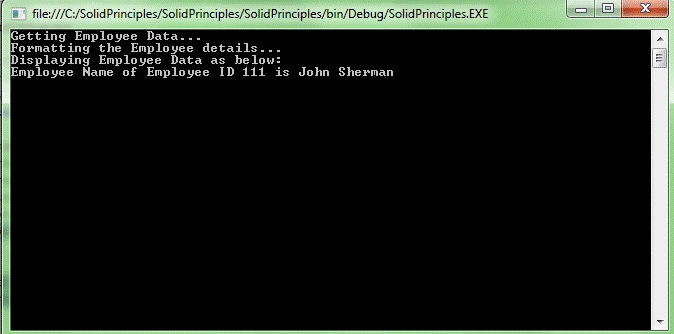
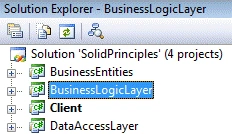
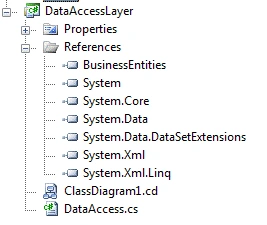
Let us open the existing project. This project has a console application as a client and there are initially two class libraries. One is for business logic classes and the second one is a business entity class.
My entities class looks like below
using System;
using System.Collections.Generic;
using System.Linq;
using System.Text;
namespace BusinessEntities
{
public class Employee
{
public string EmployeeId { get; set; }
public string EmployeeName { get; set; }
}
}
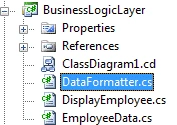
My business logic class looks like below
using System;
using System.Collections.Generic;
using System.Linq;
using System.Text;
using BusinessEntities;
namespace BusinessLayer
{
/// <summary>
/// Class to get Employee Data, Format and display the data.
/// </summary>
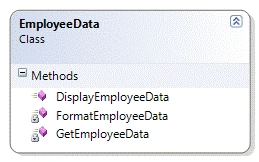
public class EmployeeData
{
/// <summary>
/// Method to get the Employee data from Database
/// Return the data to the calling method.
/// </summary>
/// <returns></returns>
private IList<Employee> GetEmployeeData()
{
var employees = new Employee[1];
employees[0] = new Employee { EmployeeId = "111", EmployeeName = "John Sherman" };
return new List<Employee>(employees);
}
private string FormatEmployeeData()
{
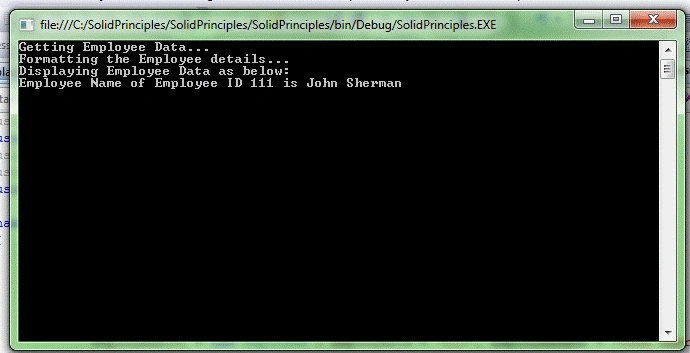
Console.WriteLine("Getting Employee Data...");
var employessList = GetEmployeeData();
Console.WriteLine("Formatting the Employee details...");
return string.Format("Employee Name of Employee ID {0} is {1}",
employessList[0].EmployeeId, employessList[0].EmployeeName);
}
public void DisplayEmployeeData()
{
GetEmployeeData();
string empData = FormatEmployeeData();
Console.WriteLine("Displaying Employee Data as below:");
Console.WriteLine(empData);
}
}
}

Kanad MehtaPosted Nov 29, 2017, 6:45 AM
This is 2017, still fall in love with your 2012 article. Really awesome.
Satish Kumar VadlavalliPosted Dec 19, 2016, 6:32 AM
Nice share, simply super!
Sumit AroraPosted Aug 14, 2016, 5:02 PM
Very nicely explained...
parthi banPosted Sep 24, 2015, 12:15 PM
for unit testing which is best rhino or mock or stub
parthi banPosted Sep 24, 2015, 12:15 PM
Intresting apart from this i have some coding doubts can you please share your mail which was so help ful
Gowtham RajamanickamPosted Apr 7, 2015, 12:27 AM
nice article
Rambabu CHPosted Sep 4, 2014, 4:19 AM
Nice article.Present we are working on the SRP
mogsamful .Posted Aug 17, 2014, 10:02 PM
Thank you very much, Sir Ivaturi. Very good explanation :)
Akkiraju IvaturiPosted May 27, 2013, 5:29 PM
Thanks Sudhirraoh...
sudhirraohPosted May 24, 2013, 5:41 AM
Nice, neat and simple explanation. Thanks very much