

Introduction
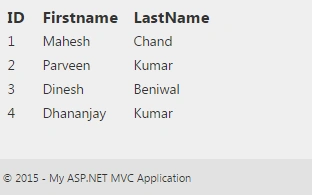
Generally we use PartialView when we implement shared component in ASP.NET MVC. For instance, there is a requirement to display top members in couple of pages, in this scenario we need to create a PartialView and use in which page it is required. It helps to create reusable component to reduce code duplicity. PartialView behaves like UserControl in ASP.NET web forms. Examples of using PartialView:
- Header/Footer in each page in application.
- A calendar widget multiple pages in application.
- A social networking component used on multiple pages, such as a Facebook Like button.
Suppose you need to load partially a webpage on demand and that needs to implement only couple of pages. Then how we will achieve this in MVC? So this article helps you to implement the same through sending PartialView using jQuery AJAX concept. Here I am taking an example as to display top members with ID, FirstName, LastName in view.
Here are the steps to implement the same:
Step 1
Add an entity class(Employee.cs) which is Employee Type in Models folder. Here we will define all the properties which are needed in our PartialView. Here's the code:
Add an entity class(Employee.cs) which is Employee Type in Models folder. Here we will define all the properties which are needed in our PartialView. Here's the code:
- public class Employee
- {
- public int EmpID { get; set; }
- public string FirstName { get; set; }
- public string LastName { get; set; }
- }
Add a user control (DemoPartial.cshtml) in Views/Shared folder. In the following code we are looping over Model and creating HTML table rows to display members.
- @model IEnumerable<MvcApplication.Models.Employee>
- <table cellpadding="1" cellspacing="1" border="1">
- <tr>
- <th>ID</th>
- <th>Firstname</th>
- <th>LastName</th>
- </tr>
- @foreach (var item in Model)
- {
- <tr>
- <td>@item.EmpID</td>
- <td>@item.FirstName</td>
- <td>@item.LastName</td>
- </tr>
- }
- </table>
Add action (GetResultByAjax) in Controller (Home) for AJAX request. Here we will create an Employee list and return PartialView(DemoPartial) with Employee list as Model. I added demo employees in code, you can implement your own logic to fetch employees from the database or any other data source. Here's the code:

Joe CastroPosted Apr 12, 2018, 2:37 PM
I know this an old post, I am new to programing. How can I accomplish this with .onclick instead of the data just showing up in the div?
Ajay RavalPosted Dec 24, 2015, 3:52 AM
if you are returning JsonResult or pure json by using custom action result then this code will work. but since you are returning partial view (basically html) you have to define dataType as html (or leave it blank). Run your code and tell me whether it is working or not.
Ajay RavalPosted Dec 24, 2015, 3:50 AM
Please have a look at this link : http://www.c-sharpcorner.com/UploadFile/d551d3/how-to-load-partial-views-in-Asp-Net-mvc-using-jquery-ajax/
Manas MohapatraPosted Dec 22, 2015, 11:51 PM
Ajay, AJAX request is receiving data in Json because "datatype is josn". Controller is sending data(HTML content) as Json. It works fine.
Ajay RavalPosted Dec 22, 2015, 11:11 PM
You have defined data type as json in your ajax request. However you are returning html. So I guess you will have to change data type. Other wise it won't be considered as a successful request and error block will be executed.
Ajay RavalPosted Dec 22, 2015, 11:09 PM
Nice one. But there's a problem.
Sachin KaliaPosted Oct 1, 2015, 1:03 AM
Manas great attempt.made..Gear Up..However realized that the Title of Article should be Load Partial view using AJAX request...Sending PartialView Through jQuery Ajax Request looks a like that you are sending Partial page in AJAX request ..PLease share your opinion.
Mohammad GhorbaniPosted Sep 30, 2015, 11:21 PM
good job man . thanks
Sachin KaliaPosted Sep 23, 2015, 4:11 PM
Gud one..Simplfied !
Sibeesh VenuPosted Sep 23, 2015, 3:04 AM
Nice Share
Ajeet MishraPosted Sep 23, 2015, 2:22 AM
good one
Ankit BansalPosted Sep 23, 2015, 1:51 AM
thanks for sharing..
Milu SwainPosted Sep 23, 2015, 1:36 AM
Nice Share...
Sujeet SumanPosted Sep 23, 2015, 1:03 AM
Nice Article...................
Atul RawatPosted Sep 23, 2015, 12:35 AM
nice article sir
Harshad PansuriyaPosted Sep 23, 2015, 12:13 AM
Nice one
Karthikeyan KPosted Sep 22, 2015, 11:14 PM
Good one sir...Thanks for sharing
Ramesh MaruthiPosted Sep 22, 2015, 4:06 PM
Neat And Clean !!
Santhakumar MunuswamyPosted Sep 22, 2015, 2:59 PM
Nice Article. Thanks for sharing