

In this article, we will learn how to manage server-side pagination, sorting, and searching in DataTable.js. Recently, I used that in one of my projects, which was basically an ASP.NET WebForm application. (It might be old technology for MVC guys but still many applications are running on with this technology. In the case, if you are working on ASP.NET MVC Application, then add an Action in your controller which returns JSON as a response. The response will be of the same type as we are returning through web service.). So, I decided to share it with you so that it can help you.

Let’s begin.
Step 1
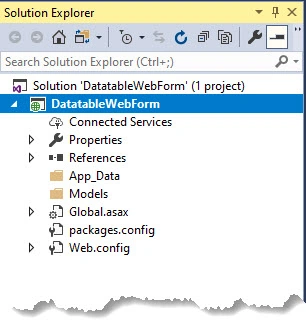
Let’s start with a fresh empty Web Form Project.
Step 2
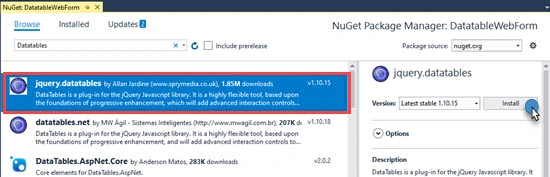
Download Datatable.js files from NuGet Package Manager. Click on Browser tab and search for data tables as shown in the below screen.
Step 3
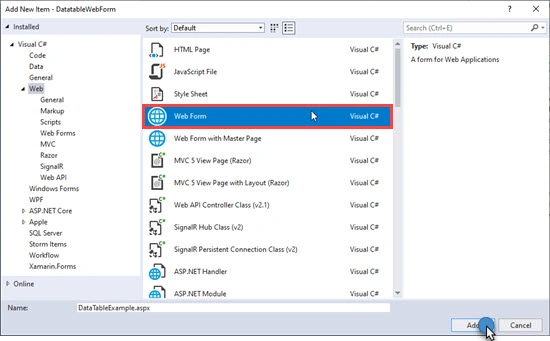
Now, right-click on Project and Click on Add a new item; i.e. Web Form. Give it a meaningful name (DataTableExample.aspx) and click on Add.
Step 4
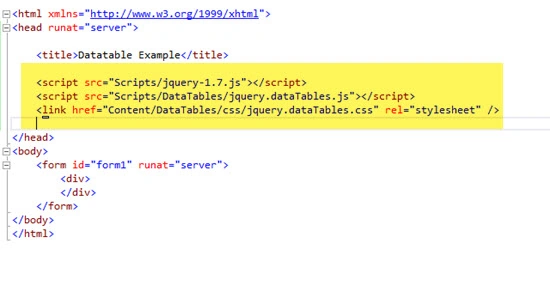
Add jQuery, DataTable.js, and Datatable.css file in the Web Form page created in the above step.
Step 5
In SQL Server Database, I have created a Sample DB that contains the Employee Table. We will use Offset and Fetch Next clause which is used in conjunction with Select and Order by Clause.
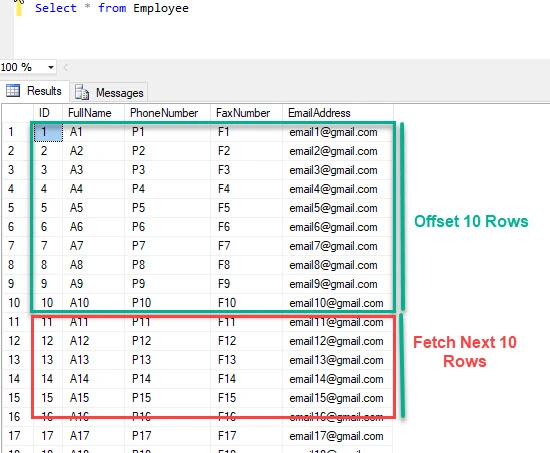
Step 6
Now add a procedure; i.e. spDataInDataTable, which will be called in order to bring the data from the database to the application. The same procedure can be written in multiple ways. The first one is a long way; i.e., without using the dynamic query as shown below.
- Create PROCEDURE [dbo].[spDataInDataTable] (
- @sortColumn VARCHAR(50)
- ,@sortOrder VARCHAR(50)
- ,@OffsetValue INT
- ,@PagingSize INT
- ,@SearchText VARCHAR(50)
- )
- AS
- BEGIN
- SELECT ID
- ,FullName
- ,PhoneNumber
- ,FaxNumber
- ,EmailAddress
- ,count(ID) OVER () AS FilterTotalCount
- FROM Employee
- WHERE (
- (
- @SearchText <> ''
- AND (
- FullName LIKE '%' + @SearchText + '%'
- OR PhoneNumber LIKE '%' + @SearchText + '%'
- )
- )
- OR (@SearchText = '')
- )
- ORDER BY CASE
- WHEN @sortOrder <> 'ASC'
- THEN ''
- WHEN @sortColumn = 'FullName'
- THEN FullName
- END ASC
- ,CASE
- WHEN @sortOrder <> 'Desc'
- THEN ''
- WHEN @sortColumn = 'FullName'
- THEN FullName
- END DESC
- ,CASE
- WHEN @sortOrder <> 'ASC'
- THEN 0
- WHEN @sortColumn = 'ID'
- THEN ID
- END ASC
- ,CASE
- WHEN @sortOrder <> 'DESC'
- THEN 0
- WHEN @sortColumn = 'ID'
- THEN ID
- END DESC
- ,CASE
- WHEN @sortOrder <> 'ASC'
- THEN ''
- WHEN @sortColumn = 'PhoneNumber'
- THEN PhoneNumber
- END ASC
- ,CASE
- WHEN @sortOrder <> 'DESC'
- THEN ''
- WHEN @sortColumn = 'PhoneNumber'
- THEN PhoneNumber
- END DESC
- ,CASE
- WHEN @sortOrder <> 'ASC'
- THEN ''
- WHEN @sortColumn = 'FaxNumber'
- THEN FaxNumber
- END ASC
- ,CASE
- WHEN @sortOrder <> 'DESC'
- THEN ''
- WHEN @sortColumn = 'FaxNumber'
- THEN FaxNumber
- END DESC
- ,CASE
- WHEN @sortOrder <> 'ASC'
- THEN ''
- WHEN @sortColumn = 'EmailAddress'
- THEN EmailAddress
- END ASC
- ,CASE
- WHEN @sortOrder <> 'DESC'
- THEN ''
- WHEN @sortColumn = 'EmailAddress'
- THEN EmailAddress
- END DESC OFFSET @OffsetValue ROWS
- FETCH NEXT @PagingSize ROWS ONLY
- END
Or we can write it in a short form with the use of a dynamic SQL query as shown below.
- ----Dynamic Query
- DECLARE @sqlQuery VARCHAR(max) = 'SELECT ID,FullName,PhoneNumber,FaxNumber,EmailAddress,count(ID) Over() as FilterTotalCount FROM Employee';
- SET @sqlQuery = @sqlQuery + ' WHERE ((''' + @SearchText + ''' <> '''' AND (FullName LIKE ''%' + @SearchText + '%'' OR PhoneNumber LIKE ''%' + @SearchText + '%'')) OR (''' + @SearchText + ''' = ''''))';
- SET @sqlQuery = @sqlQuery + ' order by ' + @sortColumn + ' ' + @sortOrder;
- SET @sqlQuery = @sqlQuery + ' OFFSET ' + cast(@OffsetValue AS VARCHAR(100)) + ' ROWS FETCH NEXT ' + cast(@PagingSize AS VARCHAR(100)) + ' ROWS ONLY';
- EXEC (@sqlQuery);
You can also write the query in the best and optimized way as per your need or by checking the execution plan in SQL Server.
Step 7
Add a class that will act as DB Layer in our project. You can also use Entity Framework and other libraries.
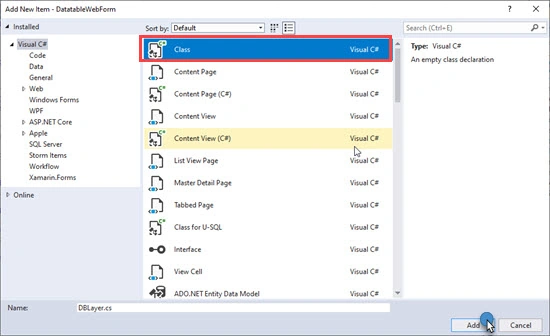
Below is the ADO.NET code which will call the Procedure.
- public class DBLayer
- {
- public DataTable GetData(string sortColumn,string sortDirection, int OffsetValue, int PagingSize, string searchby) {
- DataTable dt = new DataTable();
- using (SqlConnection conn = new SqlConnection(ConfigurationManager.ConnectionStrings["DBCS"].ConnectionString)) {
- conn.Open();
- SqlCommand com = new SqlCommand("spDataInDataTable", conn);
- com.CommandType = CommandType.StoredProcedure;
- com.Parameters.AddWithValue("@sortColumn", sortColumn);
- com.Parameters.AddWithValue("@sortOrder", sortDirection);
- com.Parameters.AddWithValue("@OffsetValue", OffsetValue);
- com.Parameters.AddWithValue("@PagingSize", PagingSize);
- com.Parameters.AddWithValue("@SearchText", searchby);
- SqlDataAdapter da = new SqlDataAdapter(com);
- da.Fill(dt);
- da.Dispose();
- conn.Close();
- }
- return dt;
- }
- }
Step 8
In order to manage the server-side paging, we need a Web Service. Add a Web Service file in the project.
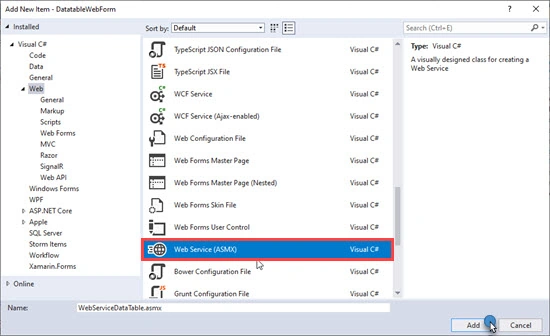
Step 9
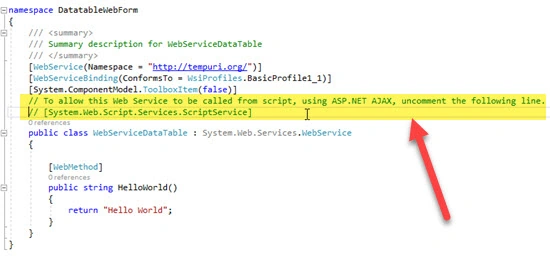
Make sure to uncomment the highlighted lines shown in the below image in order to call Web Service from the Script.
Step 10
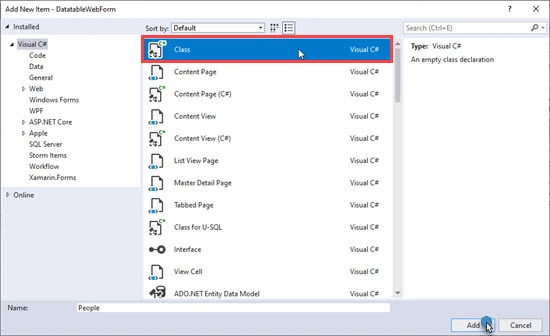
Now add a People class that is required to bind the data from the database.
Step 11
Add the below line of code in the Web Service as shown below.
- public class WebServiceDataTable : System.Web.Services.WebService
- {
- [WebMethod]
- public void GetDataForDataTable()
- {
- HttpContext context = HttpContext.Current;
- context.Response.ContentType = "text/plain";
- //List of Column shown in the Table (user for finding the name of column on Sorting)
- List<string> columns = new List<string>();
- columns.Add("FullName");
- columns.Add("PhoneNumber");
- columns.Add("FaxNumber");
- columns.Add("EmailAddress");
- //This is used by DataTables to ensure that the Ajax returns from server-side processing requests are drawn in sequence by DataTables
- Int32 ajaxDraw = Convert.ToInt32(context.Request.Form["draw"]);
- //OffsetValue
- Int32 OffsetValue = Convert.ToInt32(context.Request.Form["start"]);
- //No of Records shown per page
- Int32 PagingSize = Convert.ToInt32(context.Request.Form["length"]);
- //Getting value from the seatch TextBox
- string searchby = context.Request.Form["search[value]"];
- //Index of the Column on which Sorting needs to perform
- string sortColumn = context.Request.Form["order[0][column]"];
- //Finding the column name from the list based upon the column Index
- sortColumn = columns[Convert.ToInt32(sortColumn)];
- //Sorting Direction
- string sortDirection = context.Request.Form["order[0][dir]"];
- //Get the Data from the Database
- DBLayer objDBLayer = new DBLayer();
- DataTable dt = objDBLayer.GetData(sortColumn,sortDirection, OffsetValue, PagingSize, searchby);
- Int32 recordTotal = 0;
- List<People> peoples = new List<People>();
- //Binding the Data from datatable to the List
- if (dt != null)
- {
- for (int i = 0; i < dt.Rows.Count; i++)
- {
- People people = new People();
- people.ID = Convert.IsDBNull(dt.Rows[i]["ID"]) ? default(int) : Convert.ToInt32(dt.Rows[i]["ID"]);
- people.FullName = Convert.IsDBNull(dt.Rows[i]["FullName"]) ? default(string) : Convert.ToString(dt.Rows[i]["FullName"]);
- people.PhoneNumber = Convert.IsDBNull(dt.Rows[i]["PhoneNumber"]) ? default(string) : Convert.ToString(dt.Rows[i]["PhoneNumber"]);
- people.FaxNumber = Convert.IsDBNull(dt.Rows[i]["FaxNumber"]) ? default(string) : Convert.ToString(dt.Rows[i]["FaxNumber"]);
- people.EmailAddress = Convert.IsDBNull(dt.Rows[i]["EmailAddress"]) ? default(string) : Convert.ToString(dt.Rows[i]["EmailAddress"]);
- peoples.Add(people);
- }
- recordTotal = dt.Rows.Count > 0 ? Convert.ToInt32(dt.Rows[0]["FilterTotalCount"]) : 0;
- }
- Int32 recordFiltered = recordTotal;
- DataTableResponse objDataTableResponse = new DataTableResponse()
- {
- draw = ajaxDraw,
- recordsFiltered = recordTotal,
- recordsTotal = recordTotal,
- data = peoples
- };
- //writing the response context.Response.Write(Newtonsoft.Json.JsonConvert.SerializeObject(objDataTableResponse));
- }
- }
Step 12
In the above steps, we created a Webservice. Now let’s consume it in DataTableExample.aspx.
- <%@ Page Language="C#" AutoEventWireup="true" CodeBehind="DataTableExample.aspx.cs" Inherits="DatatableWebForm.DataTableExample" %>
- <!DOCTYPE html>
- <html xmlns="http://www.w3.org/1999/xhtml">
- <head runat="server">
- <title>Datatable Example</title>
- <script src="Scripts/jquery-1.7.js"></script>
- <script src="Scripts/DataTables/jquery.dataTables.js"></script>
- <link href="Content/DataTables/css/jquery.dataTables.css" rel="stylesheet" />
- <script type="text/javascript">
- $(document).ready(function () {
- //Once the document is ready call Bind DataTable
- BindDataTable()
- });
- function BindDataTable() {
- $('#tblDataTable').DataTable({
- "processing": true,
- "serverSide": true,
- "ajax": {
- url: "/WebServiceDataTable.asmx/GetDataForDataTable", type: "post" },
- "columns": [
- { "data": "FullName" },
- { "data": "PhoneNumber" },
- { "data": "FaxNumber" },
- { "data": "EmailAddress" }
- ]
- });
- }
- </script>
- </head>
- <body>
- <form id="form1" runat="server">
- <div>
- <!--Structure of the table with only header-->
- <table id="tblDataTable" class="display">
- <thead>
- <tr>
- <th>Full Name</th>
- <th>Phone Number</th>
- <th>Fax Number</th>
- <th>Email Address</th>
- </tr>
- </thead>
- </table>
- </div>
- </form>
- </body>
- </html>
Step 13
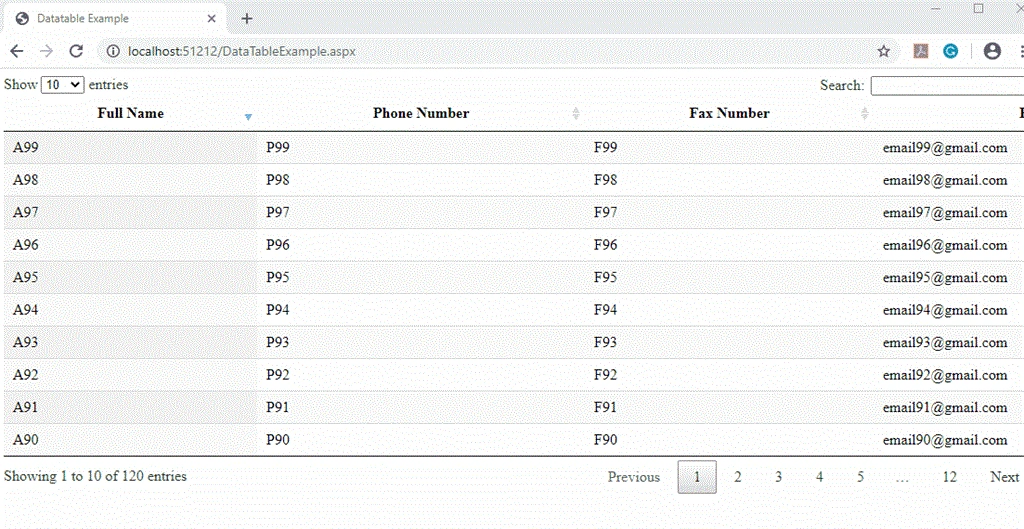
Now build and run the application.
Preview
I hope this will help you.
Thanks.
Mudzakkir TohaPosted Apr 10, 2023, 2:38 AM
Great explanation.. saved to my bookmark
Necqui TejaPosted Sep 28, 2020, 5:10 PM
Thanks for this great article.I was wondering why do you have the zero hard coded in the Web Service line 23 and 27 string sortColumn = context.Request.Form["order[0][column]"]; string sortDirection = context.Request.Form["order[0][dir]"]; This sounds like you always want the first column!
Raghuram PerlaPosted Sep 24, 2020, 6:37 AM
If we are writing mvc controller action method, what we need to use in place of HttpContext ? ( Because context.current is not working in mvc)
Bhaskar BanerjeePosted Aug 4, 2020, 1:36 AM
Very nice sir. Thank you very much.
Praveen PPosted Jul 14, 2020, 2:38 AM
Could you please share us the code