

Anaconda Navigator
Anaconda is an open source and free distribution of R and Python programming language for a machine learning as well as data science projects. Therefore, it is known as a professional data science platform. It contains a powerful environment manager, which provides a different type of Python environment such as a Spyder, Jupyter notebook, and so on.
Benefits
- Anaconda is a free and open-source distributer
- Support for Windows, Mac OS, and Linux
- Manages a lot of Python libraries
- Then it provides various environments by virtualization,
- Can easily deal with large data computing and,
- It works properly without the need for any administrative privileges.
Supported libraries or packages
- Numby
- Scipy
- Scikit learn
- Matplotlib
- NLTK
- Pandas
- Bokeh
- R essential.
- Jupyter notebook
- Jupyterlab
- Spyder
- Orange
- QtConsole
- R studio
- Visual Studio code.
Jupyter notebook
A Jupyter notebook is an open source environment run in the web browser that allows you to create and share documents belonging to the Python and R program. It provides working facilities such as data cleaning, transformation and visualization, static modeling and machine learning. Jupyter is concerned with three types of core languages such as Julia, Python, and R. Its document is a JSON document, which is default connected to the IPython kernel. It supports launching and managing condo packages without using command line commands.
Spyder
Spyder is an acronym for Scientific Python development environment used in machine learning projects developed in Python language. Then it is integrated with open sources software packages such as NumPy, SciPy, Matplotlib, and IPython. It's also called an open source cross-platform IDE. Anaconda Spyder has some essential features like advanced editing, interactive testing, and debugging.
II Program in Jupyter notebook
Step 1 - Launch Jupyter notebook
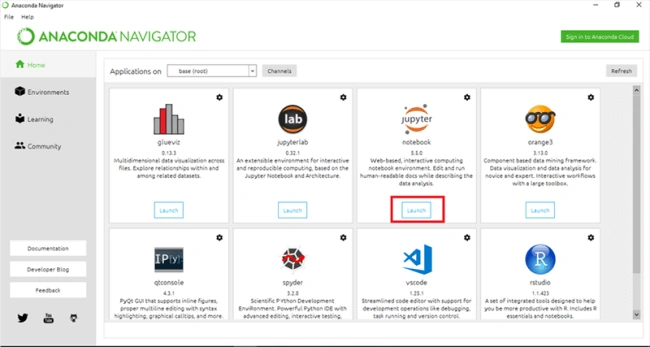
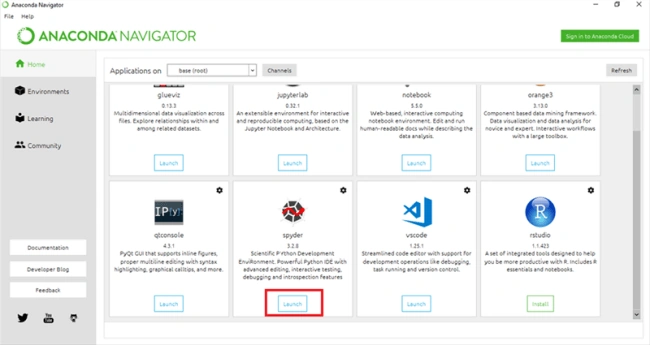
- Open the Anaconda navigator from your system; there is an available number of working environments.
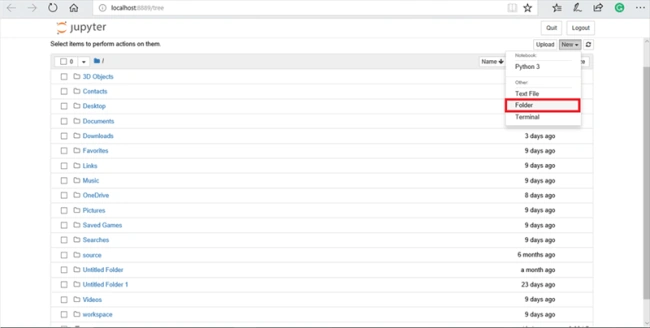
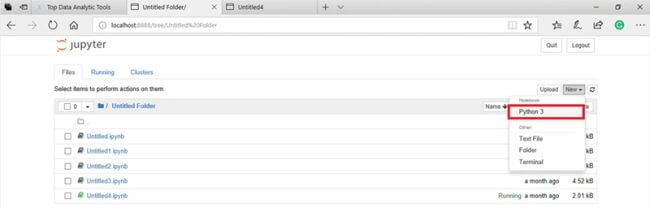
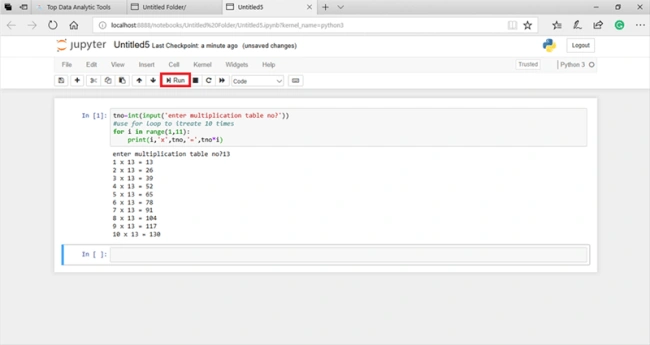
- Choose Jupyter notebook and click on “launch”. Then it will appear with your default web browser.
manikandan PalanisamyPosted Aug 15, 2019, 8:08 PM
thanks Elavarasan I have learnt more in my knowledge
Pradeep SelvamPosted Aug 15, 2019, 11:20 AM
super article
Kokila RaniPosted Jan 28, 2019, 6:09 PM
Simple and clear explanation. great.
Elavarasan RPosted Nov 20, 2018, 2:22 AM
thank you all..
Sarathlal SaseendranPosted Nov 20, 2018, 1:46 AM
Nice article elavarasan
Abhishek MishraPosted Nov 18, 2018, 11:16 AM
Superb article and useful
Guest UserPosted Nov 18, 2018, 10:49 AM
Super elavarasan..I understand easily your article.This is useful to me..Thank you to share