

In this article, we will learn how to set up an Angular 5 development environment in Visual Studio 2017 without using Angular CLI.
Prerequisites
- Node.JS should be installed (If it is not installed go to link download and install).
- NPM should be installed (Run command line to install NPM: npm install -g npm@latest).
- Visual Studio 2017 should be installed.
Step 1
Open "package.json" file that you have created with the help of the above article.
Open "package.json" file that you have created with the help of the above article.
Step 2
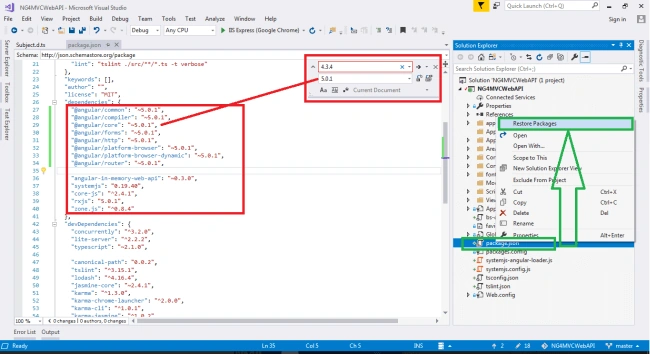
Find the Angular version "4.3.4" and replace with version "5.0.1". Now "package.json" file would look like as below :
Find the Angular version "4.3.4" and replace with version "5.0.1". Now "package.json" file would look like as below :
- {
- "name": "angular-quickstart",
- "version": "1.0.0",
- "description": "QuickStart package.json from the documentation, supplemented with testing support",
- "scripts": {
- "build": "tsc -p src/",
- "build:watch": "tsc -p src/ -w",
- "build:e2e": "tsc -p e2e/",
- "serve": "lite-server -c=bs-config.json",
- "serve:e2e": "lite-server -c=bs-config.e2e.json",
- "prestart": "npm run build",
- "start": "concurrently \"npm run build:watch\" \"npm run serve\"",
- "pree2e": "npm run build:e2e",
- "e2e": "concurrently \"npm run serve:e2e\" \"npm run protractor\" --kill-others --success first",
- "preprotractor": "webdriver-manager update",
- "protractor": "protractor protractor.config.js",
- "pretest": "npm run build",
- "test": "concurrently \"npm run build:watch\" \"karma start karma.conf.js\"",
- "pretest:once": "npm run build",
- "test:once": "karma start karma.conf.js --single-run",
- "lint": "tslint ./src/**/*.ts -t verbose"
- },
- "keywords": [],
- "author": "",
- "license": "MIT",
- "dependencies": {
- "@angular/common": "~5.0.1",
- "@angular/compiler": "~5.0.1",
- "@angular/core": "~5.0.1",
- "@angular/forms": "~5.0.1",
- "@angular/http": "~5.0.1",
- "@angular/platform-browser": "~5.0.1",
- "@angular/platform-browser-dynamic": "~5.0.1",
- "@angular/router": "~5.0.1",
- "angular-in-memory-web-api": "~0.3.0",
- "systemjs": "0.19.40",
- "core-js": "^2.4.1",
- "rxjs": "5.0.1",
- "zone.js": "^0.8.4"
- },
- "devDependencies": {
- "concurrently": "^3.2.0",
- "lite-server": "^2.2.2",
- "typescript": "~2.1.0",
- "canonical-path": "0.0.2",
- "tslint": "^3.15.1",
- "lodash": "^4.16.4",
- "jasmine-core": "~2.4.1",
- "karma": "^1.3.0",
- "karma-chrome-launcher": "^2.0.0",
- "karma-cli": "^1.0.1",
- "karma-jasmine": "^1.0.2",
- "karma-jasmine-html-reporter": "^0.2.2",
- "protractor": "~4.0.14",
- "rimraf": "^2.5.4",
- "@types/node": "^6.0.46",
- "@types/jasmine": "2.5.36"
- },
- "repository": {}
- }
Go to your project and click on "Restore Packages" as below screen.
Jignesh KumarPosted Aug 1, 2018, 8:48 AM
It's nice article. Thanks for sharing :)
Viknaraj ManogararajahPosted Aug 1, 2018, 1:47 AM
nice article...
Abhishek MishraPosted Jul 31, 2018, 11:04 PM
Good one. Most needed info. Setting up Angular projects are nightmare and this is great help.