

Database is an important part of any application or business. If the performance of the database server decreases, then it generates an adverse effect on all systems. So tuning of a database system is very crucial. System tuning is not a single-step task, it is a series of tasks (steps) that help you to increase the performance of your database. Now, I will try to post a series of articles related to this topic and try to explain, “How do we tune up the performance of SQL Server?”.
Today, we will learn about data compression in SQL Server.
What is Data Compression?
By taking advantage of SQL Server's data compression feature, we can increase SQL Server's performance without changing any application code. Generally, the performance of SQL Server is decided by the disk I/O efficiency so we can increase the performance of SQL Server by improving the I/O performance.
Generally, data compression reduces the space occupied by the data. Data compression can help improve the performance of I/O intensive workloads because the data is stored in fewer pages and queries need to read fewer pages from disk. Data compression can be performed for a table, clustered index, or non-clustered index.
Facts about Data Compression
- New pages added for DML will not use the compression until the heap is rebuilt.
- ROW and PAGE level compression can be Enabled and Disabled either offline or online.
- If the setting for the heap is changed then all Nonclustered indexes are required to be rebuilt.
- In a compressed index leaf leaf-level pages can be compressed through both Row and Page compression but the Non-leaf level doesn’t perform page compression.
- Large data types are stored separately and don't contain data compression.
- When partition is split using the ALTER Partition then each partition inherits the compression of the original partition.
- When two partitions are merged, the resultant partition inherits the data compression attribute of the destination partition.
- When a clustered index is dropped, the corresponding heap partitions retain their data compression setting unless the partitioning scheme is modified. To overcome this issue first, drop the clustered index and after that modify the table using the ALTER TABLE with REBUILD option that specifies the compression option.
- Data compression changes the query plan because the data is compressed into different numbers of pages and rows.
Types of Data Compression
SQL Server supports two types of data compression: row compression and page compression.
Row Compression
Row compression is an inner level of compression that stores the fixed character strings by using variable-length format by not storing the blank characters. The following steps are performed in row-level compression.
- All numeric data types like int, float, decimal, and money are converted into variable-length data types. For example, if 125 is stored in a column and the data type of the column is integer then we know that 4 bytes are used to store the integer value. But 125 can be stored in 1 byte because 1 byte can store values from 0 to 255. So, 125 can be stored as tiny int. such that 3 bytes can be saved.
- Char and Nchar data types are stored as variable-length data types. For example, “SQL” is stored in a char(20) type column. But after compression, only 3 bytes will be used. After the data compression, no blank character is stored with this type of data.
- The metadata of the record is reduced.
- NULL and 0 values are optimized and no space is consumed.
Page Compression
Page compression is an advanced level of data compression. A page compression also implements the row level compression automatically. Page compression is categorized into two types prefix compression and dictionary compression.
Prefix Compression
In prefix compression for each page, for each column in the page, a common value is retrieved from all rows and stored below the header in each column. Now in each row instead of a common value a reference of that value is stored.
Dictionary Compression
Dictionary compression is similar to prefix compression but common values are retrieved from all columns and stored in the second row after the header. Dictionary compression looks for exact value matches across all the columns and rows on each page.
We can perform row and page-level compression for the following database objects.
- The table is stored in a heap.
- The whole table is stored as a clustered index.
- Indexed view.
- Non-clustered index.
- Partitioned indexes and tables.
Note. We can perform data compression either at the time of creation like CREATE TABLE, CREATE INDEX, or after the creation using ALTER command with REBUILD option like ALTER TABLE REBUILD WITH.
Let us take some examples and check how data compression reduces the size of data.
Firstly, create a table.
CREATE TABLE Compress_Table
(
    Id int,
    Name [char](50)
);
Now insert some data into the table.
INSERT INTO dbo.Compress_Table
(
    Id,
    Name
)
VALUES
(
    125,
    'Demo Data'
)
GO 10000

Now we check the space used by the data of the table.
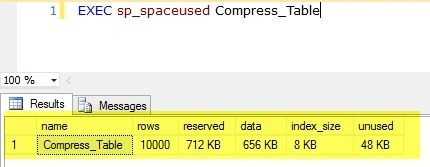
Now first we perform the ROW level compression and check how much data is compressed.
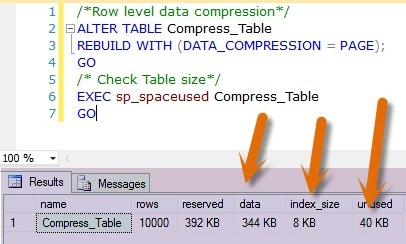
We can see that the reserved space of the table is reduced from 712KB to 344KB and unused space is reduced from 48KB to 40KB.
Now we perform the page-level compression and check the difference between row-level and page-level compression.
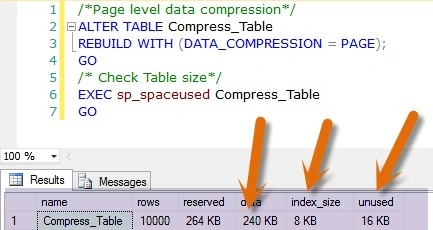
The above image shows that in page-level data compression, the size of the data is less than compared to row-level data compression.
Limitations of Data Compression
- Data compression is not available for every edition of SQL Server. Only available for Enterprise edition.
- Data compression does not allow for data tables.
- Data compression can’t change the maximum row size and the table can’t be compressed if the maximum row size plus the compression overhead exceeds the row size of 8060 bytes.
- If the specified partition exceeds the range then an error will occur.
- The non-clustered index doesn’t inherit the data compression until we don’t define the compression property explicitly.
- Data compression in the database with ROW/PAGE compression can’t be restored, attached, or used in other SQL Server editions.
- Data compression is incompatible with sparse columns so the table can’t be compressed.
- When the table is compressed and data is inserted into the table then CPU usage increases compared to the uncompressed table.
Conclusion
Data Compression is a very efficient technique to reduce the size of data, reduced data requires fewer I/O processes but when data is inserted in the compressed table then it requires more effort compared to uncompressed tables So before bulk insertion is uncompressed the data performs an insertion operation after that. After insertion, the operation again compresses the data.
Thanks for reading the article, if you have any queries or doubts, then don’t hesitate and ask your query in the comment section.
Read More
- SQL Server Performance Tuning Tips
- Transact SQL Query Performance Tuning Tips
- Transact SQL Query Performance Tuning Tips
- Improve Store Procedure Performance In SQL Server/ Store Procedure Performance Tuning
- Tips to Increase SQL Server Query Performance: Part 1
- Tips to Increase SQL Server Query Performance: Part 2
- Tips to Improve SQL Database Performance
- Transact SQL Query Performance Tuning Tips
- Tips To Increase SQL Server Stored Procedure Performance
- SQL Server Performance Tuning: Data Compression
- How To Optimize SQL Queries
- Tips And Tricks To Improve WEB API Performance
Pankaj Kumar ChoudharyPosted May 15, 2016, 1:15 PM
Thanks Anu ViVin Sir.........
Pankaj Kumar ChoudharyPosted May 15, 2016, 1:15 PM
Thanks Kuppurasu Sir.........
Anu VPosted May 11, 2016, 1:24 AM
Nice
Kuppurasu NagarajPosted May 9, 2016, 12:00 PM
Nice Sharing..
Pankaj Kumar ChoudharyPosted May 9, 2016, 10:07 AM
Thanks Debasis Saha sir........
Pankaj Kumar ChoudharyPosted May 9, 2016, 10:07 AM
Thanks @Ankur Mistry Sir........
Pankaj Kumar ChoudharyPosted May 9, 2016, 10:06 AM
Thanks Saurabh Rai Sir........
Pankaj Kumar ChoudharyPosted May 9, 2016, 10:06 AM
Thanks Neeraj Kumar......
Debasis SahaPosted May 9, 2016, 8:42 AM
Good One..
Ankur MistryPosted May 9, 2016, 3:25 AM
Helpful Article Pankaj Kumar Choudhary
Saurabh RaiPosted May 8, 2016, 12:48 PM
Nice Share
Neeraj KumarPosted May 8, 2016, 10:23 AM
Good article Pankaj Kumar Choudhary