

This article will explain how to sync cache in your ADO.NET application using .NET 6 with SQL Server and will be given a practical example of how you could take advantage of having your ADO.NET requests cached by NCache. Cache Synchronization here may have two meanings that are very different from one another. We can synchronize cache by just removing the item from the database, so when the cache is requested it is going to be null, forcing a new request to the database in order to get fresh data. Or, cache synchronization can also mean that, as the data in the database is updated, then NCache is going to manage its cache update in order to have the cached item always up to date with the data source.
The practical example will be taking advantage of the NorthWind database in SQL Server, written in a console application using C# with .NET 6. NCache will be used to manage the cache synchronization and most of its features will be presented working with practical examples.
Northwind is a populated sample database commonly used when we need to access data, sparing us some time without needing to create and populate a database from scratch.
What is ADO.NET?
ADO.NET, whereas the ADO stands for Activex Data Object, is part of the .NET Framework and has a set of classes and connectors providing access to relational, XML, and application data. ADO.NET used to be the main bridge between our applications and their databases before object-relational mappers like Entity Framework were released.
Nowadays ADO.NET is used in more specific scenarios due to its powerful engine to access a variety of data sources, alongside ADO.NET's easy way to manipulate data.
OLEDB vs ODBC
ADO.NET has two built-in drivers to access data. You must choose which one you are going to use in order to connect with your data source. Each data source may work better with one or another data source, this is something that must be taken into consideration when architecting your data access layer. Those drivers are the OLEDB and the ODBC drivers
- OLEDB stands for Object Linking and Embedding, Database. Provides access to relational and non-relational data sources.
- ODBC stands for Open Database Connectivity. Used to provide access only to relational data sources. Now with its latest updates, it also provides access to non-relational data sources like text files and NOSQL.
Data types in ADO.NET
Below are listed the most used data types in ADO.NET:
- DataReader, is used to read data from the data source.
- DataAdapter, is used to update data in the data source.
- DataSet, represents the whole data set retrieved from the database and loaded in memory.
- DataTable, represents a single table of the data set.
What is NCache?
NCache is open-source and cross-platform software. Its cache server offers a scalable in-memory distributed cache for .NET, Java, Scala, Python, and Node.js. As this article will be focusing on .NET technologies, we can use NCache to take advantage of the following usages:
- ASP.NET session state storage;
- ASP.NET view state caching;
- ASP.NET output cache;
- Entity Framework cache;
- NHibernate second-level cache.
Benefits of caching in ADO.NET with NCache
Caching is when we have a copy of the ADO.NET response stored in memory for a specified period of time. NCache is a distributed cache that gives us the capability to cache the ADO.NET response, and also NCache is able to synchronize this cache when the data in the data source changes with the Auto-Reload Functionality.
Also, a distributed cache like NCache is a very important piece of the application architecture when we are planning on scalability, because we prevent repeated requests to hit our database, resulting in a faster response and a less stressed database. A good cache strategy usually results in a much faster application using fewer infrastructure resources.
The Auto-Reload functionality is a very powerful tool that enables you to keep the requests to the database as minimum as possible. It is responsible to have an updated cached item reflecting the database. When the cached data is updated on the database side, then the auto-reload functionality is notified and updates its cached item on NCache with fresh data. With this, we can guarantee that our cached item is going to be always the same value as the data in the database.
In the Auto-Reload functionality, we are responsible only for the first request to the Database. Any subsequent request until the cache duration expires is going to be made against NCache and NCache is the one making requests to the database in order to have the cached item synchronized with the value in the database.
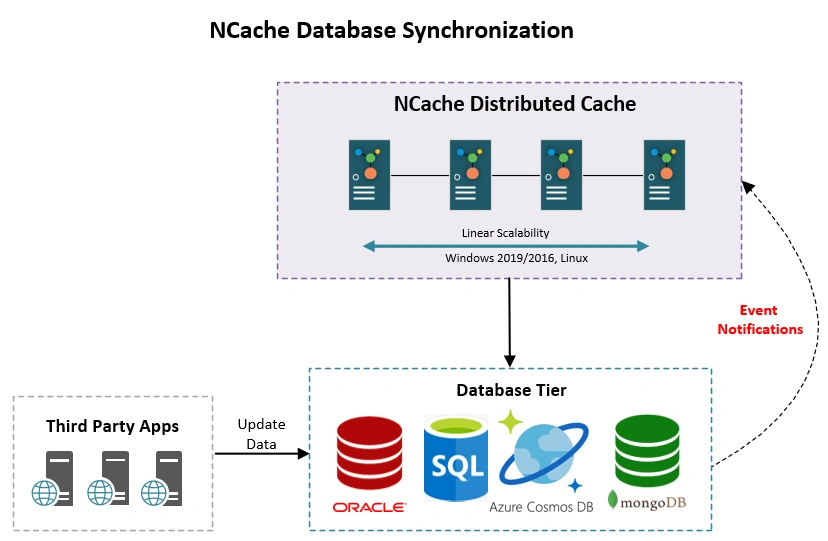
Options to sync cache with NCache
- SQL Dependency
- Parametrized Query
- Stored Procedures
- Oracle Dependency
- Parametrized Query
- Stored Procedures
- Cosmos DB / Mongo DB
- OLEDB Dependency
- CLR Dependency
- Auto Reload ( with read-through )
SQL Dependency - Common usage
As this article focus on SQL Dependency and Auto Reload, the other technologies are not going to be approached. The common usage for SQL Dependency with NCache are the ones as follows:
SqlCacheDependency is where we define the SQL Command and the Connection String which will be further associated with the cache.
 //
 // Summary:
 //     Initializes a new instance of the SqlCacheDependency class, using the supplied
 //     connection string and query string.
 //
 // Parameters:
 //   connectionString:
 //     connection string to be used by dependency.
 //
 //   cmdText:
 //     cmdText to be used by dependency.
 //
 // Returns:
 //     A SqlCacheDependency object based on the supplied parameters.
 //
 // Remarks:
 //     This constructor is used to create SqlCacheDependency objects that use the query-notification
 //     feature of SQL Server 2005 products.
 //     SQL query must include the following:
 //     Fully qualified table names, including the name of the table owner. For example,
 //     to refer to a table called "customers" that is owned by the database owner, the
 //     SQL statement must refer to "dbo.customers".
 //     Explicit column names in the Select statement. You cannot use the asterisk (*)
 //     wildcard character to select all columns from a table. For example, instead of
 //     "select * from customers", you must use "select name, address, city, state from
 //     dbo.customers".
 public SqlCacheDependency(string connectionString, string cmdText): this(connectionString, cmdText, SqlCommandType.Text, new Dictionary < string, SqlCmdParams > ()) {}
 //
 // Summary:
 //     Initializes a new instance of the SqlCacheDependency class. It supports the use
 //     of 'Stored Procedures'.
 //
 // Parameters:
 //   connectionString:
 //     Connection string to be used by dependency.
 //
 //   cmdText:
 //     CmdText to be used by dependency.
 //
 //   cmdType:
 //     The type of the command. (text/stored procedure)
 //
 //   cmdParams:
 //     Parameters to be passed to the command.
 //
 // Returns:
 //     A SqlCacheDependency object based on the supplied parameters.
 //
 // Remarks:
 //     This constructor is used to create SqlCacheDependency objects that use the query-notification
 //     feature of SQL Server 2005 products.
 //     SQL query must include the following: 1. Fully qualified table names, including
 //     the name of the table owner. For example, to refer to a table called "customers"
 //     that is owned by the database owner, the SQL statement must refer to "dbo.customers".
 //     2. Explicit column names in the Select statement. You cannot use the asterisk
 //     (*) wildcard character to select all columns from a table. For example, instead
 //     of "select * from customers", you must use "select name, address, city, state
 //     from dbo.customers".
 public SqlCacheDependency(string connectionString, string cmdText, SqlCommandType cmdType, Dictionary < string, SqlCmdParams > cmdParams) {
     switch (cmdType) {
         case SqlCommandType.Text:
             _cmdType = CommandType.Text;
             break;
         case SqlCommandType.StoredProcedure:
             _cmdType = CommandType.StoredProcedure;
             break;
     }
     _connectionString = connectionString;
     _cmdText = cmdText;
     _cmdParams = cmdParams;
 }
CacheItem is the object responsible to manage the cached object in NCache.
//
// Summary:
//     NCache uses a "key" and "value" structure for storing objects in cache. When
//     an object is added in cache it is stored as value and metadata against the specified
//     key. This combination of value and metadata is defined as CacheItem in NCache.
//     The value of the objects stored in the cache can range from being simple string
//     types to complex objects.
//     CacheItem class in NCache has properties that enable you to set metadata for
//     the item to be added in cache in an organized way. In scenarios where multiple
//     attributes have to be set while adding an item in cache using CacheItem is preferred.Using
//     CacheItem class object removes the problem of using multiple API overloads on
//     adding/updating data in cache.You can easily use the basic API overload and add/update
//     data easily using CacheItem.
public class CacheItem: ICloneable {
    //
    // Summary:
    //     Initialize new instance of cache item.
    //
    // Parameters:
    //   value:
    //     Actual object to be stored in cache.
    public CacheItem(object value);
    //
    // Summary:
    //     This property sets Alachisoft.NCache.Runtime.Caching.Expiration for the cache
    //     itme. After the specified timespan, the item expires from cache. If expiration
    //     is not set then it is disabled.
    public Expiration Expiration {
        get;
        set;
    }
    //
    // Summary:
    //     When the application's cache is full or runs low on memory, the Cache selectively
    //     purges items to free system memory. When an item is added to the Cache, you can
    //     assign it a relative priority compared to the other items stored in the Cache
    //     using this property.
    //     This eliminates the problem of using API overloads for setting the priority.
    //     Items you assign higher priority values to are less likely to be deleted from
    //     the Cache when the server is processing a large number of requests, while items
    //     you assign lower priority values are more likely to be deleted.
    //
    // Value:
    //     The default value is CacheItemPriority.Default.
    //
    // Remarks:
    //     This property will be used only when the eviction policy is set to priority in
    //     the configuration.
    public CacheItemPriority Priority {
        get;
        set;
    }
    //
    // Summary:
    //     NCache uses cache item versioning. Alachisoft.NCache.Client.CacheItemVersion
    //     is a property associated with every cache item. It is basically a numeric value
    //     that is used to represent the version of the cached item which changes with every
    //     update to an item.
    //     This property allows you to track whether any change occurred in an item or not.
    //     When you fetch an item from cache, you also fetch its current version in the
    //     cache.
    public CacheItemVersion Version {
        get;
        set;
    }
    //
    // Summary:
    //     Specifies when the item was added in cache for the first time.
    public DateTime CreationTime {
        get;
    }
    //
    // Summary:
    //     This property of CacheItem stores the last modified time of the cache item. If
    //     an item is updated in cache its last modified time is updated as well. Last modified
    //     time is checked when Least Recently Used based eviction is triggered.
    public DateTime LastModifiedTime {
        get;
    }
    //
    // Summary:
    //     Using Tags, you can associate keywords(s) with your cache items. You can mark
    //     your data with tags which act as identifiers for your cache items. Using this
    //     property, you can easily set tags for a cache item.
    public Tag[] Tags {
        get;
        set;
    }
    //
    // Summary:
    //     With Named Tags user is able to store additional information (of any type) required
    //     to query the object stored as string. Users are required to provide the list
    //     of named tags, each having two parameters, "key" (name of a tag) as string and
    //     "value" (assigned value) as any primitive type.
    //     NCache then allows you to search your objects through these named tags. Named
    //     tags can be specified by using this property of CacheItem.
    public NamedTagsDictionary NamedTags {
        get;
        set;
    }
    //
    // Summary:
    //     This property is used to define the Alachisoft.NCache.Client.CacheItem.ResyncOptions
    //     for the cache item.
    public ResyncOptions ResyncOptions {
        get;
        set;
    }
    //
    // Summary:
    //     Groups help you create a logical partition of your cached data for easy retrieval.
    //     Group information can be added with an item by setting the Group property of
    //     CacheItem. This reduces the complication of using API overloads for adding groups
    //     at the time of adding/updating item in cache.
    public string Group {
        get;
        set;
    }
    //
    // Summary:
    //     Synchronizes two separate caches so that an item updated or removed from one
    //     cache can have the same effect on the synchronized cache. For cache sync dependency,
    //     an item must exist in cache before another item can be added with a dependency
    //     on it. This property lets you set Cache sync dependency with a cache item.
    public CacheSyncDependency SyncDependency {
        get;
        set;
    }
    //
    // Summary:
    //     The file or cache key dependencies for the item. When any dependency changes,
    //     the object becomes invalid and is removed from the cache. If there are no dependencies,
    //     this property contains a null reference.
    public CacheDependency Dependency {
        get;
        set;
    }
    //
    // Summary:
    //     Creates a shallow copy of CacheItem
    public virtual object Clone();
    //
    // Summary:
    //     Returns the value stored in the cache item.
    //
    // Type parameters:
    //   T:
    //     Specifies the type of value obtained from the cache item.
    //
    // Returns:
    //     Value of the cache item with the type defined.
    //
    // Remarks:
    //     This value must be serializable, otherwise System.ArgumentException is thrown
    //     when you will try to add or insert the CacheItem.
    public T GetValue < T > ();
    //
    // Summary:
    //     You can use this to notify applications when their objects are updated or removed
    //     in the cache. Callbacks can be registered against Alachisoft.NCache.Runtime.Events.EventType
    //     for the key the items is inserted to. Callback are overridden for the same Alachisoft.NCache.Runtime.Events.EventType
    //     if called again.
    //     CacheDataNotificationCallback defines the callback to be used for notifications.
    //     EventType describes the type of event you want to register. If that event is
    //     triggered, a notification will be received.
    //
    // Parameters:
    //   callback:
    //     Callback to be raised when an item is updated or removed.
    //
    //   eventType:
    //     Alachisoft.NCache.Runtime.Events.EventType the callback is registered against.
    //
    //   datafilter:
    //     Tells whether to receive metadata, data with metadata or none when a notification
    //     is triggered.
    public void SetCacheDataNotification(CacheDataNotificationCallback callback, EventType eventType, EventDataFilter datafilter = EventDataFilter.None);
    //
    // Summary:
    //     Sets the value of the cache item.
    //
    // Parameters:
    //   value:
    //     object to be stored in cache item.
    public void SetValue(object value);
}
ResyncOptions is where we configure our cached item to sync.
public class ResyncOptions {
    //
    // Summary:
    //     If items are to be ReSynced at expiry
    public bool ResyncOnExpiration {
        get;
        set;
    }
    //
    // Summary:
    //     Readthrough provider name when item will be resynced at expiry.
    public string ProviderName {
        get;
        set;
    }
    //
    // Summary:
    //     Basic constructor for ResyncOptions, ProviderName is optional.
    public ResyncOptions(bool resyncOnExpiration, string providerName = null) {
        ResyncOnExpiration = resyncOnExpiration;
        ProviderName = providerName;
    }
}
SQL Dependency Implementation Step by Step
0. Preparation
- Setting up SQL server
In order to allow SQL Server to communicate with NCache, we must execute the following commands. Those commands enable the broker and query notifications
ALTER DATABASE <database_name> SET ENABLE_BROKER;

GRANT SUBSCRIBE QUERY NOTIFICATIONS TO [<group\user>]
GRANT CREATE QUEUE TO [<group\user>]
GRANT CREATE SERVICE TO [<group\user>]
GRANT CREATE PROCEDURE TO [<group\user>]
- Create the Northwind database
If you do not have the Northwind database running on your SQL Server then I recommend executing the script above.
1. Create a Console Application using .NET 6
And install the following Nuget packages:
- Alachisoft.NCache.SDK
- System.Configuration.ConfigurationManager
Configure your client.ncconf according to your NCache settings.
client.ncconfg example
<configuration>
	<ncache-server connection-retries="3" retry-connection-delay="0" retry-interval="1" command-retries="3" command-retry-interval="0.1" client-request-timeout="90" connection-timeout="5" port="9800" local-server-ip="192.168.240.1"/>
	<cache id="demoLocalCache" client-cache-id="" client-cache-syncmode="optimistic" skip-client-cache-if-unavailable="true" reconnect-client-cache-interval="10" default-readthru-provider="" default-writethru-provider="" load-balance="false" enable-client-logs="False" log-level="error">
		<server name="192.168.240.1"/>
	</cache>
</configuration>
2.SQL Dependency methods
I created a new class called nCacheHelper.cs for the methods below:
Simple query
- Get the product from the database
public Product GetProduct(int productId) {
    string queryText = String.Format("SELECT ProductID, ProductName, QuantityPerUnit, UnitPrice FROM dbo.PRODUCTS WHERE PRODUCTID = {0}", productId);
    Product product = null;
    using(SqlConnection sqlConnection = new SqlConnection(connectionString)) {
        SqlCommand cmd = new SqlCommand();
        SqlDataReader reader = null;
        cmd.CommandText = queryText;
        cmd.CommandType = CommandType.Text;
        cmd.Connection = sqlConnection;
        sqlConnection.Open();
        try {
            reader = cmd.ExecuteReader();
            while (reader.Read()) {
                // Populate product
                product = new Product();
                product.ProductID = (int) reader["ProductID"];
                product.ProductName = reader["ProductName"] as String;
                product.QuantityPerUnit = reader["QuantityPerUnit"] as String;
                product.UnitPrice = (Decimal) reader["UnitPrice"];
                break;
            }
        } catch (Exception ex) {
            Console.WriteLine(String.Format("An error occured while fetching product. Error {0} ", ex));
        } finally {
            if (reader != null) reader.Close();
        }
    }
    return product;
}
Join the conversation! Your thoughts help the community grow.