
This article describes the definition and uses of Task And Thread:
- What is Task?
- What is Thread?
- Why do we need Task?
- Why do we need Thread?
- How to implement Task
- How to implement Thread
- Differences between Task And Thread
What is Task in C#?
.NET framework provides Threading.Tasks class to let you create tasks and run them asynchronously. A task is an object that represents some work that should be done. The task can tell you if the work is completed and if the operation returns a result, the task gives you the result.
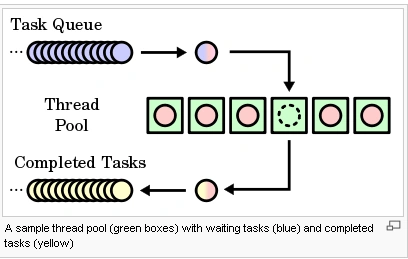
What is Thread?
.NET Framework has thread-associated classes in System.Threading namespace. A Thread is a small set of executable instructions.
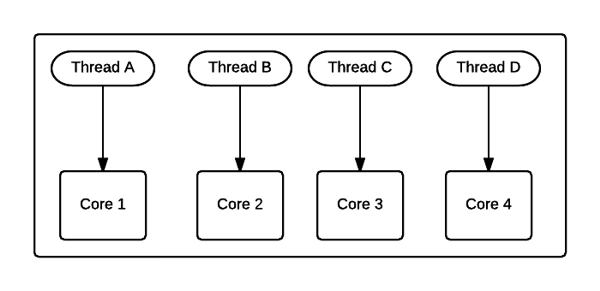
Why we need Tasks?
It can be used whenever you want to execute something in parallel. Asynchronous implementation is easy in a task, using’ async’ and ‘await’ keywords.
Why we need a Thread?
When the time comes when the application is required to perform few tasks at the same time.
Here is a beginner tutorial on Introduction to Threading in C#
How to Create a Task
static void Main(string[] args) {
    Task < string > obTask = Task.Run(() => (
        return“ Hello”));
    Console.WriteLine(obTask.result);
}
How to Create a Thread
static void Main(string[] args) {
    Thread thread = new Thread(new ThreadStart(getMyName));
    thread.Start();
}
public void getMyName() {}
Differences Between Task And Thread
Here are some differences between a task and a thread.
- The Thread class is used for creating and manipulating a thread in Windows. A Task represents some asynchronous operation and is part of the Task Parallel Library, a set of APIs for running tasks asynchronously and in parallel.
- The task can return a result. There is no direct mechanism to return the result from a thread.
- Task supports cancellation through the use of cancellation tokens. But Thread doesn't.
- A task can have multiple processes happening at the same time. Threads can only have one task running at a time.
- We can easily implement Asynchronous using ’async’ and ‘await’ keywords.
- A new Thread()is not dealing with Thread pool thread, whereas Task does use thread pool thread.
- A Task is a higher level concept than Thread.
Lalith PrasadPosted Jan 11, 2022, 7:04 AM
This is not a good blog. A Task is work that runs asynchronously on a worker thread of thread pool, which is a back ground thread. Each Task will be assigned with a separate thread from the thread pool provided the availability of threads from thread pool. now using these Tasks you can consume the thread from the thread pool without you having to maintain threads using Thread Class which results in various errors. So, you might not be using Threads at all. This sentence doesn't make sense at all: "A task can have multiple processes happening at the same time. Threads can only have one task running at a time." This is the best blog on Threads in C# - https://www.c-sharpcorner.com/article/Threads-in-CSharp/
Belal ArarPosted Jul 18, 2021, 9:39 AM
Great Article
Bohdan StupakPosted Feb 15, 2020, 11:32 AM
It's a pity async/await not covered. Great article tho
Sujeet SinghPosted Jan 12, 2020, 12:46 PM
ThreadPool, a task does not create its own OS thread. Instead, tasks are executed by a TaskScheduler; the default scheduler simply runs on the ThreadPool. Unlike the ThreadPool, Task also allows you to find out when it finishes, and (via the generic Task) to return a result. You can call ContinueWith() on an existing Task to make it run more code once the task finishes (if it's already finished, it will run the callback immediately). You can also synchronously wait for a task to finish by calling Wait(). Like Thread.Join(), this will block the calling thread until the task finishes. Since tasks still run on the ThreadPool, they should not be used for long-running operations, since they can still fill up the thread pool and block new work. Instead, Task provides a LongRunning option, which will tell the TaskScheduler to spin up a new thread rather than running on the ThreadPool. One of the major difference between task and thread is the propagation of exception. While using thread if we get the exception in the long running method it is not possible to catch the exception in the parent function but the same can be easily caught if we are using tasks.
Ashutosh TiwariPosted Nov 4, 2019, 7:39 AM
Thank You very much
Linh KhỉPosted Oct 11, 2019, 3:56 AM
"A task can have multiple processes happening at the same time. Threads can only have one task running at a time." Could you explain this?
Brendon MascarenhasPosted Sep 13, 2019, 9:21 AM
Nice Start Pragya, I'm Good. The following code does not compile. Follow code => var obTask = await Task.Run(() =>"Hello"); Console.WriteLine(obTask);
Sofia RodriguesPosted May 6, 2019, 9:53 AM
Very usefull post. Check this : https://docs.microsoft.com/dotnet/standard/threading/using-threads-and-threading! You say it is impossible to cancel threads but in the documentation of Microsoft you can read that you can use CancellationTokens.
Nicolae FieraruPosted Nov 17, 2018, 2:13 AM
The following code does not compile: using System;using System.Threading.Tasks; namespace MultiTasks { class Program { public static void Main(string[] args) { Task < string > obTask = Task.Run(() => (return "Hello";)); Console.WriteLine(obTask.result); Console.Write("Press any key to continue . . . "); Console.ReadKey(true); } } }
Hiten PandyaPosted Mar 24, 2018, 4:45 AM
Good Information on Task and Thread. Waiting for more articles on this task and thread. Keep sharing.
Rafnas T PPosted Mar 24, 2018, 2:45 AM
Nice start, keep sharing..