

Introduction
In this article, I will discuss how to trigger/run an Azure web job by using web api.
Azure web job is like a service that can run a task in the background. It doesn’t contain any UI and it is the same as our Windows service.
The scenarios where we use Azure web jobs are
- Image processing or other CPU-intensive background work.
- Queue processing.
- File maintenance, such as aggregating or cleaning up log files.
- Long-running tasks such as sending emails.
Prerequisite
- Microsoft Azure account.
- They are existing app services.
- Existing web job but that is of type either triggered or scheduled.
So let’s create a sample application and after that, we will call GET and POST call.
Here I have created an asp.net application that contains two buttons Get Web Job Call and Post Web Job Call and whose design looks like as below.

So first of all, we have to know about what the Azure web job webapi looks like.
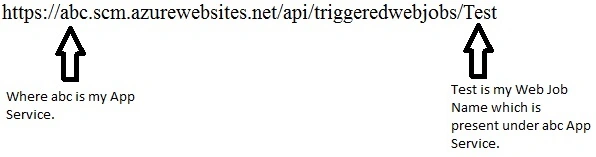
As you can see in this URL, https://abc.azurewebsites.net belonged to my Azure app service.
As the web job is present under the Azure app service, the web job api is also slightly similar and looks like this, https://abc.scm.azurewebsites.net/api/.
After the web job api URL is formed, we need to add triggeredwebjobs at last, and after that, we need to add our web job name.
So the complete web job api URL looks like this
Get call explanation
In the get call, we are retrieving the status of a web job. When we click on the get web job call button in UI then it will call getCallbtn_Click on the server side and the code looks as below.
protected void getCallbtn_Click(object sender, EventArgs e)
{
    var status = GetWebJobSync("triggeredwebjobs/Test");
    dynamic jsonStatus = JsonConvert.DeserializeObject(status);
    if (jsonStatus.latest_run != null)
    {
        var jobStatus = jsonStatus.latest_run.status;
    }
}
The getCallbtn_Click method will call the GetWebJobSync method bypassing the web job name and will return the job status.
private string GetWebJobSync(string call)
{
    string ApiUrl = "https://abc.scm.azurewebsites.net/api/";
    string result = string.Empty;
    string userPswd = "$demo" + ":" + "igQqdPY2pjbF6mTvo5WmjBpualiyqxBWgjgkaA0yc8tEo7Kbun7bRnddRvMb";
    userPswd = Convert.ToBase64String(Encoding.Default.GetBytes(userPswd));
    string baseURL = string.Format("{0}", call);
    try
    {
        using (var client = new HttpClient())
        {
            client.BaseAddress = new Uri(ApiUrl);
            client.Timeout = TimeSpan.FromMinutes(30);
            client.DefaultRequestHeaders.Accept.Clear();
            client.DefaultRequestHeaders.Accept.Add(new MediaTypeWithQualityHeaderValue("application/json"));
            client.DefaultRequestHeaders.Authorization = new AuthenticationHeaderValue("Basic", userPswd);
            var response = new HttpResponseMessage();
            response = client.GetAsync(baseURL).Result;
            result = response.IsSuccessStatusCode ? (response.Content.ReadAsStringAsync().Result) : response.IsSuccessStatusCode.ToString();
        }
        return result;
    }
    catch (Exception ex)
    {
        throw ex;
    }
}
The GetWebJobSync method uses a web api technique with a basic authentication approach to retrieve the status of the job.
Post call explanation
In the post-call, we are running the web job. When we click on the post web job call button, then it will call postCallbtn_Click on the server side and the code looks as below.
protected void postCallbtn_Click(object sender, EventArgs e)
{
    var statusPOST = POSTWebJobSync();
}
The postCallbtn_Click method will call the POSTWebJobSync method and return the response message.
private HttpResponseMessage POSTWebJobSync()
{
    string ApiUrl = "https://abc.scm.azurewebsites.net/api/";
    string call = "triggeredwebjobs/Test/run";
    string result = string.Empty;
    string userPswd = "$demo" + ":" + "igQqdPY2pjbF6mTvo5WmjBpualiyqxBWgjgkaA0yc8tEo7Kbun7bRnddRvMb";
    userPswd = Convert.ToBase64String(Encoding.Default.GetBytes(userPswd));
    var response = new HttpResponseMessage(HttpStatusCode.NotFound);
    try
    {
        using (var client = new HttpClient())
        {
            client.BaseAddress = new Uri(ApiUrl);
            client.Timeout = TimeSpan.FromMinutes(30);
            client.DefaultRequestHeaders.Accept.Clear();
            client.DefaultRequestHeaders.Accept.Add(new MediaTypeWithQualityHeaderValue("application/json"));
            client.DefaultRequestHeaders.Authorization = new AuthenticationHeaderValue("Basic", userPswd);
            response = client.PostAsync(call, new StringContent(string.Empty, System.Text.Encoding.UTF8, "application/json")).Result;
        }
        return response;
    }
    catch (Exception ex)
    {
        throw ex;
    }
}
In both get and post call, we are retrieving the username and password from the publish profile whose publishMethod="MSDeploy" which is present in the web app and shown below.
<publishData>
    <publishProfile
        profileName="demo - Web Deploy"
        publishMethod="MSDeploy"
        publishUrl="demo.scm.azurewebsites.net:443"
        msdeploySite="demo"
        userName="$demo"
        userPWD="igQqdPY2pjbF6mTvo5WmjBpualiyqxBWgjgkaA0yc8tEo7Kbun7bRnddRvMb"
        destinationAppUrl="http://demo.azurewebsites.net"
        SQLServerDBConnectionString=""
        mySQLDBConnectionString=""
        hostingProviderForumLink=""
        controlPanelLink="http://windows.azure.com"
        webSystem="WebSites">
        <databases />
    </publishProfile>
    <publishProfile
        profileName="demo - FTP"
        publishMethod="FTP"
        publishUrl="ftp://demo.ftp.azurewebsites.windows.net/site/wwwroot"
        ftpPassiveMode="True"
        userName="demo\$demo"
        userPWD="igQqdPY2pjbF6mTvo5WmjBpualiyqxBWgjgkaA0yc8tEo7Kbun7bRnddRvMb"
        destinationAppUrl="http://demo.azurewebsites.net"
        SQLServerDBConnectionString=""
        mySQLDBConnectionString=""
        hostingProviderForumLink=""
        controlPanelLink="http://windows.azure.com"
        webSystem="WebSites">
        <databases />
    </publishProfile>
</publishData>
Output
The output of the get web job call status is shown below.
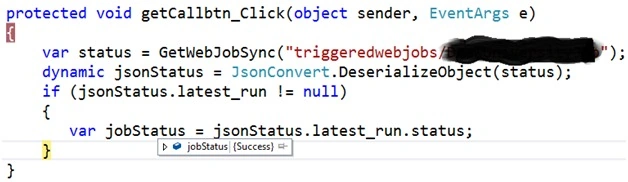
Also, the output of the post-call status is shown below.

Note
- We can integrate the above code in asp.net, MVC, or any other technologies.
- In place of ABC and Test, you need to use your app service name and web job name.
Surya KantPosted Aug 3, 2022, 6:09 AM
Salman Beg - As you said above we can call the web job from API but in my case I want to send a model data from API to web job. Is this possible and this model contain list of data. Let me know your thought on this.
Keval ChauhanPosted Feb 23, 2021, 7:00 AM
Hello, Can you please explain/ give example on how do I receive the POST JSON data on webjob side?
Mageshwaran RPosted Nov 15, 2019, 12:11 AM
Nice Article Sir...