

Welcome to the "Understand jQuery Ajax function" article series. In this article series we are learning to consume various C# methods using a jQuery Ajax function. In the previous two articles we learned to consume a code-behind C# method and a Web Service method using a jQuery Ajax function. You can get them here.
Understand jQuery Ajax function: call code behind C# method
Understand jQuery Ajax function : Call Web service method
In this article we will learn to consume a WCF service using a jQuery Ajax method. This article requires a basic understanding from the reader. At least, the terminology like DataContract, OperationContract, ServiceContract and so on.
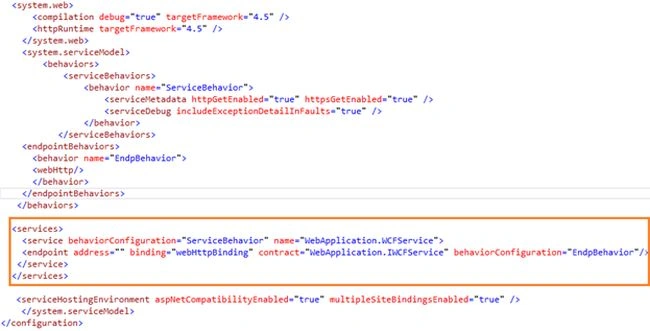
Step 1: create WCF service and configure it
In this step we will create one sample WCF service and we need to configure it.
Define the interface first.
Here we will define the interface in the WCF service. The interface is very simple to implement, we only need to specify the following attribute above the method declaration. Here is the attribute.
[WebInvoke(Method = "POST",BodyStyle = WebMessageBodyStyle.Wrapped,ResponseFormat = WebMessageFormat.Json)]
This attribute specifies that the method can be invoked by client script and then it will be executed by the POST verb. Here is the complete code of the interface definition.
using System;
using System.Collections.Generic;
using System.Linq;
using System.Runtime.Serialization;
using System.ServiceModel;
using System.ServiceModel.Web;
using System.Text;
namespace WebApplication
{
[ServiceContract]
public interface IWCFService
{
[OperationContract]
[WebInvoke(Method = "POST",BodyStyle = WebMessageBodyStyle.Wrapped,ResponseFormat = WebMessageFormat.Json)]
string GetData();
}
}
Implement interface in class
This is the second part of configuration. Here we will implement the interface in a C# class within a WCF application. The class definition is very simple, like interface, we only need to specify the attribute called.
[AspNetCompatibilityRequirements(RequirementsMode = AspNetCompatibilityRequirementsMode.Allowed)]
Just before the class definition. Have a look at the following example.
using System;
using System.Collections.Generic;
using System.Linq;
using System.Runtime.Serialization;
using System.ServiceModel;
using System.ServiceModel.Activation;
using System.Text;
namespace WebApplication
{
[AspNetCompatibilityRequirements(RequirementsMode = AspNetCompatibilityRequirementsMode.Allowed)]
public class WCFService : IWCFService
{
public string GetData()
Join the conversation! Your thoughts help the community grow.