

Introduction
If you have been struggling with JavaScript iterators and searching about JavaScript generators, you are in the right place. In this article, we will take a look at JavaScript generators and how they are different from iterators. Moreover; we will go in-depth with its methods and see some tips when using function generators on an arrow function and inside an object.
Background
It’s good to have a basic understanding of iterators, one reason is to recognize the differences between iterators and generators. In such a case, you can read here or you can Google search. However; if this doesn’t apply to you, you can skip the reading part and proceed to the next section.
What is a JavaScript Generator?
Great! You have probably read the recommended reading material above before jumping into this section. And, hopefully, that helped and I want to say: “Thank you”. OK, then let’s get started.
In my opinion, JavaScript custom iterators are useful when utilized but it demands careful and thorough programming because of its internal state. Thereby, we have an alternative, JavaScript generator, to allow us (JavaScript programmers) to define a single function whose execution is continuous.
Things to remember about JavaScript Generators
- Appears to be a normal function but behaves like an iterator.
- It is written using the function* syntax.
- Invoking a generator function doesn’t execute its body immediately, but rather returns a new instance of the generator object (an object that implements both, iterable and iterator protocols).
- It is a function that returns multiple values one by one.
- It can be paused and resumed. This is possible through the usage of the yield keyword.
- /**
- * It is written using the function* syntax. [✓]
- * Appears to be a normal function. [✓]
- * Uses the yield keyword. [✓]
- */
- function* myFavoriteFruits() {
- let grapeFruit = yield "Grapefruit",
- pineApple = yield "Pineapple",
- apple = yield "Apples",
- mango = yield "Mango";
- }
Now, that we have seen how to declare a generator. Why not invoke the function generator? Finally, check and see the returned object.
Let’s see an example below.
- /**
- * Invoking a generator function doesn't execute its body immediately.
- */
- var mygenerator = myFavoriteFruits();
- //Output: Returns a new instance of the generator object.
- console.log(mygenerator);
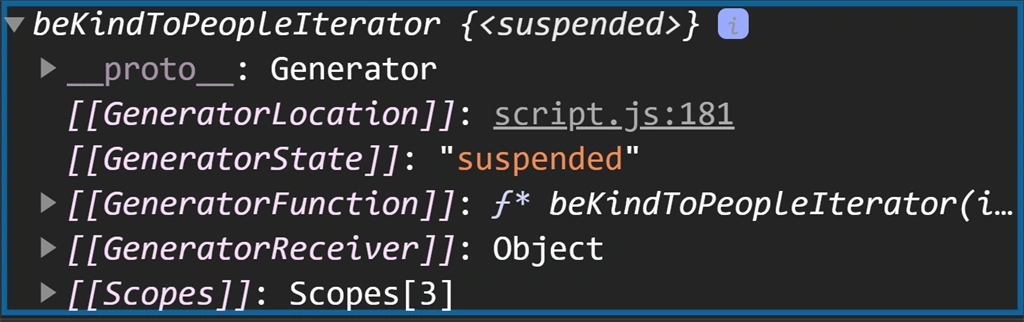
Output
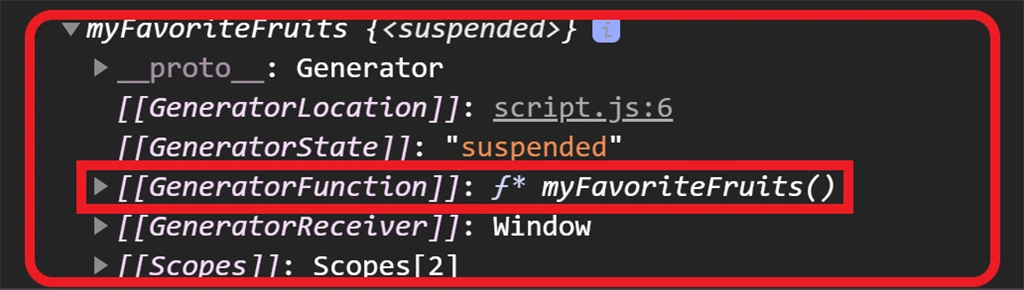
As you can see, the myFavoriteFruits (generator function) returns an instance of the generator object. Moreover, this object implements both iterable and iterator protocols.
JavaScript Generator Instance Methods
The JavaScript generator has 3 instance methods,
- next()
- return()
- throw()
The next() method
When the next() method of the generator object executes, it looks for the function’s body until the yield keyword is encountered. Thereby, it returns the yielded value and pauses the function. Again, when the next() method is invoked it resumes the execution, and then returns the next yielded value.
Lastly, the method next() has two properties: value and done.
- value property is the returned value by the iterator.
- done property is true when the generator function doesn’t yield any more value.
Let’s see an example below.
- function* myFavoriteFruits() {
- let grapeFruit = yield "Grapefruit",
- pineApple = yield "Pineapple",
- apple = yield "Apples",
- mango = yield "Mango";
- //output:undefined undefined undefined undefined -> more of this later.
- console.log(grapeFruit, pineApple, apple, mango);
- }
- var mygenerator = myFavoriteFruits();
- //output: {value: "Grapefruit", done: false}
- console.log(mygenerator.next());
- //output: {value: "Pineapple", done: false}
- console.log(mygenerator.next());
- //output: {value: "Apples", done: false}
- console.log(mygenerator.next());
- //output: {value: "Mango", done: false}
- console.log(mygenerator.next());
- //output: {value: undefined, done: true}
- console.log(mygenerator.next());
Another thing to remember on the next() method is that we can pass an optional argument to it. This argument becomes the value returned by the yield statement, where the generator function is currently paused.
To go back to the previous example, on line 9 we have this statement: console.log(grapeFruit, pineApple, apple, mango); which resulted in undefined undefined undefined undefined. To fix this, let’s see an example below.
- function* myFavoriteFruits() {
- let grapeFruit = yield "Grapefruit",
- pineApple = yield "Pineapple",
- apple = yield "Apples",
- mango = yield "Mango";
- //output:Grapefruit Pineapple Apples Mango
- console.log(grapeFruit, pineApple, apple, mango);
- }
- var mygenerator2 = myFavoriteFruits();
- //output: {value: "Grapefruit", done: false}
- console.log(mygenerator2.next());
- //output: {value: "Pineapple", done: false}
- console.log(mygenerator2.next("Grapefruit"));
- //output: {value: "Apples", done: false}
- console.log(mygenerator2.next("Pineapple"));
- //output: {value: "Mango", done: false}
- console.log(mygenerator2.next("Apples"));
- //output: {value: undefined, done: true}
- console.log(mygenerator2.next("Mango"));
The return() method
The return() method can end the generator function before it can yield all the values. Moreover, this method takes an optional argument and acts as the final value to return.
Let's see an example below.


Jaimin ShethiyaPosted Oct 4, 2020, 11:26 PM
Good one :)