

Today, I have provided an article showing how to use a Sequence Object in SQL Server 2012. To create a sequence of a number in the past, we have used options of IDENTITY. But in SQL Server 2012, there is an interesting option to utilize called Sequence. In this article I am going to illustrate how to create and use the Sequence object. Let's take a look at a practical example. The example is developed in SQL Server 2012.
Sequence
Sequence is a user-defined object that creates a sequence of a number. It has similar functionality to an identity column. You can create it with SQL Server Management Studio or T-SQL.
Creating Sequence
The following syntax creates a Sequence object:
CREATE SEQUENCE [schema_name . ] sequence_name
[ AS [ built_in_integer_type | user-defined_integer_type ] ]
[ START WITH <constant> ]
[ INCREMENT BY <constant> ]
[ { MINVALUE [ <constant> ] } | { NO MINVALUE } ]
[ { MAXVALUE [ <constant> ] } | { NO MAXVALUE } ]
[ CYCLE | { NO CYCLE } ]
[ { CACHE [ <constant> ] } | { NO CACHE } ]
[ ; ]
START WITH - Starting number in the sequence
INCREMENT BY - The incrementing value of the sequence
MINVALUE - The minimum value the sequence can produce.
MAXVALUE - The maximum value the sequence can produce.
CYCLE - If the MAXVALUE is set with the CYCLE, when the MAXVALUE is reached the sequence will cycle to the MINVALUE and start again.
CACHE - If a CACHE argument is provided, SQL Server will cache (store in memory) the amount of values specified.
Example
Now let's create a sequence similar to an identity column with 1 as increment.
CREATE SEQUENCE dbo.TestSequence AS BIGINT
START WITH 5
INCREMENT BY 1
MINVALUE 2
MAXVALUE 9
CYCLE
CACHE 10;
Now creating a table.
CREATE table TABLEsequenceTest
(
ID INT,
Name nvarchar(100) NOT NULL
)
NEXT VALUE FOR
The new NEXT VALUE FOR T-SQL keyword is used to get the next sequential number from a Sequence.
Now insert some data into the table.
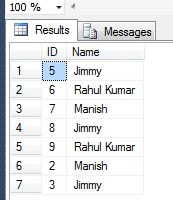
INSERT TABLEsequenceTest (ID, Name)VALUES (NEXT VALUE FOR TestSequence, 'Jimmy');
INSERT TABLEsequenceTest (ID, Name)VALUES (NEXT VALUE FOR TestSequence, 'Rahul Kumar');
INSERT TABLEsequenceTest (ID, Name)VALUES (NEXT VALUE FOR TestSequence, 'Manish');
INSERT TABLEsequenceTest (ID, Name)VALUES (NEXT VALUE FOR TestSequence, 'Jimmy');
INSERT TABLEsequenceTest (ID, Name)VALUES (NEXT VALUE FOR TestSequence, 'Rahul Kumar');

Join the conversation! Your thoughts help the community grow.