

Introduction
In this article, I will explain how to perform user management with their location in PHP using XAMPP server. This application is used to add the user name, email, mobile number and address and is also able to edit details and remove users. Download the XAMPP server in https://www.apachefriends.org/download.html. We can learn using this article curd operation and basic core PHP and MySQL server databases connection. Also all added user can view the google map location.
Here will see MySQL database connection, fetch all user details also insert, update and delete.
Create DB and Table in MySQL database
Using phpMyAdmin XAMPP server we can create our db.My database name is usermanagement.
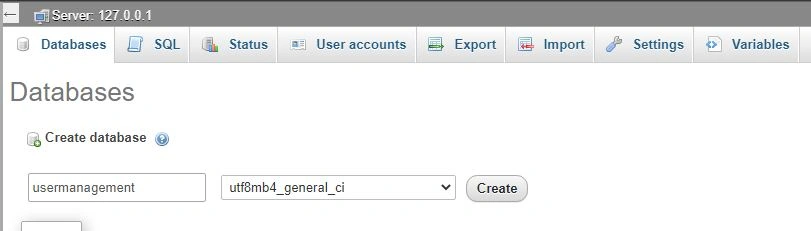
To create table follow this below set of queries.
-- Database: `usermanagement`
-- ---------------------------
-- Table structure for table `tblusers`

CREATE TABLE `tblusers` (
  `ID` int(10) NOT NULL,
  `FirstName` varchar(200) DEFAULT NULL,
  `LastName` varchar(200) DEFAULT NULL,
  `MobileNumber` bigint(10) DEFAULT NULL,
  `Email` varchar(200) DEFAULT NULL,
  `Address` mediumtext DEFAULT NULL,
  `CreationDate` timestamp NOT NULL DEFAULT current_timestamp() ON UPDATE current_timestamp(),
  `Country` varchar(255) DEFAULT NULL
) ENGINE=InnoDB DEFAULT CHARSET=utf8mb4;

-- Dumping data for table `tblusers`

INSERT INTO `tblusers` (`ID`, `FirstName`, `LastName`, `MobileNumber`, `Email`, `Address`, `CreationDate`, `Country`) VALUES
(13, 'jai', 'S', 9879887711, '[email protected]', 'Thiruvanmiyur,chennai', '2020-10-16 13:51:16', NULL),
(14, 'nikki', 's', 4654564111, '[email protected]', 'London', '2020-10-16 15:21:12', NULL),
(20, 'geetha', 'boss', 908776543, '[email protected]', 'london', '2021-03-03 05:42:04', NULL),
(34, 'dana', 's', 2323298830, '[email protected]', 'London\r\n', '2021-10-19 06:36:47', NULL),
(36, 'hasan', 'd', 2987123390, '[email protected]', 'Sweden', '2021-10-19 06:36:02', NULL),
(43, 'sagar', 'f', 3333333333, '[email protected]', 'London', '2021-10-19 06:36:28', NULL);

-- Indexes for dumped tables

-- Indexes for table `tblusers`
ALTER TABLE `tblusers`
  ADD PRIMARY KEY (`ID`);

-- AUTO_INCREMENT for dumped tables

-- AUTO_INCREMENT for table `tblusers`

ALTER TABLE `tblusers`
  MODIFY `ID` int(10) NOT NULL AUTO_INCREMENT, AUTO_INCREMENT=48;
COMMIT;
PHP database connection using MySQL
Create a database.php file and write below code to connect Database
<?php
$con=mysqli_connect("localhost","root","","usermanagement");
if(mysqli_connect_errno($con))
{
	echo "connection failed".mysqli_connect_error($con);
}
?>
index.php
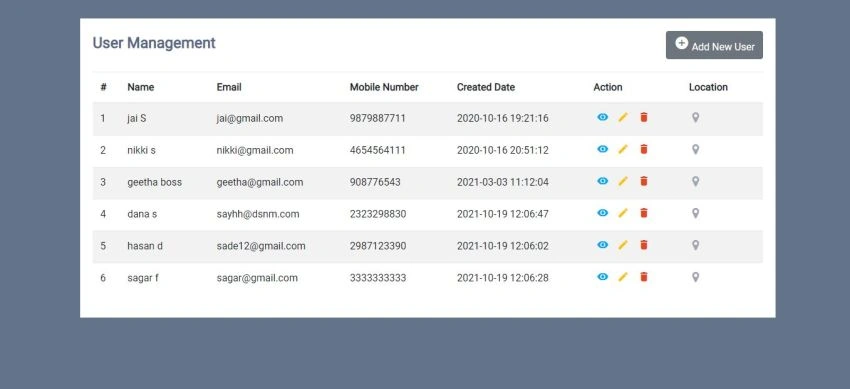
index.php file is our application first page to view all added users.
<?php
$ret = mysqli_query($con, "select * from tblusers");
$cnt = 1;
$row = mysqli_num_rows($ret);
if ($row > 0)
{
while ($row = mysqli_fetch_array($ret))
{
?>
<!--Fetch the Records -->
<tr>
<td><?php echo $cnt; ?></td>
<td><?php echo $row['FirstName']; ?> <?php echo $row['LastName']; ?></td>
<td><?php echo $row['Email']; ?></td>
<td><?php echo $row['MobileNumber']; ?></td>
<td> <?php echo $row['CreationDate']; ?></td>
<td>
<a href="read.php?viewid=<?php echo htmlentities($row['ID']); ?>" class="view" title="View" data-toggle="tooltip"><i class="material-icons"></i></a>
<a href="edit.php?editid=<?php echo htmlentities($row['ID']); ?>" class="edit" title="Edit" data-toggle="tooltip"><i class="material-icons"></i></a>
<a href="index.php?delid=<?php echo ($row['ID']); ?>" class="delete" title="Delete" data-toggle="tooltip" onclick="return confirm('Do you really want to Delete ?');"><i class="material-icons"></i></a>
</td>
<td> <a href="weblocation.php?id=<?php echo ($row['ID']); ?>" class="location" title="location" data-toggle="tooltip"><i class="fa fa-map-marker" aria-hidden="true"></i></a></td>
</tr>
<?php
$cnt = $cnt + 1;
}
}
Join the conversation! Your thoughts help the community grow.