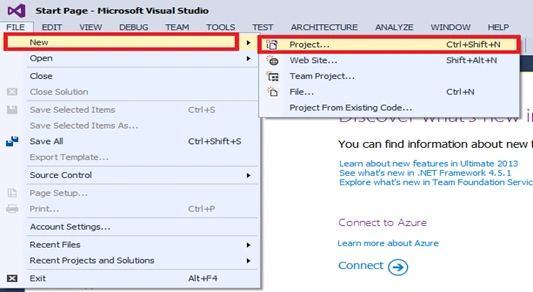
Step 1: Open Visual Studio and click File=> New=> Project.
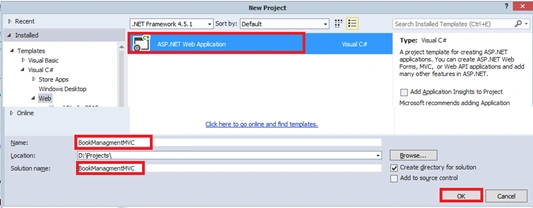
Step 2: Now, select ASP.NET Web Application .Here, our project name will be “BookManagement “.
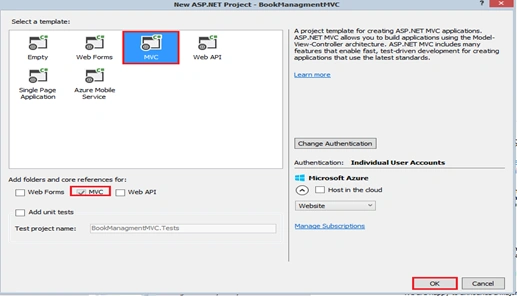
Step 3: Here, select MVC Template and click OK button.
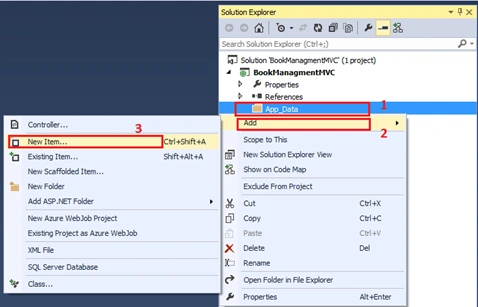
Step 4: Right click on App_Data and Select Add => New Item.
Step 5: In the following figure, give a database name. Here, my database name is “BookDatabase”.
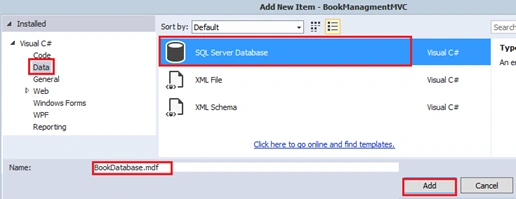
Step 6: After creating a database, you will create a table for it.
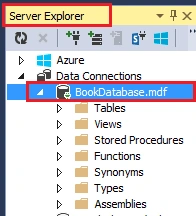
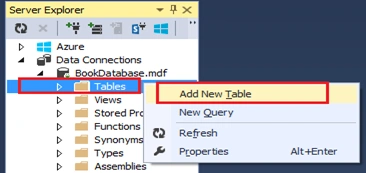
Step 7: Now, click on Server Explorer at the left side of the Window, select BookDatabase.Mdf. Afterwards, right click Tables, Add New Table.
Step 8: I need to create some data field name and define its data type. After creating a data field name, you will click Update button. I have given the name of table “Mybook”.
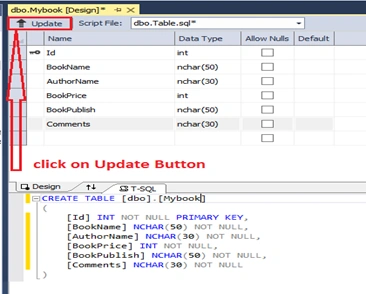
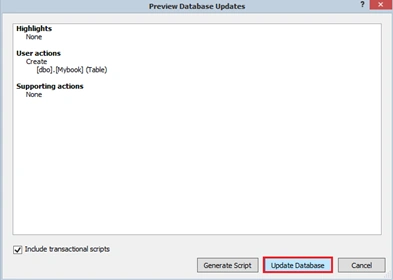
Step 9: As given in the figure, you will click Update Database button.
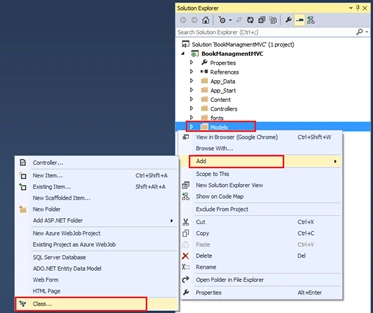
Step 10: Now, I need to create a model Class. Right click on the models folder and click Add. Click Class to add a class.
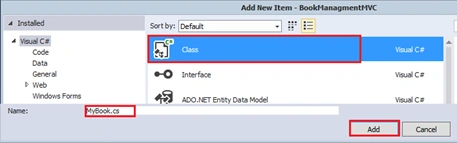
Step 11: Again, select Class template and give it a name. I have given the name of Class “Mybook”.
Click add button.
Thus, our model class has been created. There are six properties in the class. Here, I am using validation. I need to add “using System.ComponentModel.DataAnnotations;” namespace for the validation.
- using System;
- using System.Collections.Generic;
- using System.ComponentModel.DataAnnotations;
- using System.Linq;
- using System.Web;
- namespace BookManagmentMVC.Models
- {
- public class MyBook {
- public int Id {
- get;
- set;
- }
- [Required(ErrorMessage = "Please Enter BookName")]
- public string BookName {
- get;
- set;
- }
- [Required(ErrorMessage = "Please Enter AuthorName")]
- public string AuthorName {
- get;
- set;
- }
- [Required(ErrorMessage = "Please Enter Price")]
- public int BookPrice {
- get;
- set;
- }
- [Required(ErrorMessage = "Please Enter Bookpublish")]
- public string BookPublish {
- get;
- set;
- }
- [Required(ErrorMessage = "Please Enter Comments")]
- public string Comments {
- get;
- set;
- }
- }
- }
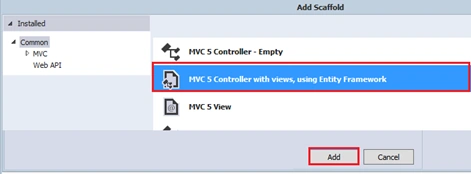
Step 12: You need to create a controller with the views, using Entity Framework. Add new Scaffold
in the project.
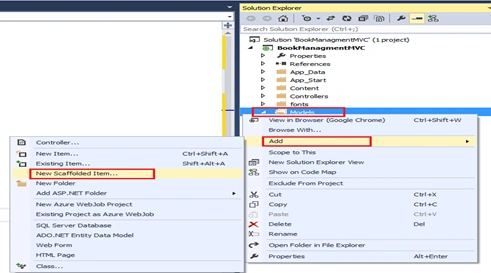 Step 13:
 Now, choose MVC 5 Controller, using Entity framework.
Click Add button.
 Step 14:
 In case of error, you will be building the project and again Add Controller.
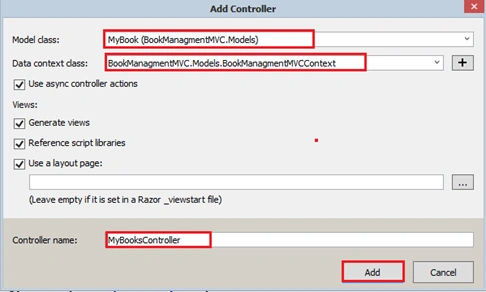 Step 15:
 Finally, the controller was created by automatic CRUD operations. It is very simple to perform CRUD operations.
- using System;
- using System.Collections.Generic;
- using System.Data;
- using System.Data.Entity;
- using System.Linq;
- using System.Threading.Tasks;
- using System.Net;
- using System.Web;
- using System.Web.Mvc;
- namespace BookManagmentMVC.Models
- {
- public class MyBooksController: Controller {
- private BookManagmentMVCContext db = new BookManagmentMVCContext();
-
- public async Task < ActionResult > Index() {
- return View(await db.MyBooks.ToListAsync());
- }
-
- public async Task < ActionResult > Details(int ? id) {
- if (id == null) {
- return new HttpStatusCodeResult(HttpStatusCode.BadRequest);
- }
- MyBook myBook = await db.MyBooks.FindAsync(id);
- if (myBook == null) {
- return HttpNotFound();
- }
- return View(myBook);
- }
-
- public ActionResult Create() {
- return View();
- }
-
-
-
- [HttpPost]
- [ValidateAntiForgeryToken]
- public async Task < ActionResult > Create([Bind(Include = "Id,BookName,AuthorName,BookPrice,BookPublish,Comments")] MyBook myBook) {
- if (ModelState.IsValid) {
- db.MyBooks.Add(myBook);
- await db.SaveChangesAsync();
- return RedirectToAction("Index");
- }
- return View(myBook);
- }
-
- public async Task < ActionResult > Edit(int ? id) {
- if (id == null) {
- return new HttpStatusCodeResult(HttpStatusCode.BadRequest);
- }
- MyBook myBook = await db.MyBooks.FindAsync(id);
- if (myBook == null) {
- return HttpNotFound();
- }
- return View(myBook);
- }
-
-
-
- [HttpPost]
- [ValidateAntiForgeryToken]
- public async Task < ActionResult > Edit([Bind(Include = "Id,BookName,AuthorName,BookPrice,BookPublish,Comments")] MyBook myBook) {
- if (ModelState.IsValid) {
- db.Entry(myBook).State = EntityState.Modified;
- await db.SaveChangesAsync();
- return RedirectToAction("Index");
- }
- return View(myBook);
- }
-
- public async Task < ActionResult > Delete(int ? id) {
- if (id == null) {
- return new HttpStatusCodeResult(HttpStatusCode.BadRequest);
- }
- MyBook myBook = await db.MyBooks.FindAsync(id);
- if (myBook == null) {
- return HttpNotFound();
- }
- return View(myBook);
- }
-
- [HttpPost, ActionName("Delete")]
- [ValidateAntiForgeryToken]
- public async Task < ActionResult > DeleteConfirmed(int id) {
- MyBook myBook = await db.MyBooks.FindAsync(id);
- db.MyBooks.Remove(myBook);
- await db.SaveChangesAsync();
- return RedirectToAction("Index");
- }
- protected override void Dispose(bool disposing) {
- if (disposing) {
- db.Dispose();
- }
- base.Dispose(disposing);
- }
- }
- }
You can see, here the views are automatically created.
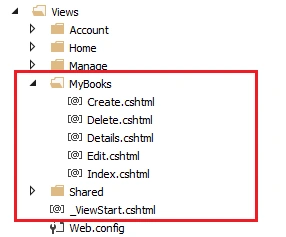
Here is the
output:
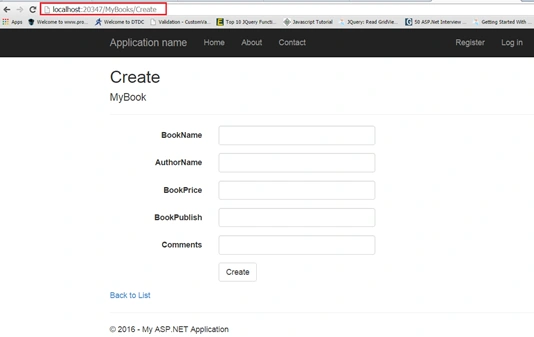
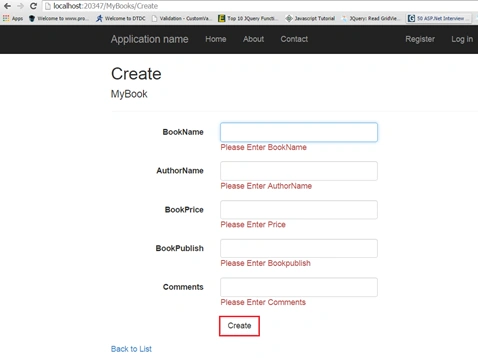
Here, click Create button. You will find all the validations are working.
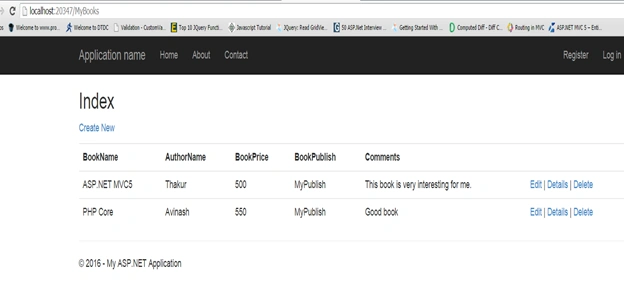
In the screenshot, you will get all the information successfully inserted. If you need to Delete or Edit, you will go to the link button on Delete and Edit modify.


Kalyani ShindePosted Aug 3, 2018, 12:13 AM
Very helpful article and very ggod
Avinash ThakurPosted Aug 10, 2016, 9:22 AM
Thanks Gagan Sharma
Gagan SharmaPosted Aug 8, 2016, 9:23 AM
Very helpful to learn
SubashPosted Aug 5, 2016, 4:14 AM
Nice
Avinash ThakurPosted Jul 25, 2016, 1:27 AM
Thanks
Amit MishraPosted Jul 25, 2016, 12:15 AM
Good one.......
Bhavik PatelPosted Jul 23, 2016, 11:45 PM
Nice
Pankaj Kumar ChoudharyPosted Jul 23, 2016, 7:51 AM
Nice Example of EntityFramework with MVC..
kalu singh raoPosted Jul 23, 2016, 1:52 AM
Nice Starting
Vignesh ManiPosted Jul 22, 2016, 5:27 PM
Good start