Today while working in an ASP.NET MVC project I faced a certain scenario where I need to bind the complex object returned from the controller to the View. So in the beginning I was facing problem to achieve the same then with some research I was able to achieve the same. So today I am going to teach how to bind the JSON result object to the DropDownlistFor Control in ASP.NET MVC.
Before going ahead and talking about complex object let’s talk about ViewModel.
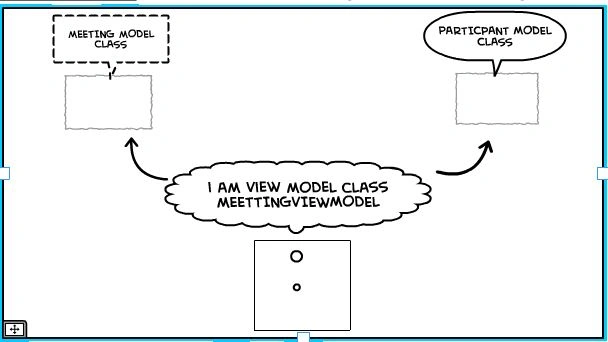
ViewModel - In MVC we are known of the terminology like View, Controller and Model. In MVC we have another Model that is a layer between View and Model which provide us separation of concern between View and Model. We can also say that View Model contains the data which we want to show into the View section. View Model allows us to shape multiple entities of a class into a single model class object and we can inject also View logic in View Model.
Figure 1.0: View Model demonstrating ViewModel as a collection of class objects that are needed to be displayed in View.
Let’s get practical switch to Visual studio and follow these steps:
- Start Visual Studio.
- Select File, New, then New Project.
- Select Visual C# and in menu of C# select Web section.
- Select ASP.NET Web application and select ASP.NET MVC.
- Name your project and now follow the screenshots.
Step 6: Add Controller and Name your controller name as shown below:

Figure 2.0: Creating MVC Web Application
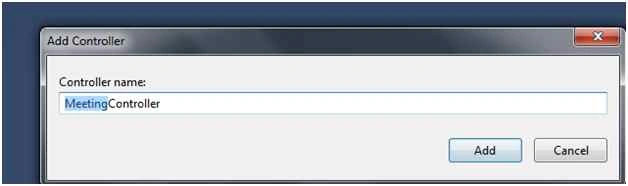
Figure 3.0: Creating MVC Web Application Controller Name
Step 7: Adding your Model class.
E.g.: Employee, Meeting as shown below,
Meeting Class
- using System;
- using System.Collections.Generic;
- using System.Linq;
- using System.Web;
- namespace ComplexObjectViewModel.Models
- {
-
- public class Meeting
- {
- public int MeetingId
- {
- get;
- set;
- }
- public string MeetingName
- {
- get;
- set;
- }
- }
- }
l
- using System;
- using System.Collections.Generic;
- using System.Linq;
- using System.Web;
- namespace ComplexObjectViewModel.Models
- {
- public class Employee
- {
- public int EmployeeId
- {
- get;
- set;
- }
- public string EmployeeName
- {
- get;
- set;
- }
- }
- }
Now we will create View Model which will contain properties of type model which can be used in View.
- using System;
- using System.Collections.Generic;
- using System.Linq;
- using System.Web;
- using ComplexObjectViewModel.Models;
- namespace ComplexObjectViewModel.Models
- {
- public class MeetingVM
- {
- public Meeting objMeeting
- {
- get;
- set;
- }
- public List < Meeting > objMeetinglst
- {
- get;
- set;
- }
- public Employee objEmploye
- {
- get;
- set;
- }
- public List < Employee > objEmployeelist
- {
- get;
- set;
- }
- public string isSelectedMeetng
- {
- get;
- set;
- }
- public string isSelectedEmployee
- {
- get;
- set;
- }
- }
- }
Now we will create our view which is strongly typed view of MeetingVM that will contain list of Employees and Meeting as shown below. Here I am creating two dropdown list which will populate the list of Meeting and list of Employees as shown below:
View - @model ComplexObjectViewModel.Models.MeetingVM
- @*STRONGLY TYPED MODEL OF MeetingVM contains definition for List of Meetings, List of
-
- @{
- Layout = null;
- }
-
- <!DOCTYPE html>
-
- <html>
- <head>
- <meta name="viewport" content="width=device-width" />
- <title>Index</title>
- </head>
- <body>
- @using (Html.BeginForm())
- {
-
- <table>
- <tr>
- <td>
- Meeting Details
-
- </td>
- <td>
- @*contains list of Meetings*@
- @Html.DropDownListFor(M => M.isSelectedMeetng, new SelectList(Model.objMeetingList, "MeetingId", "MeetingName"), "---Select---")
-
- </td>
-
- </tr>
- <tr>
- <td>
- Employee Details
-
- </td>
-
- <td>
- @*contains list of Employees*@
- @Html.DropDownListFor(M => M.isSelectedEmployee, new SelectList(Model.objEmployeeList, "EmployeeId", "EmployeeName"), "---Select---")
-
- </td>
-
- </tr>
-
- </table>
-
- }
-
- </body>
- </html>
In controller I have added hardcoded list of Employees and Meeting in real time project this will come from DB.
- using System;
- using System.Collections.Generic;
- using System.Linq;
- using System.Web;
- using System.Web.Mvc;
- using ComplexObjectViewModel.Models;
- namespace ComplexObjectViewModel.Controllers
- {
- public class MeetingController: Controller
- {
-
-
- public ActionResult Index()
- {
- MeetingVM obj = new MeetingVM();
- obj.objEmploye = new Employee();
- obj.objEmployeeList = new List < Employee > ();
- obj.objMeetingList = new List < Meeting > ();
- obj.objEmploye.EmployeeId = 1;
- obj.objEmploye.EmployeeName = "saillesh";
- obj.objEmployeeList.Add(obj.objEmploye);
- obj.objEmploye = new Employee();
- obj.objEmploye.EmployeeId = 2;
- obj.objEmploye.EmployeeName = "Nishant";
- obj.objEmployeeList.Add(obj.objEmploye);
- obj.objEmploye = new Employee();
- obj.objEmploye.EmployeeId = 3;
- obj.objEmploye.EmployeeName = "Ankit";
- obj.objEmployeeList.Add(obj.objEmploye);
- obj.objMeeting = new Meeting();
- obj.objMeeting.MeetingId = 1;
- obj.objMeeting.MeetingName = "Retails";
- obj.objMeetingList.Add(obj.objMeeting);
- obj.objMeeting = new Meeting();
- obj.objMeeting.MeetingId = 2;
- obj.objMeeting.MeetingName = "Operational";
- obj.objMeetingList.Add(obj.objMeeting);
- obj.objMeeting = new Meeting();
- obj.objMeeting.MeetingId = 3;
- obj.objMeeting.MeetingName = "Audit";
- obj.objMeetingList.Add(obj.objMeeting);
- return View(obj);
- }
- }
- }
Run the application you will see the output as shown below:
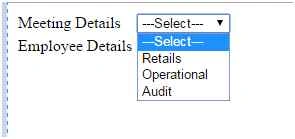 Figure 4.0:
 Sample 1
 Figure 5.0:
 Sample 2
So here we can see how we can shape multiple entities of a class into a single model class with the help of View Model class.
Now we will focus to our problem or objective i.e. that on dropdown change of Participant(Employee) I will make a Ajax GET call to the controller and return complex object of View model and return the Json object and bind the data to the new Html.dropdownlist. For example, Occupation for that we will create a new model class called Occupation as in the following,
- using System;
- using System.Collections.Generic;
- using System.Linq;
- using System.Web;
-
- namespace ComplexObjectViewModel.Models
- {
- public class Occupation
- {
-
- public int OccupationId { get; set; }
- public string OccupationName { get; set; }
- }
- }
Adding the model to the ViewModel to be used in the View as shown below:
Add the following properties in ViewModel Class.
- public Occupation objOccupation { get; set; }
-
- public List<Occupation> objOccupationList { get; set; }
Now on the page load pass the null object of OccupationList to the view.
The page will appear as shown below:
 Figure 6.0:
 Page View
Now on Employee Details dropdown change I will load the Detail of the Employee Occupation based on the selected Employee Value as shown below using Ajax. I hope you are familiar to Ajax, if not I would request you to learn Ajax before moving ahead of the article.
So now will add our Ajax Call for calling a GET method from Controller:
- <script>
- $(document).ready(function ()
- {
- $("#isSelectedEmployee").change(function ()
- {
- {
- var Value = $("#isSelectedEmployee option:selected").val();
- $.ajax(
- {
- url: '/Meeting/FillOccupation',
- data:
- {
- 'id': Value
- },
- dataType: "json",
- type: "GET",
- error: function ()
- {
- alert(" An error occurred.");
- },
- success: function (data)
- {
- debugger;
- for (var key in data)
- {
- if (data[key].OccupationId)
- {
- var optionhtml = '<option value="' + data[key].OccupationId + '">' + data[key].OccupationName + '</option>';
- $("#isSelectedOccupation").append(optionhtml);
- }
- }
- }
- })
- }
- });
- })
- </script>
FillOccupation method in Controller which will receive the Id from the Ajax call and same id will search in the list of Occupation and the list of Occupation object is returned in JSON format and same is bind to my Occupation DropdownListfor.
Note: I have hardcoded the occupation list and same will be displayed from the DB.
- public ActionResult FillOccupation(int ? Id)
- {
- MeetingVM obj = new MeetingVM();
- obj.objEmploye = new Employee();
- obj.objEmployeeList = new List < Employee > ();
- obj.objMeetingList = new List < Meeting > ();
- obj.objEmploye.EmployeeId = 1;
- obj.objEmploye.EmployeeName = "saillesh";
- obj.objEmployeeList.Add(obj.objEmploye);
- obj.objEmploye = new Employee();
- obj.objEmploye.EmployeeId = 2;
- obj.objEmploye.EmployeeName = "Nishant";
- obj.objEmployeeList.Add(obj.objEmploye);
- obj.objEmploye = new Employee();
- obj.objEmploye.EmployeeId = 3;
- obj.objEmploye.EmployeeName = "Ankit";
- obj.objEmployeeList.Add(obj.objEmploye);
- obj.objMeeting = new Meeting();
- obj.objMeeting.MeetingId = 1;
- obj.objMeeting.MeetingName = "Retails";
- obj.objMeetingList.Add(obj.objMeeting);
- obj.objMeeting = new Meeting();
- obj.objMeeting.MeetingId = 2;
- obj.objMeeting.MeetingName = "Operational";
- obj.objMeetingList.Add(obj.objMeeting);
- obj.objMeeting = new Meeting();
- obj.objMeeting.MeetingId = 3;
- obj.objMeeting.MeetingName = "Audit";
- obj.objMeetingList.Add(obj.objMeeting);
- obj.objOccupationList = new List < Occupation > ();
- obj.objOccupation = new Occupation();
- obj.objOccupation.OccupationId = 2;
- obj.objOccupation.OccupationName = "INDIAN NAVY";
- obj.objOccupationList.Add(obj.objOccupation);
- obj.objOccupation = new Occupation();
- obj.objOccupation.OccupationId = 1;
- obj.objOccupation.OccupationName = "Software Engineer";
- obj.objOccupationList.Add(obj.objOccupation);
- obj.objOccupation = new Occupation();
- obj.objOccupation.OccupationId = 1;
- obj.objOccupation.OccupationName = "Author";
- obj.objOccupationList.Add(obj.objOccupation);
- obj.objOccupation = new Occupation();
- obj.objOccupation.OccupationId = 3;
- obj.objOccupation.OccupationName = "Business";
- obj.objOccupationList.Add(obj.objOccupation);
-
- var ListOfOcuupation = obj.objOccupationList.Where(m => m.OccupationId == Id).ToList();
- obj.objOccupationList = new List < Occupation > ();
- foreach(Occupation objOcupation in ListOfOcuupation)
- {
- obj.objOccupationList.Add(objOcupation);
- }
- return Json(obj.objOccupationList, JsonRequestBehavior.AllowGet);
- }
Now I have put debugger in the JQuery function to check the flow as shown below:
As soon as User selects the Employee Details Dropdown list the javascript function is called as shown below:
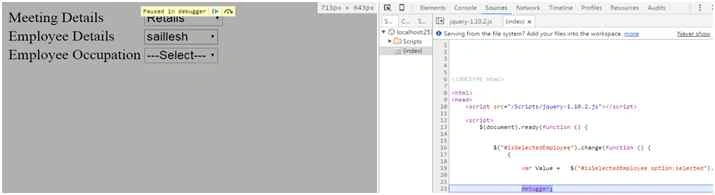 Figure 7.0 :
 Picture Demonstrating Ajax Call to FillOccupation method
The value of selected Dropdown list is stored in Value var and same is passed to the controller as shown below:
 Figure 8.0 :
 Get method hits to FillOccupation method
Now the list of Occupation is searched where Occupation Id is same as Employee Id and same list is returned in JSON format as shown below.
 Figure 9.0:
 JSON object is returned to JavaScript function
Now same data is collected in object in JavaScript as shown below:
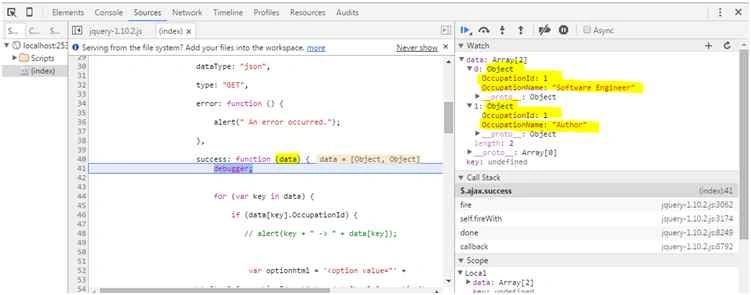 Figure 10.0:
 Received data in Object
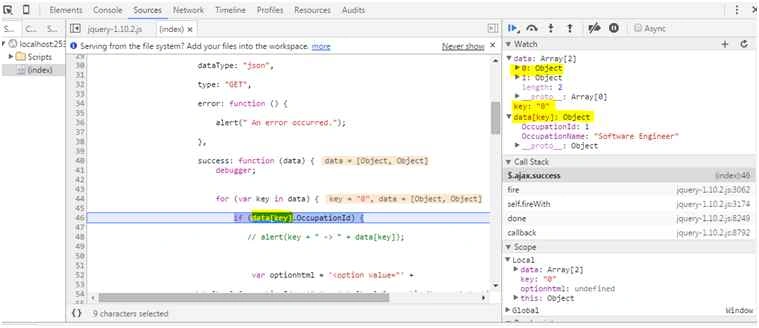 Figure 11.0:
 Looping throw the received objects using key eg 0,1 refereeing to object array value and looping to the object property as shown.
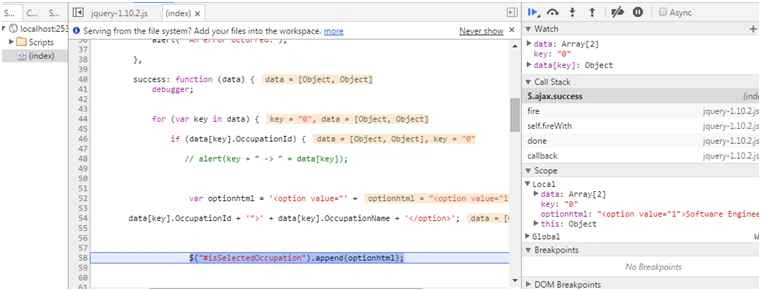 Figure 12.0:
 Appending the list to Occupation Dropdownlist
 Figure 13.0:
 Received JSON data appended to the Dropdown of Employee Occupation.
Conclusion
In this article we specially focused about View Model and how to send complex JSON objects to ASP.NET MVC View. Your comments, votes and suggestions motivate us for writing more stuff like this.


Sathish SPosted Aug 15, 2020, 1:41 PM
Hi, Am quite confused here.. Am sorry! Do we have two action method here? I mean Index and FillOccupation?? If yes, do we need to hardcode data in both these functions? Please assist me, am trying this example.
Humayun Kabir MamunPosted Dec 7, 2015, 3:14 AM
Nice...
Ankit BansalPosted Dec 7, 2015, 12:49 AM
nice one..thanks
Ankur MistryPosted Dec 6, 2015, 5:55 AM
nice share
Mukesh KumarPosted Dec 5, 2015, 1:32 PM
Good One